OPERATION CONT.
7
USING THE THROTTLE
The throttle allows rider to control the e-bike’s speed. Slowly
twist the inner-portion of the right grip clock-wise to accelerate.
(see figure 1)
USING THE TURN SIGNALS
Rock the switch, with the left and right arrow icons located on
the left handle bar, left or right to alert other riders of your intent.
(see figure 1 for switch location, 3 & 4 for light locations)
USING THE HORN
Press the button with a the horn icon, located on the left
handlebar control, to engage and signal riders of your location.
(see figure 1)
USING THE BRAKES
The e-bike is quipped with front and rear disk brakes use to slow
down and stop.
NOTE: Apply the rear brake before the front in low-traction
conditions.
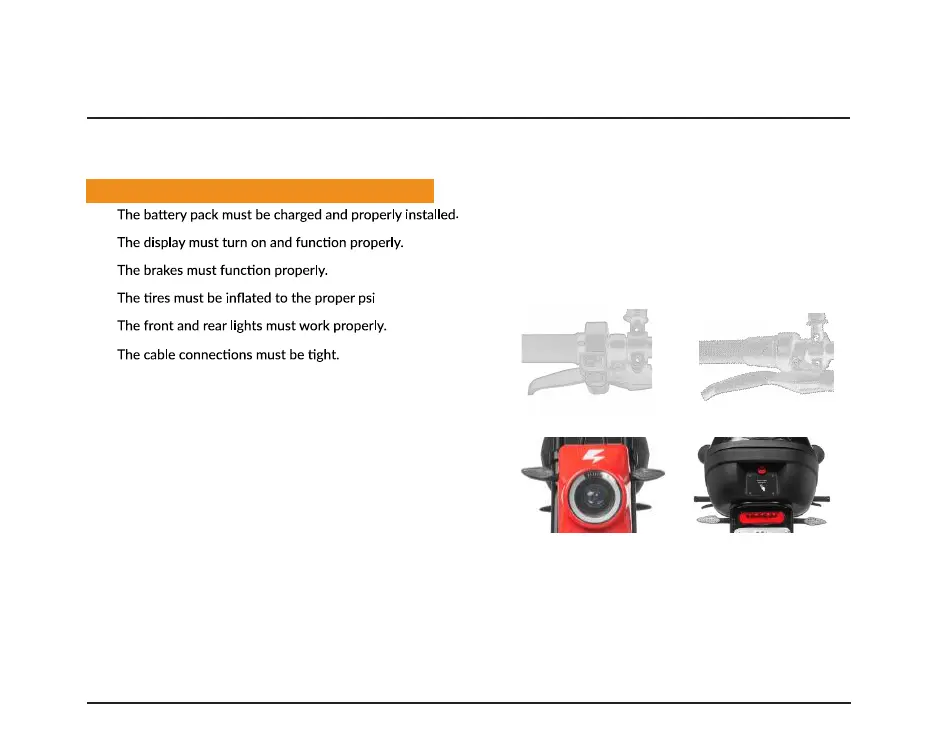
• The brake on the front wheel is controlled by the lever on the
left-hand side of the handlebar.
(see figure 1)
• The brake on the front wheel is controlled by the lever on the
left-hand side of the handlebar. (see figure 2)
INITIAL RIDE
SAFETY CHECK BEFORE EACH RIDE
•
•
•
•
•
•
Fig. 1 - Left Brake, Turn-Signal Rocker Switch,
Horn button, & Left Mirror
Fig. 2 - Throttle, Right Brake, & Right Mirror
Fig. 3 - Headlight & Front Turn-Signals
USING THE KICKSTAND
Pull down and rock the bike back until it sits on the stand and
back tire. The front tire will no longer be touching the ground.
ADJUSTING THE MIRRORS
There are two rear-view mirrors located on each side of the
handlebars. Adjust to view behind you while riding.
HEADLIGHT & BRAKE LIGHT
Headlight will turn on when bluetooth device is connected. Brake
light will turn on when brakes are engaged.
(see figure 3 & 4)
Fig 4. - Rear Turn-Signals, Brake light, & Case
?


 To Next Page