Ethernet
V 4.00
- 8 -
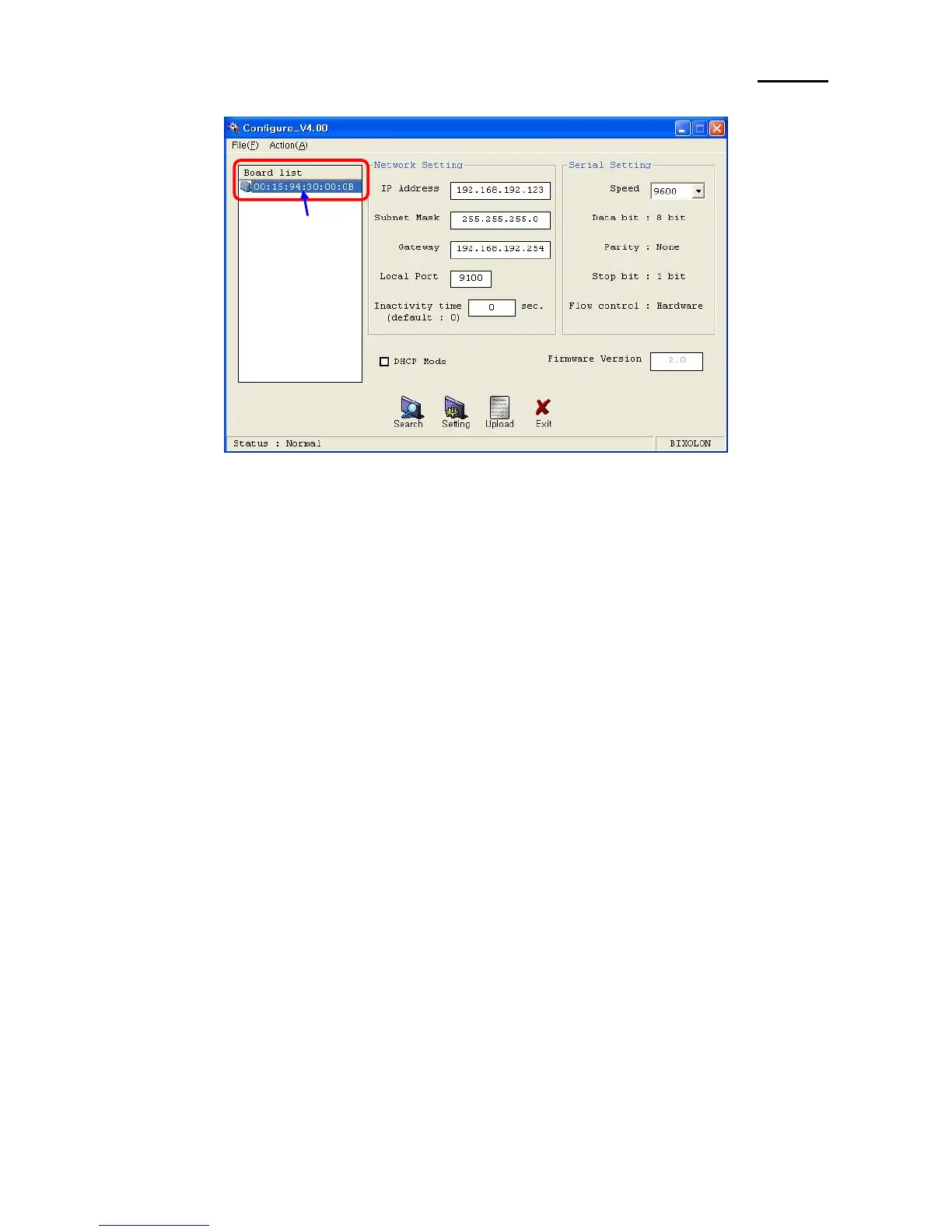
4) Select MAC Address in Board list and set up Network Setting.
MAC Address
[Note]
- If many MAC addresses appear, refer to the MAC address on the label of the
interface card.
- Ask the Network administrator IP and its related information.
- If you are not aware of Subnet Mask, refer to the below.
When the IP address is
(1) 1~126.xxx.xxx.xxx: Subnet Mask: 255.0.0.0
(2) 128~191.xxx.xxx.xxx: Subnet Mask: 255.255.0.0
(3) 192~223.xxx.xxx.xxx: Subnet Mask: 255.255.255.0
For example, when the IP address is 192.168.192.321,
Subnet mask is 255.255.255.0.
- If you are not aware of Gateway,
(1) When the Network is connected to Internet (Router or Server computer),
refer to the Network setting of other computers on the Network.
(2) When the Network is connected to Internet (Router or Server computer),
enter 0.0.0.0 for Gateway.


 To Next Page