BJ-256 BJ Control Pro
User Guide
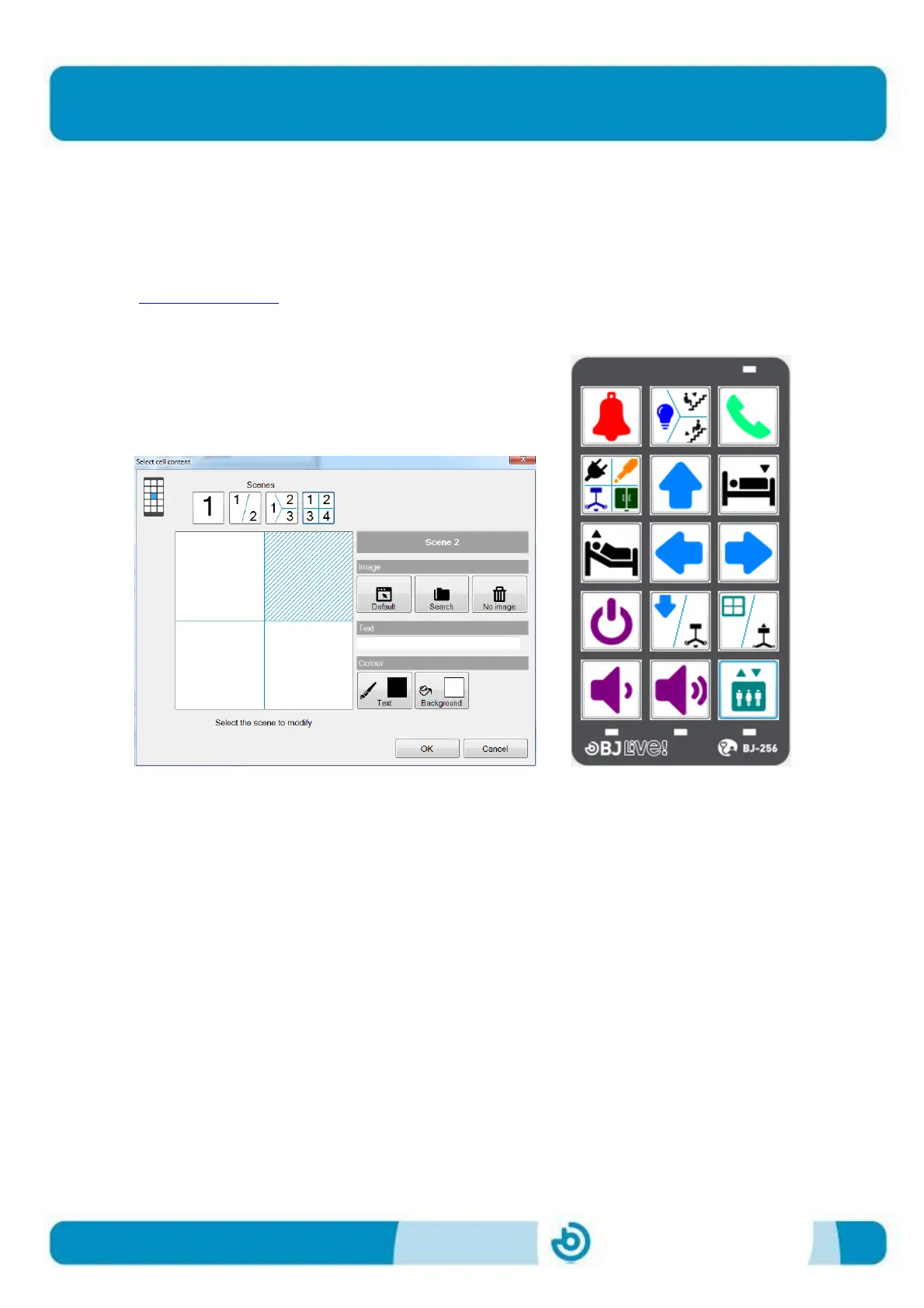
Icons, images or text can be added to the cells to indicate the element that they
control. Each cell can contain icons, images or text for up to 4 functions (4 levels)
as shown in the figure below. The template is designed using the software included
with the remote.
This software can be also downloaded from the product’s webpage
(www.bjliveat.com)
Figure 2. Cells on the BJ-256 remote control
The template needs to be printed on see-through paper so that the light from the
LEDs can be seen through it.
The remote control includes a methacrylate cover and an ergonomic keypad with
configurable tremor-control. It is equipped with a control input for connecting a
switch next to the micro USB port, and an infrared port for recording and
reproduction located on the top end of the remote. It is powered by a long-life
battery that can be recharged by connecting it directly to the USB port of a
computer or using the charger supplied with the remote. The reset button of the
remote control is located on the back of it. It can be reset any time it fails to
respond properly and all your settings will be saved.
To remove the methacrylate cover, press gently with your fingers between keys 2
and 14 using a pinching movement in order to bend the cover. Once the cover is in
a curved position, you can remove it by lifting one of the sides and releasing the
tabs.


 To Next Page