EasyManua.ls Logo

BK Radio DPH - User Manual

Default Icon
21 pages
Print Icon
To Next Page IconTo Next Page
Loading...
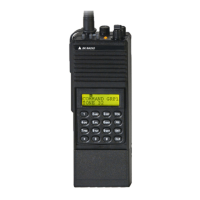
DPH
DIGITAL PORTABLE RADIO
Owner’s Manual
© Copyright 2004 RELM Wireless Corporation. All rights reserved.
P/N 7001-30958-100 03-04
BK Radio
7100 Technology Drive
West Melbourne, FL 32904
Telephone: (321) 984-1414
FAX: (321) 984-0434
www.relm.com
Question and Answer IconNeed help?

Do you have a question about the BK Radio DPH and is the answer not in the manual?

Summary

Service Information

Introduction

FCC Requirements

Safety Precautions

Definitions and Acronyms

RF Energy Exposure Awareness and Control

Federal Communications Commission Regulations

Compliance with RF Exposure Standards

Industry Canada Compliance

Scan List Cloning

Battery Installation and Removal

Installing the Battery

Steps to install the battery pack onto the radio.

Removing the Battery

Steps to safely detach the battery pack from the radio.

Special Cloning Instructions

RF Exposure Compliance Guidelines and Operating Instructions

Radio Controls Overview

Alphanumeric Display

Details about the radio's alphanumeric display and its indicators.

Programming a Label

Programming a Numeric ID

Cloning Procedure

Basic Operation

Receive Mode

How to operate the radio in receive mode.

Transmit Mode

How to transmit using the radio's PTT button.

Channel Guard Operation

Channel Guard Receive

Instructions for receiving on a channel guard channel.

Channel Guard Transmit

Instructions for transmitting on a channel guard channel.

Display Backlighting

Channel Labels

Group Labels

Alphanumeric Display Indicators

Mixed Mode Operation

Mixed Mode Talkback

Channel Groups

Select a Group;Channel

Steps to select a specific group or channel on the radio.

Busy Channel Lockout

Busy Channel Lockout Override

ANI Encoding (Analog Mode Only)

Time-Out-Timer

Busy Channel Operation

Busy Channel Indication

Explanation of the busy channel indicator light.

Group Selector

Custom Selector

Programmable Top Switches; Function Menu

Other Operational Features

Scan Delay

Adjusting scan delay for optimal radio response.

Hi;Lo Power Selection

Selecting transmit power levels for channels.

DTMF Encoding (Analog Mode Only)

Enabling DTMF tones for communication.

User Selected Channel Guard

Keypad Lock

Scan Operation

Scan Channel Guard Channels

Nuisance Channel Delete

Transmit with Scan On

Emergency Call

Programming a Label

Programming a Numeric ID

Talkback Scan

Change the Scan List

Group Scan

Priority Scan

Unit-to-Unit Callback

Programming Unit-to-Unit Call List

Initiating a Unit-to-Unit Call

Receiving a Unit-to-Unit Call

Dual Priority Scan

Old-Style BK Priority Scan

Which Mode is Installed?

Priority Mode A with Scan

Priority Mode B

Priority Mode C

Priority Mode C with Scan

Unit-to-Unit Call

Unit-to-Unit Mode

Priority Mode B with Scan

Priority Mode C

Priority Mode C with Scan

Change the Priority 1 Channel

Summary

Service Information

Introduction

FCC Requirements

Safety Precautions

Definitions and Acronyms

RF Energy Exposure Awareness and Control

Federal Communications Commission Regulations

Compliance with RF Exposure Standards

Industry Canada Compliance

Scan List Cloning

Battery Installation and Removal

Installing the Battery

Steps to install the battery pack onto the radio.

Removing the Battery

Steps to safely detach the battery pack from the radio.

Special Cloning Instructions

RF Exposure Compliance Guidelines and Operating Instructions

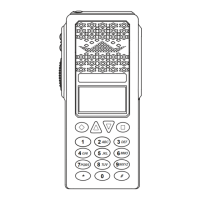
Radio Controls Overview

Alphanumeric Display

Details about the radio's alphanumeric display and its indicators.

Programming a Label

Programming a Numeric ID

Cloning Procedure

Basic Operation

Receive Mode

How to operate the radio in receive mode.

Transmit Mode

How to transmit using the radio's PTT button.

Channel Guard Operation

Channel Guard Receive

Instructions for receiving on a channel guard channel.

Channel Guard Transmit

Instructions for transmitting on a channel guard channel.

Display Backlighting

Channel Labels

Group Labels

Alphanumeric Display Indicators

Mixed Mode Operation

Mixed Mode Talkback

Channel Groups

Select a Group;Channel

Steps to select a specific group or channel on the radio.

Busy Channel Lockout

Busy Channel Lockout Override

ANI Encoding (Analog Mode Only)

Time-Out-Timer

Busy Channel Operation

Busy Channel Indication

Explanation of the busy channel indicator light.

Group Selector

Custom Selector

Programmable Top Switches; Function Menu

Other Operational Features

Scan Delay

Adjusting scan delay for optimal radio response.

Hi;Lo Power Selection

Selecting transmit power levels for channels.

DTMF Encoding (Analog Mode Only)

Enabling DTMF tones for communication.

User Selected Channel Guard

Keypad Lock

Scan Operation

Scan Channel Guard Channels

Nuisance Channel Delete

Transmit with Scan On

Emergency Call

Programming a Label

Programming a Numeric ID

Talkback Scan

Change the Scan List

Group Scan

Priority Scan

Unit-to-Unit Callback

Programming Unit-to-Unit Call List

Initiating a Unit-to-Unit Call

Receiving a Unit-to-Unit Call

Dual Priority Scan

Old-Style BK Priority Scan

Which Mode is Installed?

Priority Mode A with Scan

Priority Mode B

Priority Mode C

Priority Mode C with Scan

Unit-to-Unit Call

Unit-to-Unit Mode

Priority Mode B with Scan

Priority Mode C

Priority Mode C with Scan

Change the Priority 1 Channel

BK Radio DPH Specifications

General IconGeneral
Operating Temperature-30°C to +60°C
Ingress ProtectionIP67
Frequency Range136-174 MHz
Modulation16K0F3E
Power Output5 Watts
WeightApprox. 450g (with battery)
Battery TypeLithium-Ion

Related product manuals