Page 16
MAX FUNCTION
- Ideal for the summer to cool rooms rapidly.
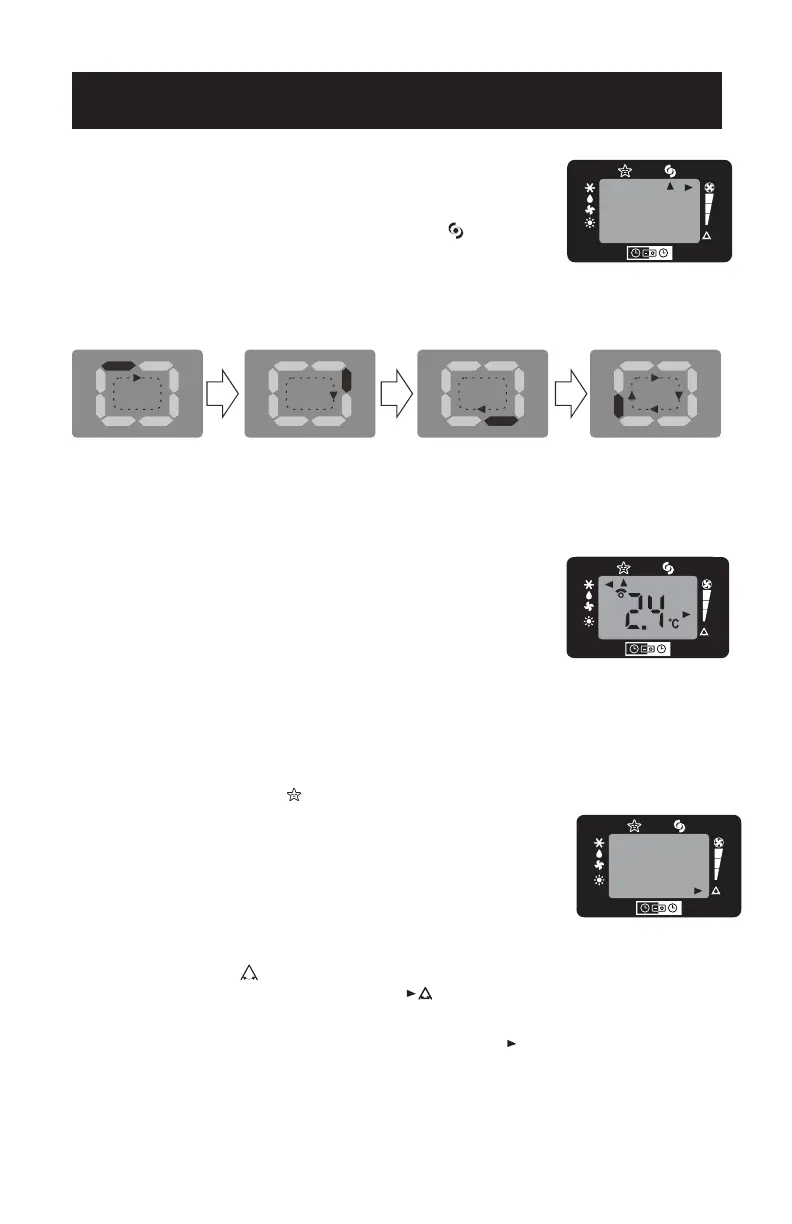
- Activate by simply pressing the MAX button ( ).
- The appliance operates in cool mode at fan speed auto.
While this function is selected, it is not possible to set the
temperature or change fan speed.
- Display on the control panel:
It is at max function when the display is in constant motion (see above).
NOTE: MAX function button will not operate while the unit is in the HEAT MODE.
SLEEP OPERATION
The selected temperature will increase (cooling) or
decrease (heating) by 1˚F/1˚C for the first 60 minutes. The
temperature will then increase (cooling) by another 1˚F/1˚C
after an additional 60 minutes. The temperature will then
decrease (heating) by another 2˚F/2˚C after an additional
120 minutes. This sleep operation will be maintained for 6
hours before it returns to shutdown.
NOTE: · This feature is not available in FAN mode.
- This function is useful for the night as it gradually reduces operation of the
appliance. To set this function correctly.
- Select the operating mode (COOL/DRY) as described above.
- Press the SLEEP button ( ) the appliance operates in the previously selected
mode.
AIR SWING FUNCTION
- This function is useful for selecting the
left/right swing of air circulation.
- To set this function correctly:
- Select the operating mode (cool/dry/fan) as described above.
- Press the “ ” button. The appliance operates in the previously
selectced mode. The message “ ” appears on the remote control to
indicate swing is activated.
- Press the swing button again, the message “ ” disappears to indicate
swing is stopping.
SETTING THE TIMER
-This timer can be used to delay the appliance start up to shutdown, this avoids
wasting electricity by optimizing operating periods.
SET UP & USE


 To Next Page
 Loading...