Step 7
You
can either download pre-existing configuration data
using the
“Transfer”
function or initialize a configuration by
selecting an Offline program function from the &Menu, then
overview PLC type and other Jparameters.
Step
8
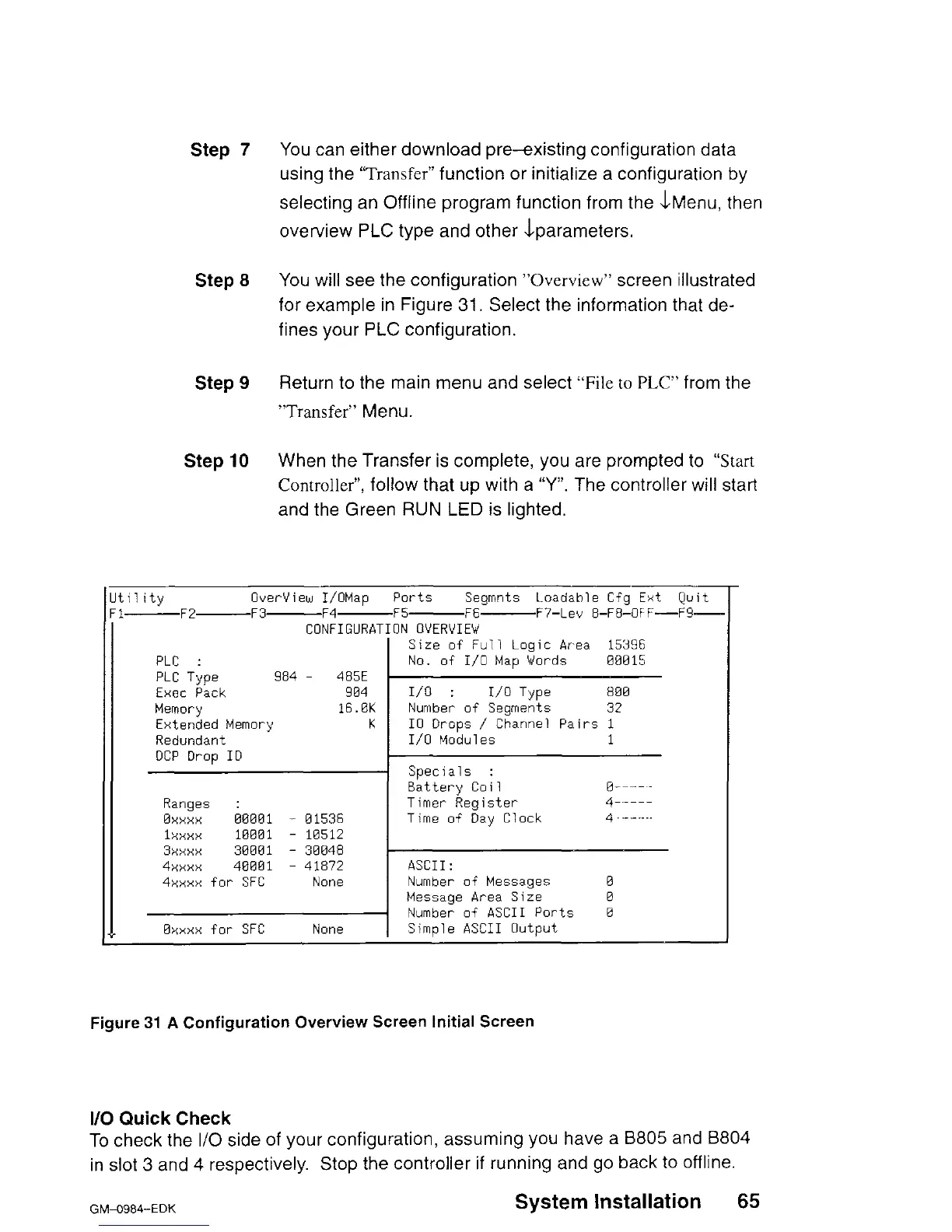
You will see the configuration
“Overview”
screen illustrated
for example in Figure 31. Select the information that de-
fines your PLC configuration.
Step 9
Return to the main menu and select
“File to PLC”
from the
“Transfer”
Menu.
Step 10
When the Transfer is complete, you are prompted to “Start
Controller”,
follow that up with a “Y”. The controller will start
and the Green RUN LED is lighted.
tllitv Overview I/OMau ports
Seqmnts Loadahle Cfq Ext Quit
lzF2-F3-F4-F5-F6- F7-Lev &FB:OFF-F9-
CONFIGURATION OVERVIEW
Size of Full Logic Area 15396
PLC :
No. of I/O Map Words 00015
PLC Type
984 -
485E
Exec Pack
904 I/O
:
I/O Type
800
Memory
16.0K
Number of Segments 32
Extended Memory
K IO Drops / Channel Pairs 1
Redundant
I/O Modules 1
DCP Drop ID
Specials
:
Battery Coil
0__--_
Ranges
:
Timer Register
4-----
0XXXX 00001
- 01536
Time of Day Clock
4 _-....
IXXXX 100!31
- 10512
3xxxx 30001
- 30048
4xxxx 40001
- 41872 ASCII:
4xxxx for SFC
None
Number of Messages 0
Message Area Size
0
Number of ASCII Ports
0
0xxxx for SFC
NOi%
Simple ASCII Output
Figure 31 A Configuration Overview Screen Initial Screen
l/O Quick
Check
To check the I/O side of your configuration, assuming you have a 8805 and B804
in slot
3
and 4 respectively. Stop the controller if running and go back to offline.
GM-0984-EDK
System Installation
65












 To Next Page