EasyManua.ls Logo

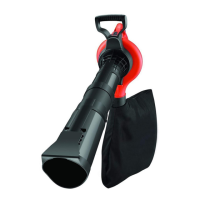
Black & Decker GW2500 - User Manual

Black & Decker GW2500
120 pages
Print Icon
To Next Page IconTo Next Page
Loading...
www.blackanddecker.eu
GW2500

Table of Contents

Questions and Answers

  • M
    Molly TownsendJul 28, 2025
    What to do if my Black & Decker Blower fails to operate?
    • L
      levineallenJul 28, 2025
      If your Black & Decker Blower fails to operate, try the following: * Ensure the blower is properly connected to the power supply. * For UK models, check and replace the fuse in the plug if it's blown. * Confirm that the blow/vacuum tube assembly is correctly fitted to the powerhead. * If the fuse continues to blow, disconnect from the power supply immediately and consult an authorized Black & Decker repair agent.
  • S
    Sarah SanchezAug 10, 2025
    Why is my Black & Decker GW2500 Blower vacuuming poorly and making a high-pitched whine?
    • M
      Michelle DillonAug 10, 2025
      If your Black & Decker Blower is vacuuming poorly and making a high-pitched whine, the following steps may help: 1. Switch off the blower and disconnect it from the power supply, allowing any debris to fall clear of the tube. 2. Remove and empty the collection bag. 3. Check that both the inlet and exit ports on the vacuum tube are clear. 4. Remove any debris from the fan area. 5. If poor vacuuming continues, disconnect the blower from the power supply and consult an authorized Black & Decker repair agent.

Summary

Intended Use and General Safety

General Appliance Safety Warnings

Basic safety precautions for mains-powered/cordless appliances to reduce risks.

Personal Safety

Stay alert, use common sense, do not use when tired or under influence of medication.

Appliance Operation and Electrical Safety

Appliance Use and Care

Check for damage, ensure switch works, disconnect power for adjustments, keep tools sharp.

Electrical Safety

Match plug to outlet, avoid wet conditions, care for cord, use outdoor extension cords.

Safety, After Use, and Service

Continued Electrical Safety and Storage

Use RCD in damp locations. Switch off before adjustments, cleaning, or blockages. Store dry.

Additional Safety and Electrical Information

General Operation and Cord Safety

Do not block openings, use upright. Operator responsible for hazards. Disconnect damaged cord.

Electrical Safety (Double Insulation)

Appliance is double insulated, no earth wire needed. Check power supply voltage.

Extension Cables and Residual Risks

Features, Assembly, and Use

Product Operation: Blow and Vacuum Modes

Wear safety glasses/mask. Attach tubes correctly. Use sweeping motion for blowing/vacuuming.

Vacuuming, Troubleshooting, and Maintenance

Technical Data and Declarations

Black & Decker GW2500 Specifications

General IconGeneral
Power sourceAC
TypeHandheld blower
Airflow624 m³/h
Airspeed310 km/h
Bag capacity40 L
Product colorBlack, Orange
Mulching ratio10:1
Shoulder strapYes
Weight and Dimensions IconWeight and Dimensions
Weight3200 g

Related product manuals