15
CHAPTER 4: Making Connections
4.4 Operating Mode Selection and Wiring
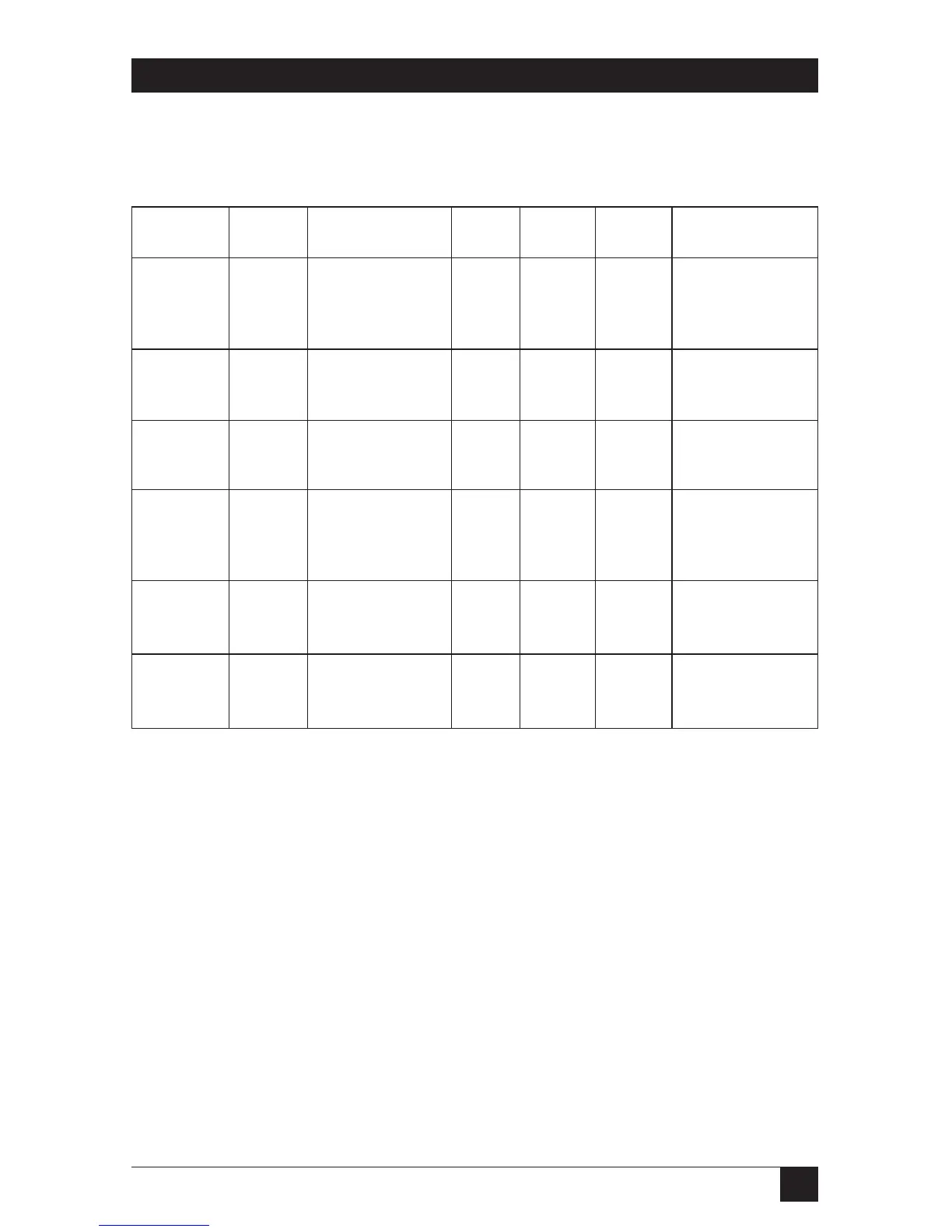
Table 4-2. Operating mode selection and wiring.
Wire Mode Use Connectors SW3 SW2-5 SW2-6 Notes
2 wire Half- 2 wire to 2 wire 2 wire OFF OFF One master with 1 or
Duplex parallel all units. more remotes.
Master or Carriers flash.
remote(s)
2 wire Simplex 2 wire is out. 2 wire ON ON Data flows from
(Bits) master to remote(s)
Master only. No carrier.
2 wire Simplex 2 wire is in. 2 wire ON OFF Data flows from
(Bits) master to remote(s)
Remote only. Carrier on.
4 wire Half- Cross wire 4 wire 4 wire ON ON One master with 1
Duplex to all remote 2 wire or more remotes.
Master and 2 wire from all
remote 4 wire.
4 wire Half- Same as 4-wire 4 wire ON OFF Remote carrier LED
Duplex Master. Cross wire. always on.
Remote
4 wire Full Cross connect 2 wire 4 wire OFF ON 2 Modem 202Ts only.
Duplex to 4 wire between Both carrier LEDs on.
both units.
NOTE
SW3 2-wire with SW2-5 off and SW2-6 on will enter self-test display.
SW3 4-wire with SW2-5 off and SW2-6 off is an invalid combination.


 To Next Page