EasyManua.ls Logo

Black Box 32144 - Jumpers

Black Box 32144
195 pages
Print Icon
To Next Page IconTo Next Page
To Previous Page IconTo Previous Page
Loading...
15
CHAPTER 2: Quick Start
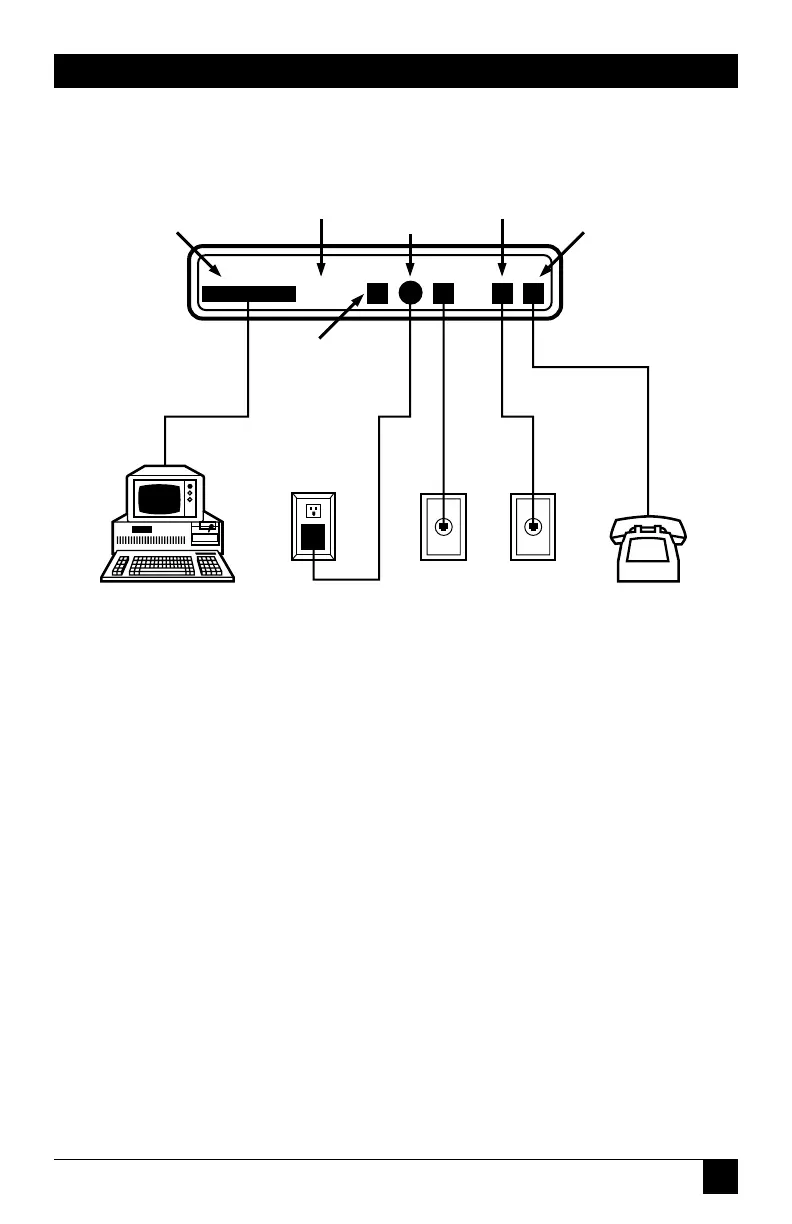
Fig. 2-1. Installation of the Modem.
DTE
REAR PANEL LEASED LINE
POWER
PHONE
DIAGNOSTIC
CONNECTOR*
EIA RS-232C
INTERFACE CABLE
WITH DB-25
CONNECTOR
DATA TERMINAL
EQUIPMENT
(DTE)
POWER
TRANSFORMER
DIAL
LINE*
LEASED
LINE*
TELEPHONE*
(HANDSET)
* NOT REQUIRED FOR
ALL APPLICATIONS
2.1.3 J
UMPERS
For most applications, you don’t
need to reset internal jumper
switches. However, jumper switches
must be reset if you need to
connect frame ground to signal
ground, switch from A/A1 control
to MI/MIC control, or use the
modem in a DC rack enclosure.
For detailed jumper information,
see Appendix C.

Related product manuals