ServSwitch Wizard VGA/USB
724-746-5500 | blackbox.com
Page 10
3.2 Connections
Installation of the modules is straightforward and requires minimal configuration in most cases.
• Connectionsatthelocalmodule
• Connectionsattheremotemodule
IMPORTANT: The ServSwitch Wizard VGA-USB can be used with other hubs in the system, but please note that the local unit
should not be connected to the downstream port of a bus-powered hub due to power constraints. Additionally, dual-variant local
units must always be powered using their supplied power adapter. Please see section 3.2.1.5 Local module power for details.
3.2.1 Connections at the local module
3.2.1.1 Video connections
1 Where possible ensure that power is disconnected from the computer system to be connected.
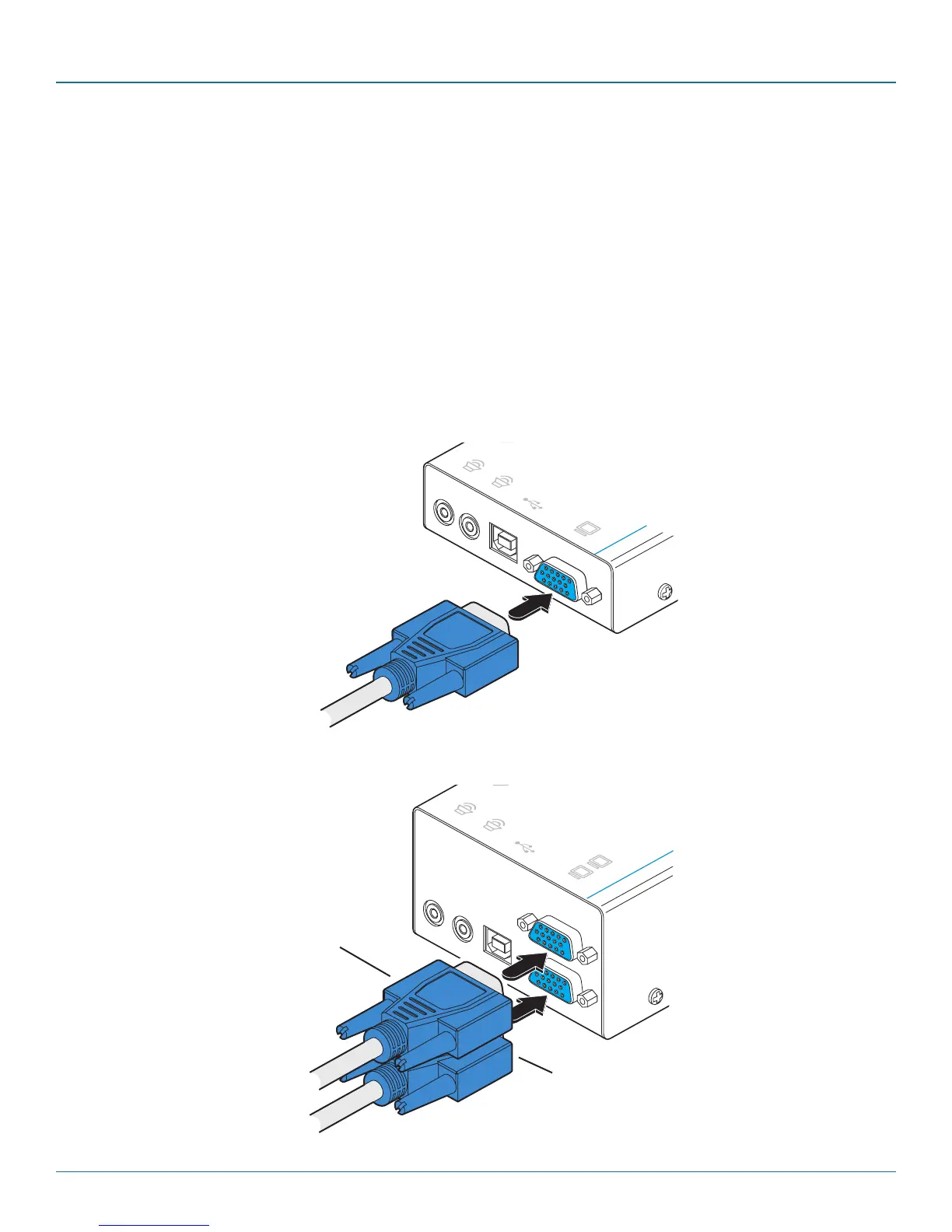
2 Use the supplied VGA link cable to connect the VGA input socket of the local module to the video output socket of the com-
puter as shown in Figure 3-3:
Figure 3-3. Attaching the VGA video link cable
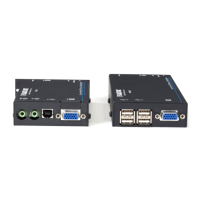
[Dual-variant only] Optionally attach a second
video input from the computer system.
Figure 3-4. Attaching two VGA video link cables to the dual-variant local module
To secondary video
output port
To primary video
output port



 To Next Page