Battery
Battery Installation
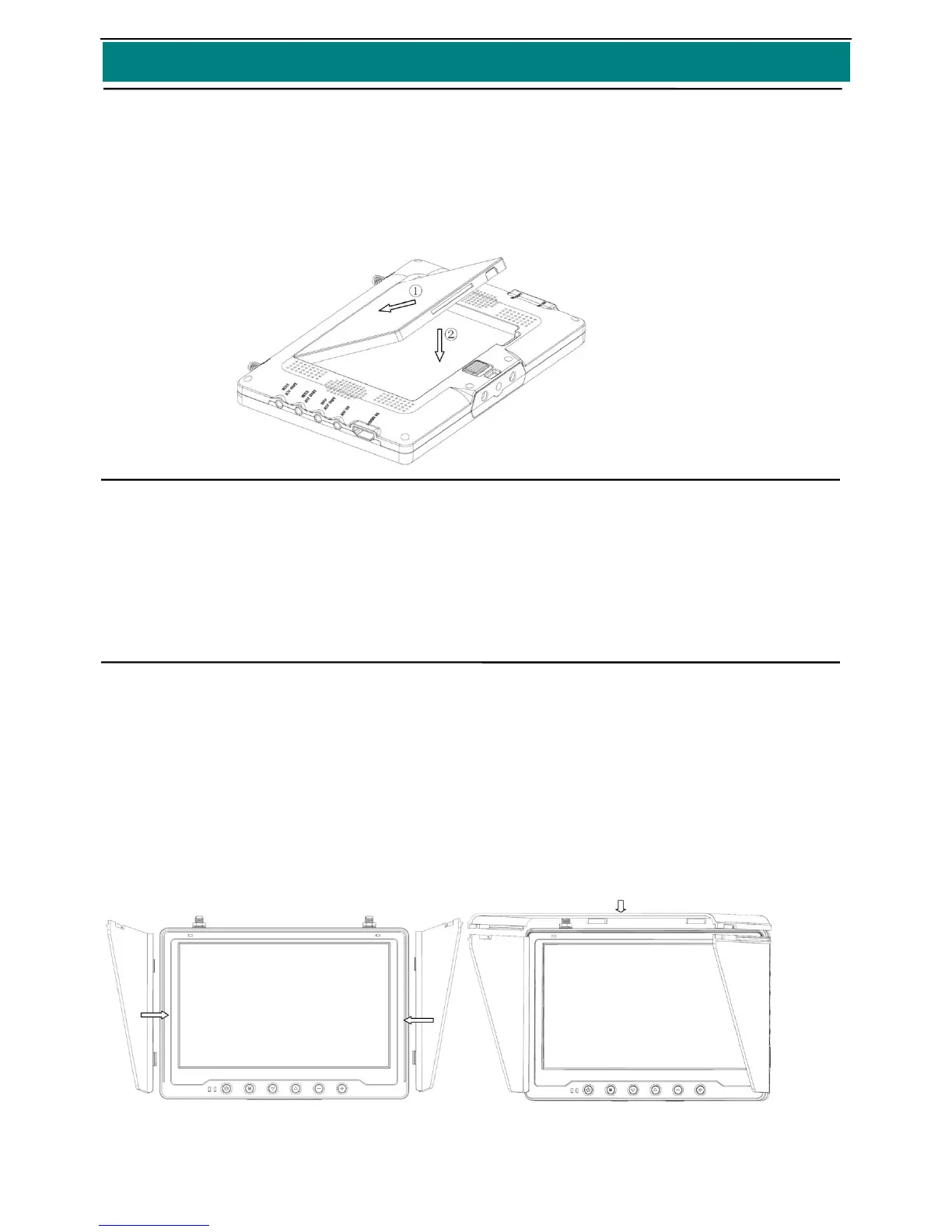
● Push the battery socket with gold contacts toward the gold contacts of the battery compartment of
the device,and press the battery down;when battery reaches the bottom of the battery
compartment,the battery lock will fix the battery automatically.
● If you don’t install the battery, you can use 7~28V power supply.
Recharge the Battery
● Please use power supply with 15V/2A at least
● Please recharge the battery fully at the first time
● During recharging,the red indicated light is on;after recharging,the green indicated light is on.
Sun-shadow
Install the Sun-shadow
● 3 pieces of baffles make up the sun-shadow,first install 2pieces of baffles on the both sides of
main body ,then install
● The top baffle toward the card slot of the main body according to the icon as below,and make sure
they are fixed well,.
● When you disassemble the sun-shadow,please take off the top baffle,then the right and left one.


 To Next Page