ENGLISH
BLACKSTONEPRODUCTS.COM/SUPPORT
OWNER’S MANUAL | ASSEMBLY GUIDE MODELS:
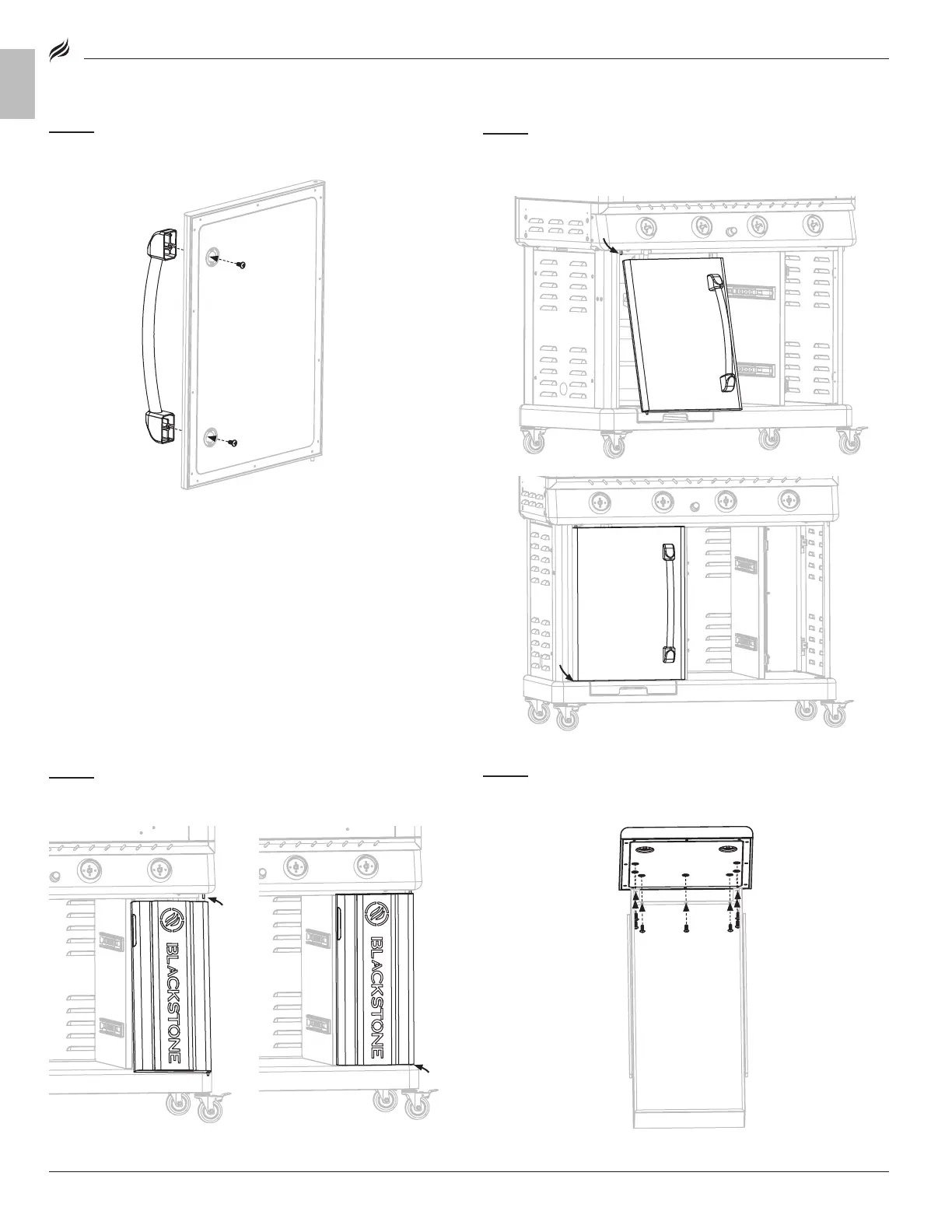
STEP 15
Use two (2) M6x15 screws [a.] to attach the cart door handle
to the left cart door.
STEP 16
Attach the left cart door to the cart by first
❶ ❶
inserting the
door into the upper door hinge pin, then
❷ ❷
inserting the lower door
hinge pin into the cart base.
STEP 17
Attach the right cart door to the cart by first
❶ ❶
inserting the
door into the upper door hinge pin, then
❷ ❷
inserting the lower door
hinge pin into the cart base.
STEP 18
Use seven (7) M5x10 screws [b.] to attach the lower drawer
front panel to the one (1) drawer body.
❶
❷
❶
❷








 To Next Page