2
INTRODUCTION
This Blackbird™ device can be controlled by a computer using an RS-232 serial connection
and by issuing commands using RS-232 control software.
CONNECTION
This device includes a
3-pin to DB-9 RS-232 cable, which is used to connect your PC to it to
allow for RS-232 control. If your PC lacks a DB-9 serial port, you will need to use a USB to
Serial adapter cable (available separately P/N 3726). Refer to the full
User's Manual
for
connection details.
Controlling a Third Party Device Using a Local Connection
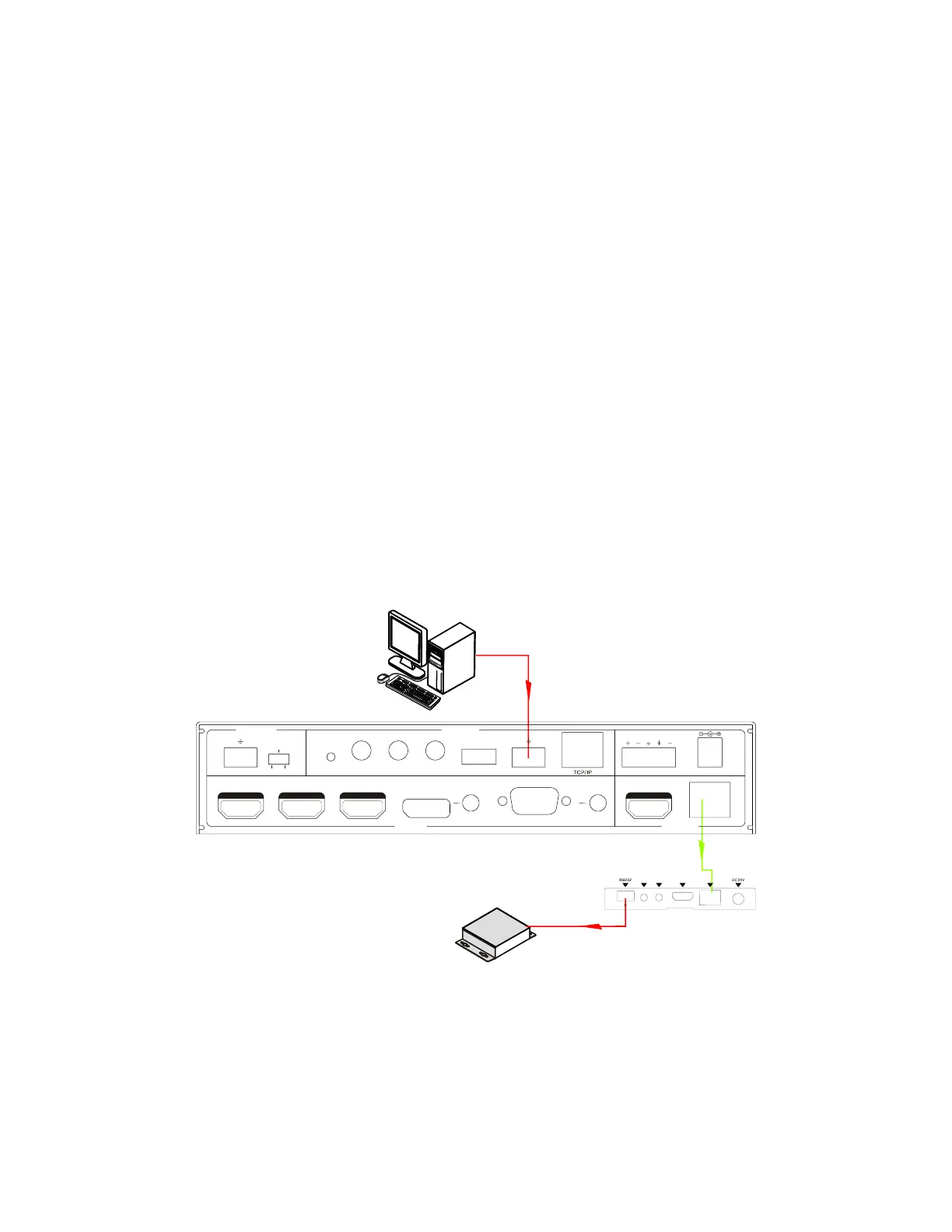
1. Connect your PC and Third Party device to the system as shown in the diagram
below:
2. Send the command
50787% to enable Serial Control Mode 1.
3. Send your commands as desired, either for the Scaler/Switch or the Third Party
device.
3rd party
PC
48V LINE IR EYEIR IN
IR OUT
MIC INPUT
MIC
FIRMWARE AUDIO OU T
L R
RES RESET
RS232
Tx
Rx
L R
INPUTS OUTPUTS
3-HDM I
2-HDM I1-HDM I / MHL 4-DP 5-VGA
HDMI
HDBT
CONTROL
DC 24V
I
R
O
U
T
I
R
I
N
H
D
M
I
O
U
T
HDBT IN
Tx Rx
HDBaseT Receiver


 To Next Page