Blackmagic Design - Leading the creative video revolution
™
Multibridge
Windows XP
™
Mac OS X
™
11
Workflow - Example
[Example SD analog to SD digital 4:2:2]
Sony BetacamSP™ deck to DeckLink SDI capture card via Multibridge.
To begin, power on Multibridge and launch Multibridge Utility software.
Source: Sony Betacam SP.
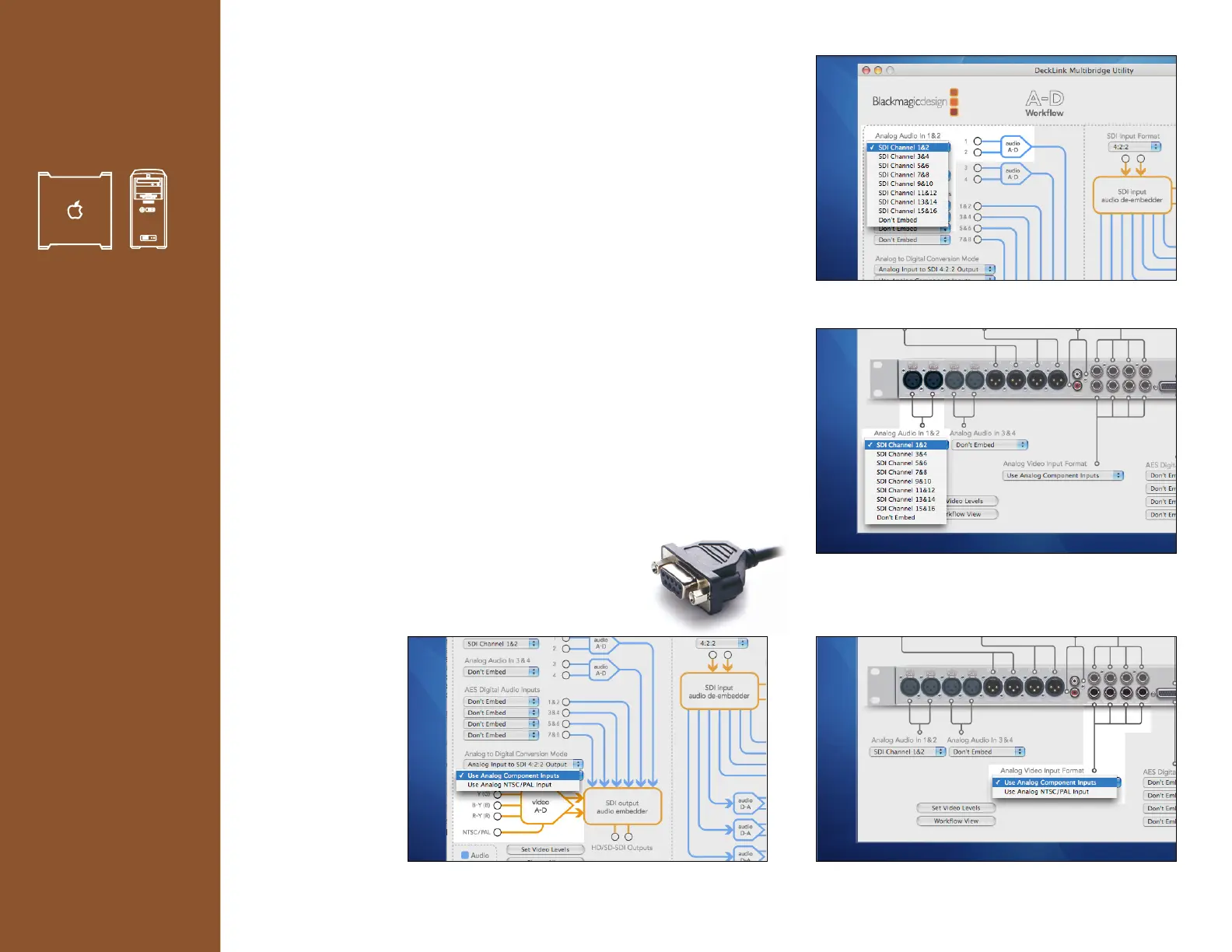
1. Connect your source analog audio cables to XLR inputs 1&2
on your Multibridge.
From the pull down menus within the Multibridge Utility select:
> Analog Audio In 1&2
> SDI Channel 1&2.
You might be prompted to “Embed this input” if another audio source
was previously configured to embed to SDI channels 1&2.
2. Connect your source to Analog Video In.
From the pull down menus in the Multibridge Utility select:
> Analog to Digital Conversion Mode
> Use Analog Component Inputs.
3. Directly connect your Serial RS-422 connection from
your DeckLink capture card to the Betacam SP deck.
Verify that device control is working.
Workflow View 1.(default)
Picture View 1.(option)
Workflow View 2.(option)
Picture View 2.(default)










 To Next Page