Blackmagic Design - Leading the creative video revolution
™
Multibridge
Windows XP
™
Mac OS X
™
12
Workflow - Example cont.
[Example SD analog to SD digital 4:2:2]
Destination: SDI DeckLink capture card
Connect the SDI cable to the SDI output of the Multibridge, and then to
the input of the DeckLink SDI connector.
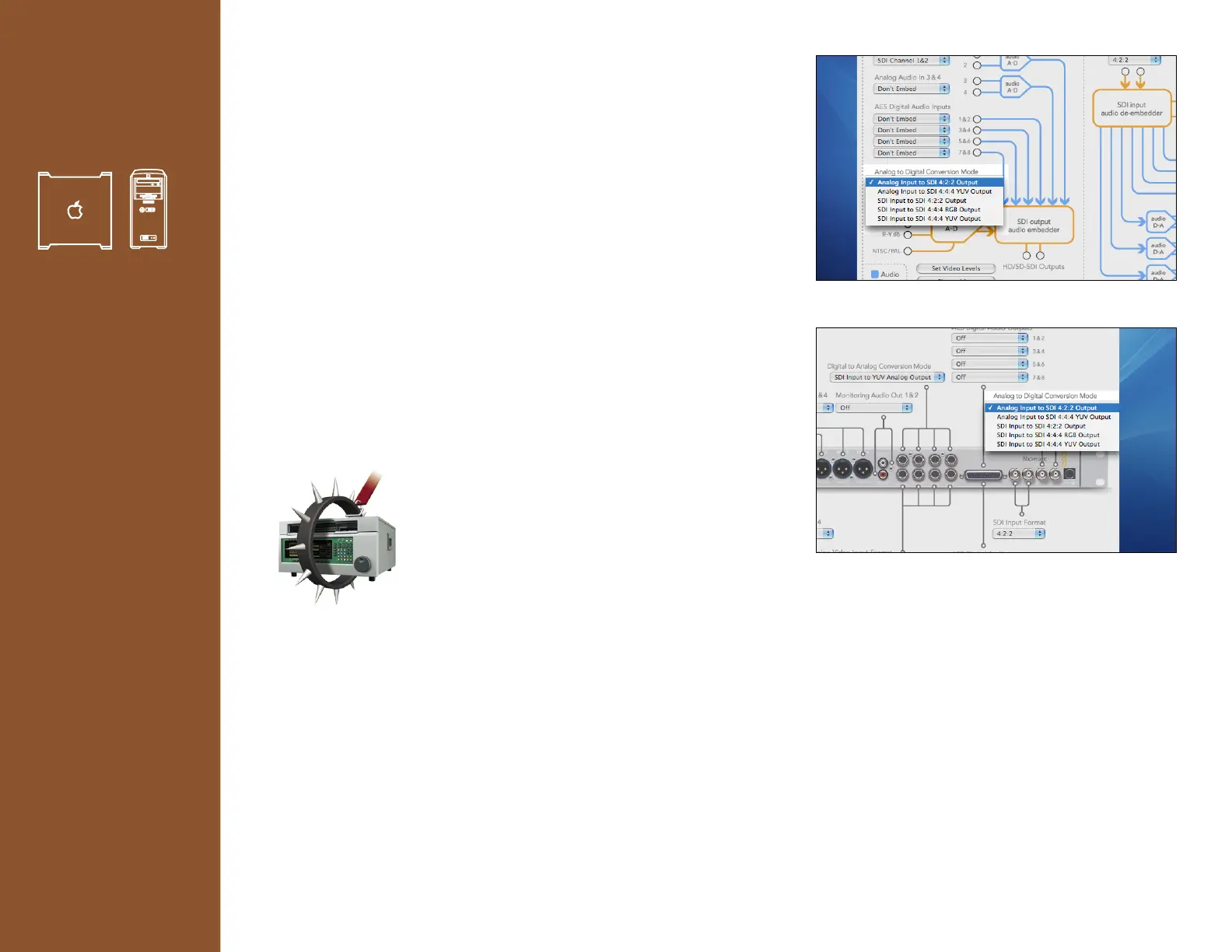
4. From the pull down menus in the Multibridge Utility select:
> Analog to Digital Conversion Mode
> Analog Input to SDI 4:2:2 Output
To store this profile select New profile from the Profiles menu and
enter a name. (See example on page 14)
5. Launch Deck Control or NLE application.
Deck control: Blackmagic’s Deck Control application
Select from Edit>Preferences>Easy Setups>
Blackmagic PAL/NTSC 8/10bit
Now you’ll have control over your tape deck,
and will be converting from Analog to Digital in
realtime via your Multibridge.
Workflow View 4.(default)
Picture View 4.(optional).
Blackmagic Deck Control.










 To Next Page