Blackmagic Design - Leading the creative video revolution
™
Multibridge
Windows XP
™
Mac OS X
™
13
Workflow View 1.(default)
Picture View 1.(option)
Workflow Example
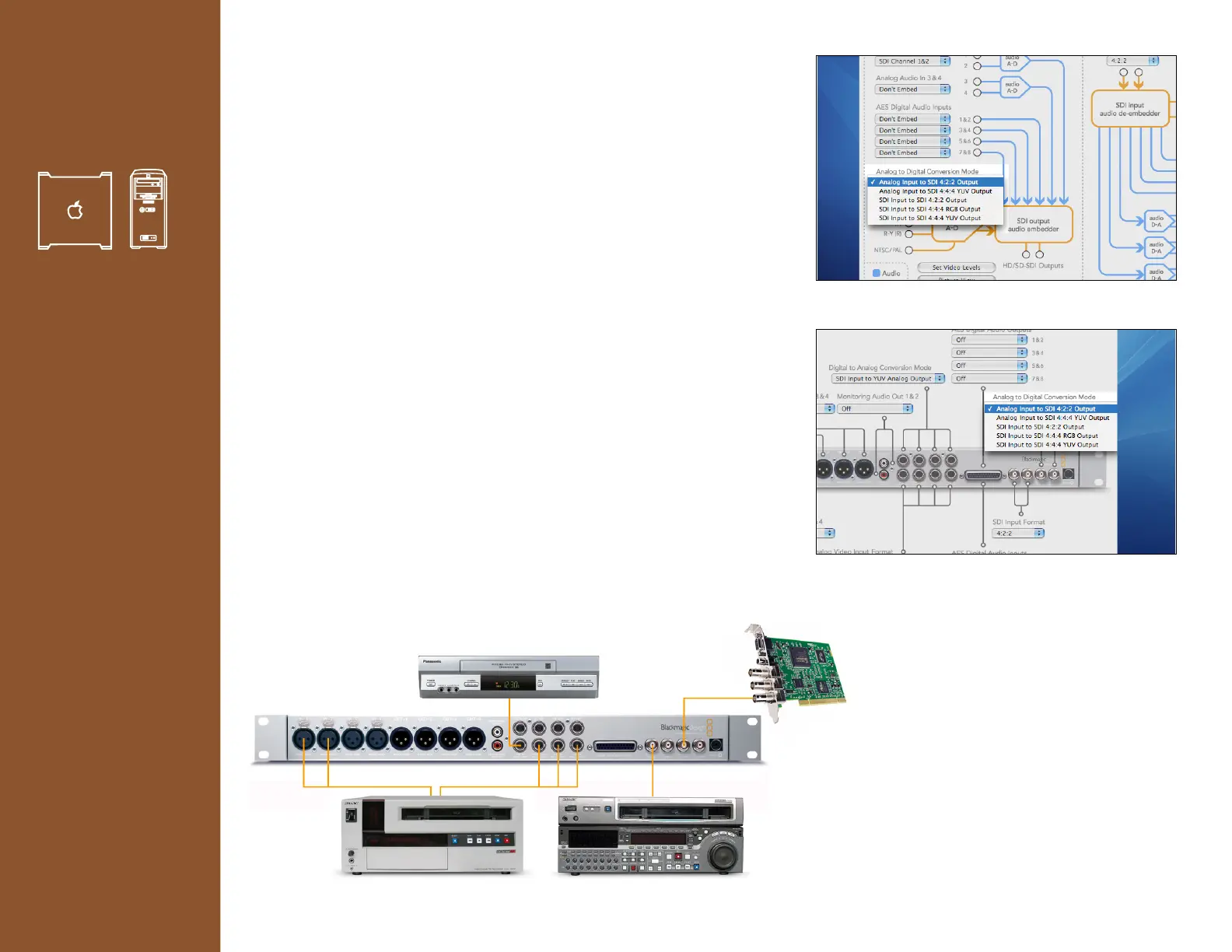
[Multiple sources, to a Multibridge]
Destination: SDI DeckLink capture card
Scenario: A Video Editor has three sources for video material. A Betacam
SP™ (Analog), Digital Betacam™(SDI) and a VHS (composite) tape deck.
Using the Multibridge the DeckLink capture card is now able to capture
video and audio from these varied source.
1. Connect the Digital Betacam SDI Output to the SDI Input on your
Multibridge.
2. Connect the Betacam SP Component Output to the Component Input
on your Multibridge.
3. Connect the VHS tape deck’s Composite Output to Composite Input
on your Multibridge.
4. Connect the SDI Input on your DeckLink capture card to the SDI
Output on your Multibridge.
5. Select > Analog to Digital Conversion Mode
> Choose the “From input” to route source.
Mac users please note press the control key while performing this task
to access more items in the pull down list.
It is now possible to route SDI to SDI,
Component to SDI and Composite to
SDI output.










 To Next Page