EasyManua.ls Logo

Black+Decker CLMA4820L2 - User Manual

Black+Decker CLMA4820L2
144 pages
Print Icon
To Next Page IconTo Next Page
Loading...
www.blackanddecker.eu
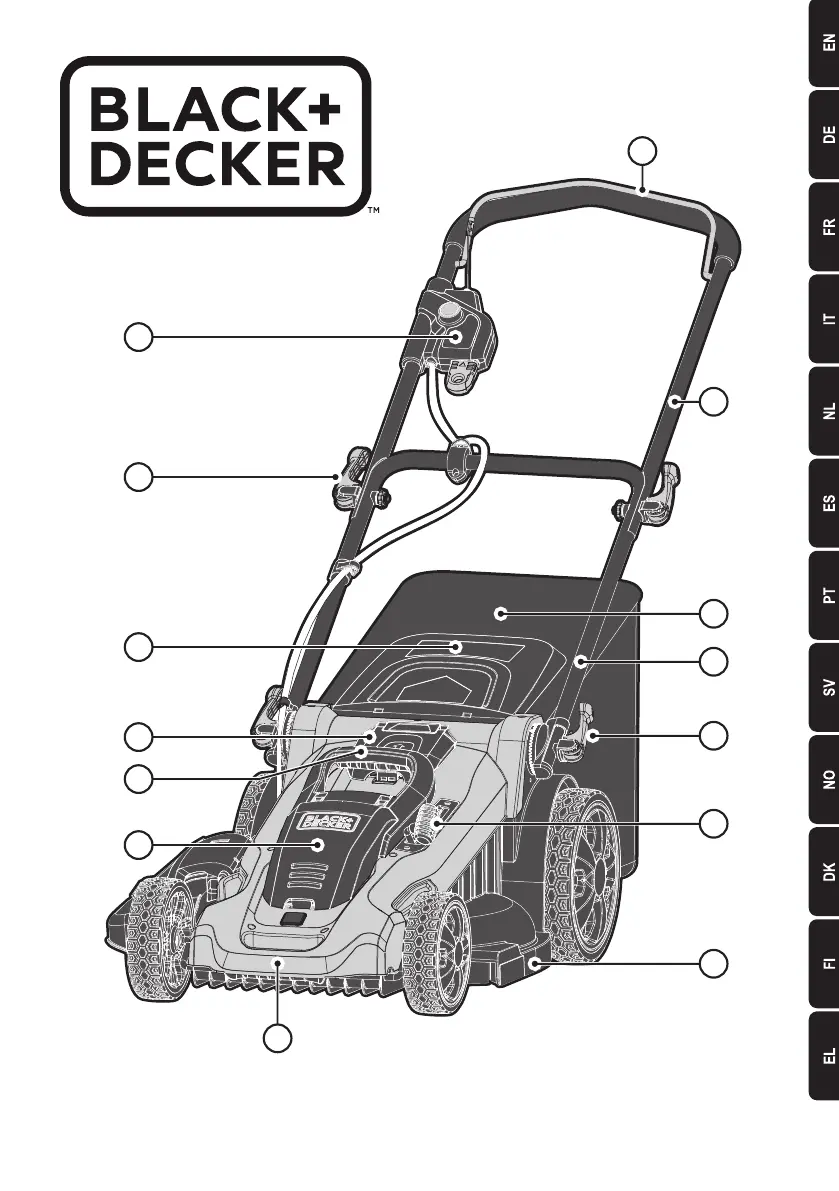
CLMA4820L2
1
5
9
11
10
13
7
6
4
3
2
8
12
12

Table of Contents

Questions and Answers

  • W
    wilkinsonjessicaAug 3, 2025
    Why does my Black+Decker CLMA4820L2 Lawn Mower motor stop while mowing?
    • M
      Michael JacksonAug 3, 2025
      Your Black+Decker Lawn Mower might stop for several reasons. To troubleshoot: * First, release the bail handle, remove the safety key and battery pack, then check if the blade can turn freely. * Increase the cutting height. * Ensure the battery cavity is free of debris and properly connected. * Check if the battery is fully charged by pressing the state of charge button. * Avoid overloading the mower by slowing your pace or raising the cutting height.
  • D
    David NelsonAug 8, 2025
    What to do if the Black+Decker CLMA4820L2 battery charger LEDs are not on?
    • S
      Samantha DavisAug 8, 2025
      If the LEDs on your Black+Decker Lawn Mower battery charger are not lit, check the plug connection and replace the charger if needed.
  • J
    Jerome RasmussenAug 13, 2025
    What to do if my Black+Decker CLMA4820L2 Lawn Mower runs but cutting performance is unsatisfactory?
    • S
      Sharon SawyerAug 13, 2025
      If your Black+Decker Lawn Mower runs but the cutting performance is poor, consider the following: * Check if the battery is fully charged by pressing the state of charge button. * Turn the mower off, remove the safety key and battery pack, then inspect the blade sharpness and check for clogging in the deck and discharge chute. Keep the blade sharp. * The wheel height may be too low for the grass. Try raising the cutting height.
  • K
    Karla Williams PhDAug 18, 2025
    How to fix Black+Decker CLMA4820L2 not picking up clippings with bag?
    • D
      Dr. Edwin ConwayAug 18, 2025
      If your Black+Decker Lawn Mower isn't picking up clippings, it might be due to: * A clogged chute. Turn the mower off, remove the safety key and battery pack, and clear the chute. * The cutting height may be too low. Raise the wheel height. * The bag might be full. Empty it more often.
  • H
    Heather MooreAug 22, 2025
    Why is my Black+Decker CLMA4820L2 so noisy and vibrating?
    • M
      marc79Aug 23, 2025
      If your Black+Decker Lawn Mower is unusually noisy and vibrating: 1. Turn the mower off, remove the safety key and battery pack, and inspect the blade for damage. Replace if necessary with an official BLACK+DECKER replacement blade. 2. If the deck underside is damaged, take the mower to a BLACK+DECKER authorized service center. 3. If there's no visible damage, disassemble the blade assembly, clean each piece, and reassemble. If vibration persists, return the mower to a BLACK+DECKER authorized service center.
  • R
    rglassAug 28, 2025
    How to make my Black+Decker Lawn Mower easier to push?
    • B
      Brian ScottAug 28, 2025
      If your Black+Decker Lawn Mower is hard to push, release the bail handle, remove the safety key and battery pack. Raise the cutting height to reduce deck drag and check each wheel for free rotation.

Summary

Intended Use and Safety Instructions

Using Your Appliance

Always take care when using the appliance and follow specific usage guidelines for safety.

After Use Procedures

Store the appliance in a dry, well-ventilated place out of reach of children.

Inspection and Repairs

Check for damaged or defective parts before use and have them repaired by an authorized agent.

Additional Safety Instructions for Lawn Mowers

Safety of Others and Residual Risks

Warning Symbols and Battery;Charger Safety

Batteries Safety

Safety guidelines for handling, charging, and disposing of batteries to prevent injury and fire.

Chargers Safety

Information on charger usage, voltage compatibility, and safety precautions.

Battery Charging and Diagnostics

Bad Battery Detection

Indicates a weak or damaged battery; return for service or recycling.

Hot;Cold Pack Delay

Charger suspends charging if battery is too hot or cold until normalized.

Battery Status and Handling

State of Charge Indicator

How to check the battery's current charge level using the indicator lights.

Installing and Removing the Battery Pack

Instructions for inserting and removing the battery pack.

Assembly Procedures

Handle Assembly

Instructions for attaching and adjusting the mower handles.

Operation and Adjustments

Handle and Mower Height Adjustment

How to adjust handle height and cutting height for optimal use.

Safety, Features, and Storage

Safety Key Usage

Instructions for using the safety key to prevent accidental starts.

Carrying, Mowing Tips, and Blade Maintenance

Maintenance and Troubleshooting

Maintenance and Cleaning

Guidelines for cleaning, preventing corrosion, and general maintenance.

Troubleshooting Common Issues

Solutions for starting, running, cutting, and charging problems.

Technical Data and Guarantee

Black+Decker CLMA4820L2 Specifications

General IconGeneral
Power SourceBattery
Battery TypeLithium-ion
Battery IncludedYes
Mulching CapabilityYes
Deck MaterialPlastic
Self-PropelledNo
Foldable HandleYes
Grass CollectionYes
Cutting Width20 inches
Battery RuntimeUp to 60 minutes
Battery Charge Time120 minutes
Wheel Size7 inches

Related product manuals