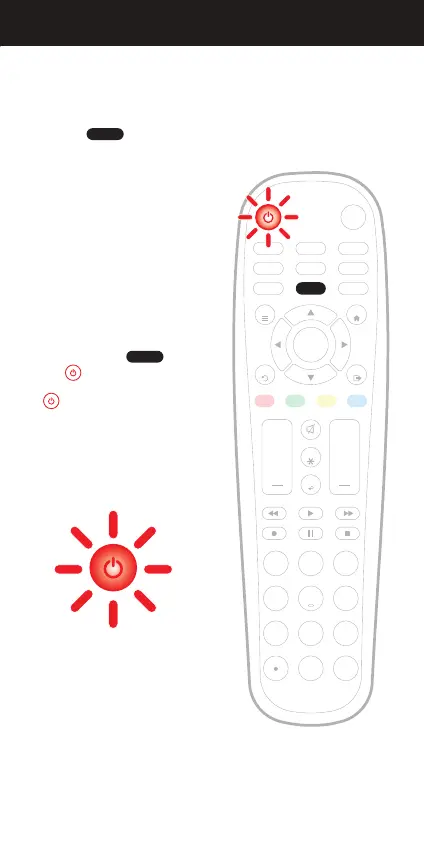
Press and hold the button
until the button lights up red.
The button’s red indicator light
remains on.
Programming your remote is as easy as 1, 2, 3
Before beginning, please make sure that the device you want to control
is powered on and follow these three simple steps.
NOTE: Press to exit at any time.
NOTE: The Blackweb universal remote comes pre-programmed to operate
many Samsung TVs.
PROGRAMMING YOUR REMOTE DIRECT CODE ENTRY
1.
AMP AUX
SAT/CBL STREAMTV
BRAY/DVD
INPUT
FAV
ENTER
1 2 3
4 5 6
7 8
0
9
+ +
CH
GUIDE
VOL CH
MENU
BACK
APPS
EXIT
OK
PROGRAM
PROGRAM
PROGRAM
Red indicator light
INFO
05


 To Next Page