EasyManua.ls Logo

Blaupunkt AMP2002 - Page 14

Blaupunkt AMP2002
16 pages
Print Icon
To Next Page IconTo Next Page
To Previous Page IconTo Previous Page
Loading...
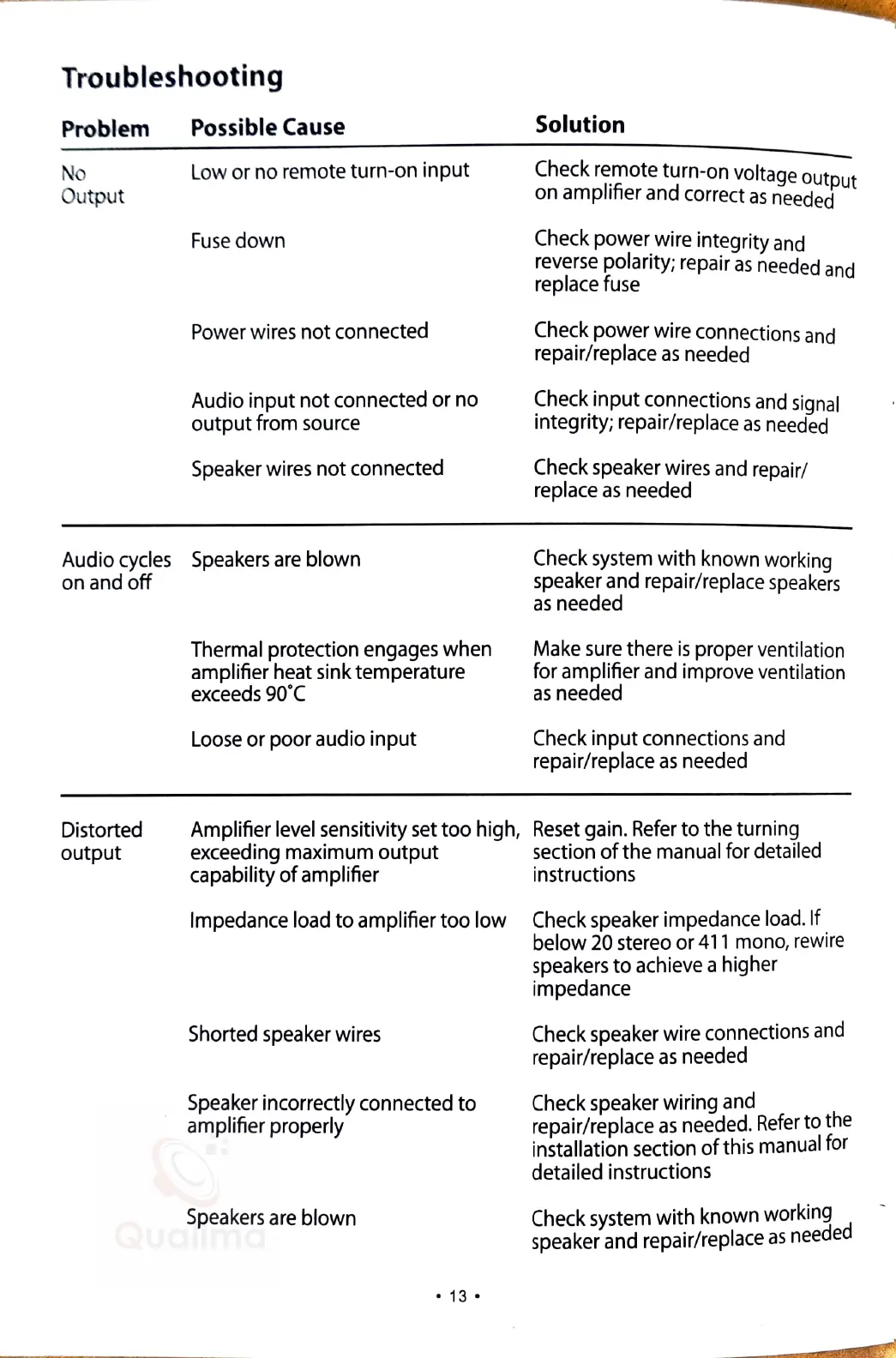
Troubleshooting
Problem
No
Ou
tput
Possible
Cause
Low
or
no
remote turn-on input
Fuse
down
Power
wires
not connected
Audio input not connected or no
output from
source
Speaker
wires
not connected
Audio
cycles
Speakers
are
blown
on
and
off
Thermal
protection
engages
when
amplifier heat sink temperature
exceeds
90°C
Loose
or poor audio input
- -
-•
a
Solution
Check
re_mote
turn-on voltage output
on
amplifier
and
correct
as
needed
Check
power wire integrity
and
reverse
polarity; repair
as
needed
and
replace
fuse
Check
power wire connections
and
repair/replace
as
needed
Check
input connections
and
signal
integrity; repair/replace
as
needed
Check
speaker
wires
and
repair
/
replace
as
needed
Check
system
with known working
speaker
and
repair/
replace
speakers
as
needed
Make
sure
there
is
proper ventilati
on
for amplifier
and
improve
vent
i
lation
as
needed
Check
input connections
and
repair/replace
as
needed
Distorted
output
Amplifier
level
sensitivity
set
too high,
Reset
gain.
Refer
to the turning
exceeding maximum output section
of
the manual for
de
t
ai
l
ed
capability
of
amplifier instructions
Impedance load to amplifier too low
Shorted
speaker
wires
Speaker
incorrectly connected to
amplifier properly
Speakers
are
blown
13
Check
speaker
impedance
load.
If
below
20
stereo or
411
mono,
rewi
re
speakers
to
achieve
a higher
impedance
Check
speaker
wire connections
and
repair/replace
as
needed
Check
speaker
wiring
and
repair/replace
as
needed.
Refer
to
the
installation section
of
this
manual
for
detailed instructions
Check
system
with known working -
speaker and
repa
ir/replace
as
needed
,,,sa
a&£
~
ﺎﻤﯿﻟاﻮﮐ هﺎﮕﺷوﺮﻓ
214 کﻼﭘ مود ﻪﻘﺒﻃ 26 یرﺎﺠﺗ ﻊﻤﺘﺠﻣ ﯽﺑﻮﻨﺟ ﯽﺳودﺮﻓ ناﺮﻬﺗ
ﯿا ا هو
021-66712845
QualimaShop.com

Related product manuals