Settings
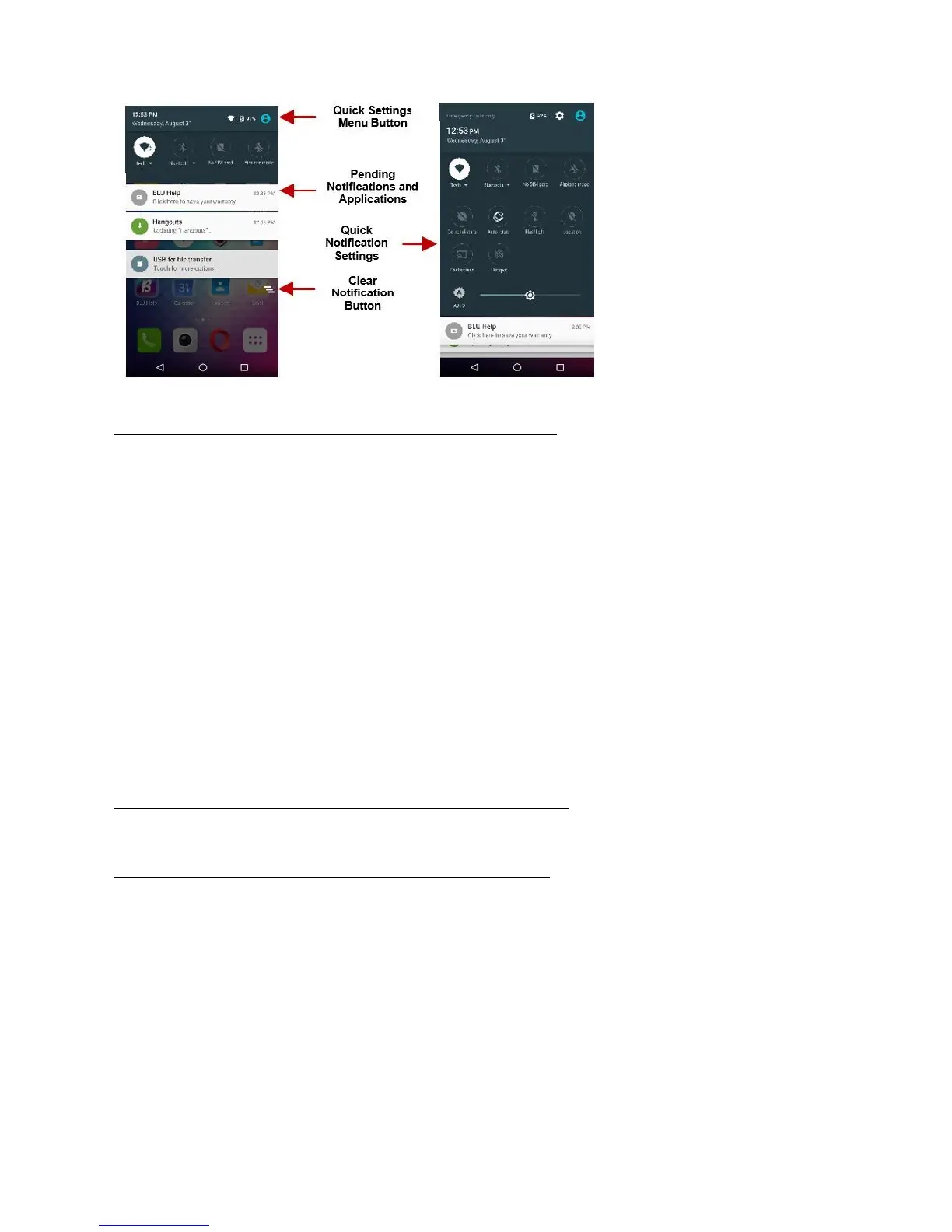
settings panel provides shortcuts to different phone settings for quick access. Click on any of the
shortcut notification icons to power on or off.
Drag down the notification bar and click the clear notification icon on the lower right hand part of the notification
screen (3 horizontal lines as shown in the figure).
access the quick notification settings menu:
Drag down the notification bar completely. Some settings include Wi-Fi, Bluetooth, Location, Airplane mode,
Flashlight.
Call Functions
interface, enter the phone number and then click the dial key.
Call
Click the Keypad button to open the dial keyboard. At the dial keyboard, enter the phone number you wish to
hold the 0 key to add a (+) sign when adding an international dialing prefix.
Click the dial button to make the call.
you may click on the keypad button to open the keypad interface and enter the number of
Click the end button to end the call.
Options
options that can be used in the call log and dialing interface. You may press the menu key
while in the general dialing interface and adjust call settings,
enter call history, clear your frequently dialed
numbers, and add a new contact.
Logs
called and received will be saved in the phones call log. All recently called numbers in
the call log can be dialed by clicking on the contact tile in the
speed dial tab, or by clicking on the contact and
selecting call back in the
recent tab. When the number appears on the list, click it to view details. To delete a call
from the call history, press the menu key and select delete. You
may remove one or multiple calls.



 To Next Page