SERVICE@BLUDOT.COM | 12ASSEMBLY NOTES
PT. 1218 x 4PT. 8054 x 4
PT. 8041 x 2
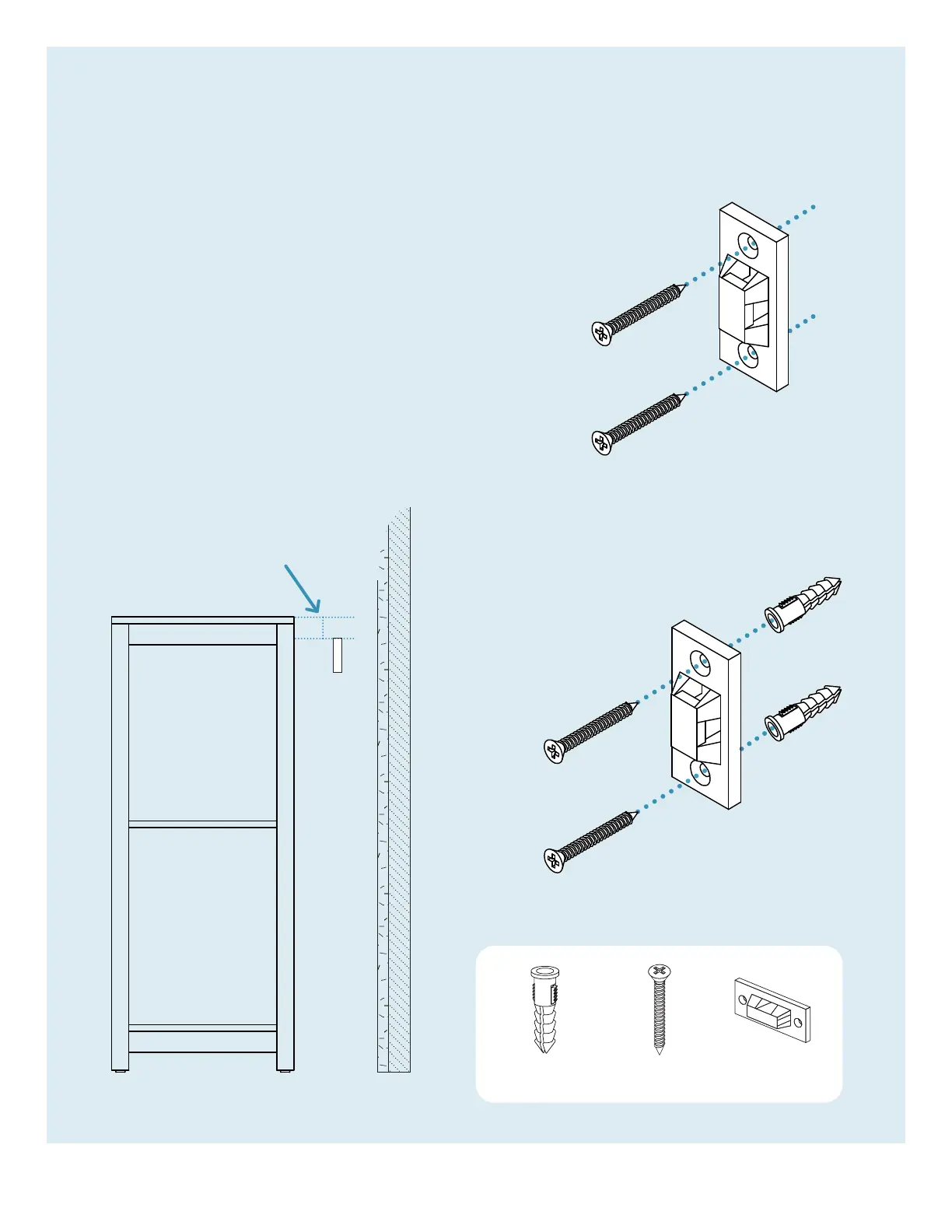
1” lower than
case top
OR
wall
wall
Step 10
ATTACH ANTI-TIP BRACKET TO WALL.
Wall anchors and fasteners are included for installation
into drywall. Please consult your local hardware
professional to determine the hardware best suited for
your wall type.
If the mounting locations are positioned on a stud, the
installation of wall anchors may be skipped. Instead,
drill 7/64” pilot holes in the marked positions and install
anti-tip bracket with provided hardware as shown.
If the mounting locations are not positioned on a stud,
drill 15/64” holes into the marked locations and press
wall anchors into the drilled holes and install anti-tip
bracket with provided hardware as shown.


 To Next Page