9
Conguring the Meter
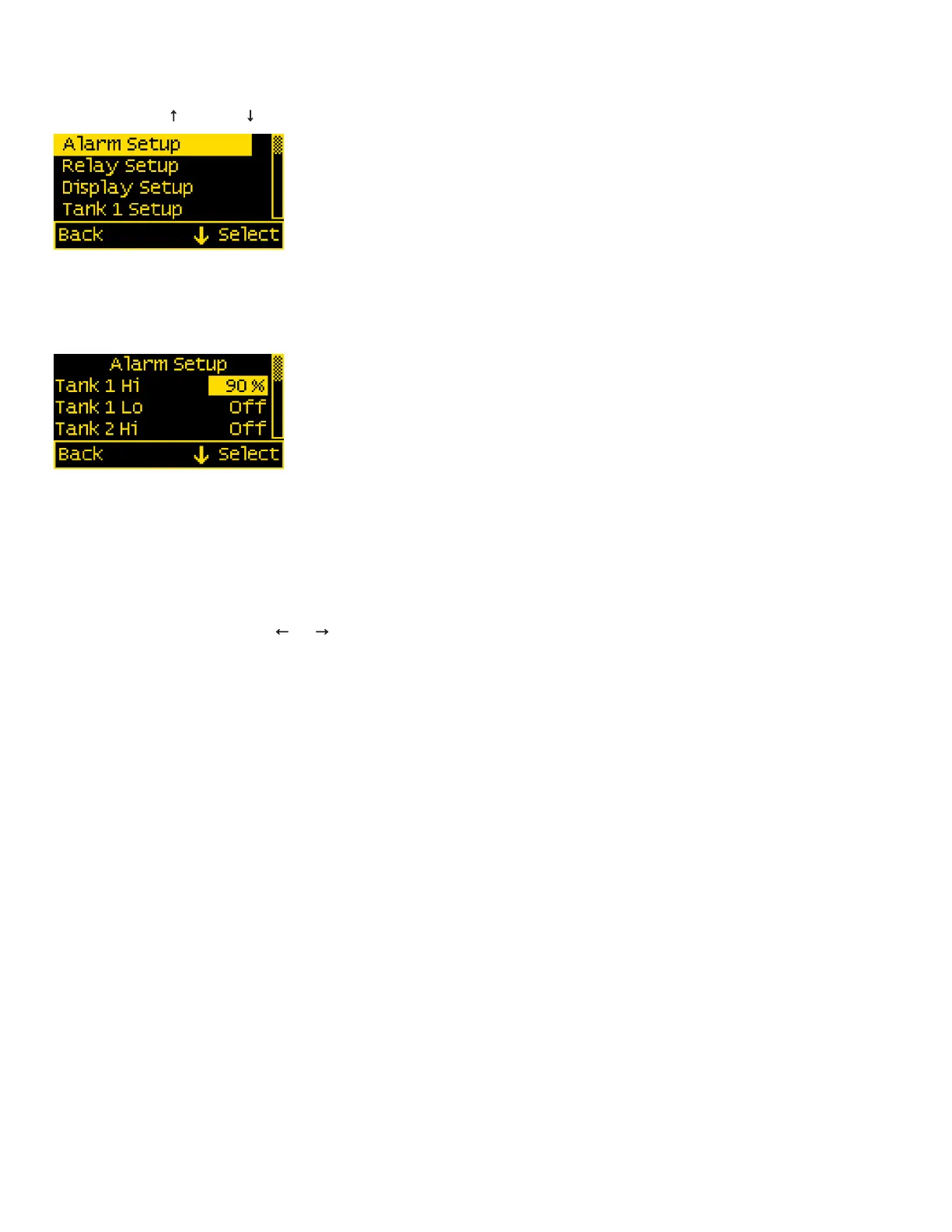
Meter settings can be congured from the Setup menu. This menu can be accessed by pressing the Menu button and then scrolling to and selecting
Setup. Press the UP ↑ and DOWN ↓ arrow buttons to move the cursor. The different setup options are described below.
Alarm Setup & Control
The meter’s alarm can be set to trigger for full or empty tanks. Alarms can be set from the Alarm Setup menu. To get there, rst navigate to the Setup
menu. Then scroll to Alarm Setup and press the Select button.
Setting Alarms
The M2 Meter family provides monitoring capability of input channels. Alarms are triggered if a channel is above or below a certain user selected
threshold value. The following example indicates how to setup a tank full alarm.
1. Go to the Alarm Setup menu.
2. Scroll to the desired input channel (i.e., Tank 1 Hi).
3. Press the Select button and the cursor should start blinking.
4. Set the tank level threshold using the ← and → buttons. (Holding down the buttons allows faster selection)
5. Press the Enter button to save the change or the Cancel button to cancel any change.
NOTE: A low tank level threshold cannot be set above a high tank level threshold. Likewise, a high tank level threshold cannot be set below the low tank
level threshold. The meter will automatically increase or decrease the tank level thresholds to enforce this.
In the above example, an alarm will set anytime Tank 1 is greater than or equal to 90% of the full scale rating. This could be used to monitor a holding
tank or to indicate that a tank is almost full while lling fuel. Note that the display can be changed from % to gallons or liters in Tank 1 Setup.
Tank Alrm Dly (Alarm Delay)
An alarm delay can be specied so that alarms don’t immediately trigger. This can be useful if tank sloshing is causing false alarms.
The hold off timer operates as a count-up/count-down timer. When the tank value exceeds the alarm value then the timer will start counting up until it
reaches the delay time. When it reaches the delay timer, an alarm will sound. If the alarm condition goes away before the delay timer has been met, then
the timer will count down until the timer is zero again. For example, if the Alarm Delay is set for 5 minutes and an alarm condition is active for 4 minutes
and then inactive for 1 minutes then if the alarm condition is active again, the alarm will sound in 2 minutes (5 minutes - 4 minutes + 1 minute). Note that
there is only one delay per channel.


 To Next Page