10
11
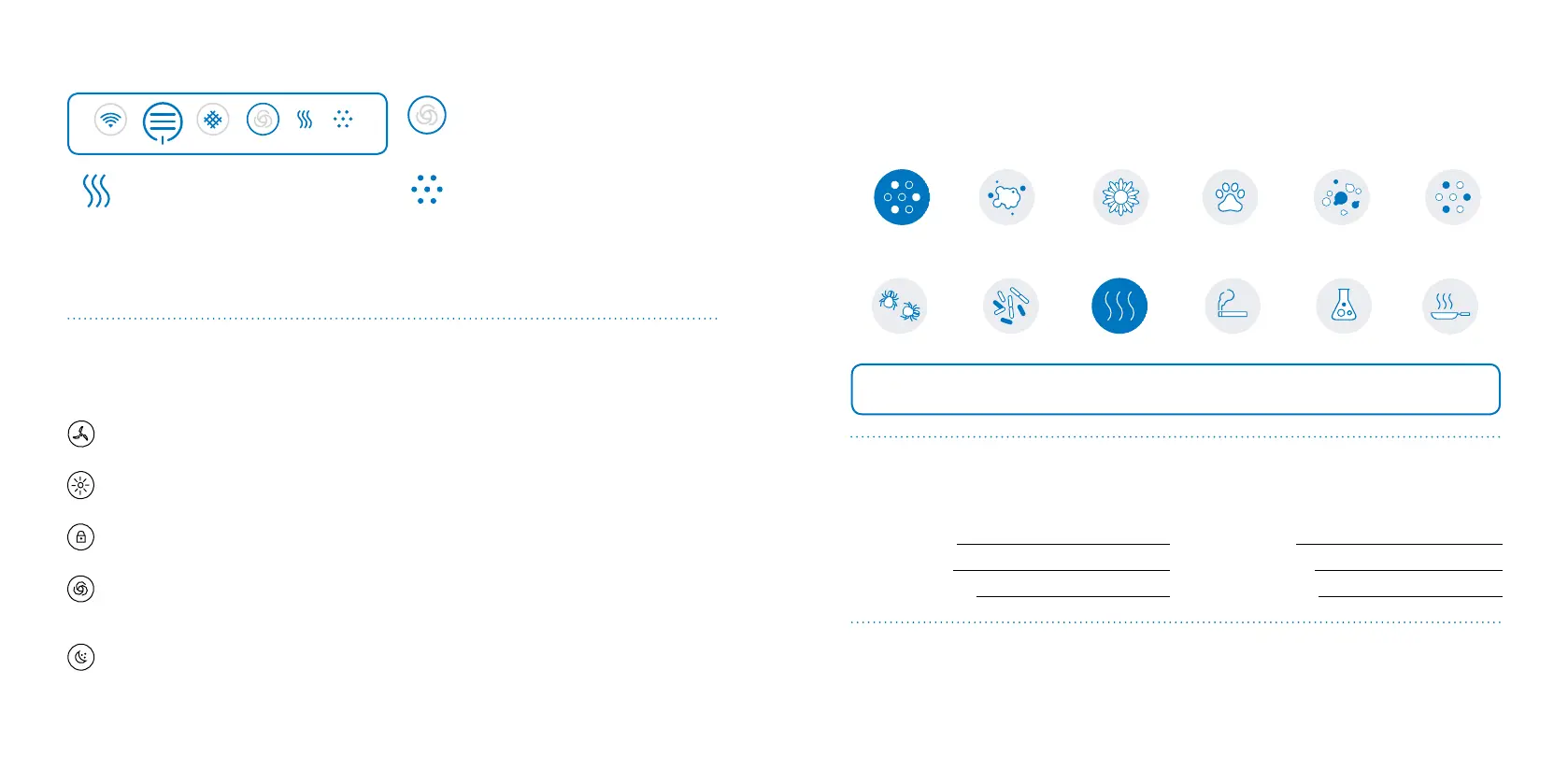
Auto speed
Status circle blue - unit is on
Status symbol grey - Auto speed OFF
Status symbol blue - Auto speed ON
PM2.5 indicator
Status blue - from excellent to moder-
ate pollution levels.
Status orange - from slight to high pol-
lution levels
VOC indicator
Status blue - from excellent to
moderate pollution levels
Status orange - from slight to high
pollution levels
Wi-Fi AUTOFILTER
PM 2.5
VOC
Classic 280i control panel touch buttons
Blueair Friend mobile app settings
Please note that you must rst add your air purier unit to the Blueair Friend mobile app before you can
control the following settings via the app:
Adjust airow speed
Changes the fan speed between speed 1, 2 and 3.
Adjust LED intensity
Changes the LED intensity for those lamps that are visible.
Child lock
Regulates your ability to control the air purier unit via the control panel on the unit.
Auto mode
Automatically controls the fan speed based on readings either from the built-in sensors (”i”
models only), or from the external air quality monitor Blueair Aware.
Night mode
Allows the activation/deactivation of certain settings at specic times.
See Blueair Friend mobile app for further information regarding pollution and threshold
levels
Filters
General information
The unit is delivered with one HEPASilent
TM
lter already installed.
Particle lters remove:
DustPM2.5 Pollen ParticlesPet dander Mold
Smokestop
TM
lters remove all the above pollutants, plus:
Smoke
VOC
Dust mites Bacteria
Chemicals
Cooking odors
IMPORTANT! Use only genuine Blueair lters to ensure proper function of your unit and to
qualify for full warranty coverage.
Blueair lter subscription program
This convenient service is available in some countries – contact your local Blueair retailer to nd out if
you can join.
Model number
Serial number
Retailer’s name
Retailer’s address
Date of purchase Telephone number
Filter checklist
To make it easy to nd the right lter in the future, please ll in the customer record below and keep
this user manual for reference. The model number and serial number of this product can be found on
the rating label on the bottom of the unit.







 To Next Page