12
13
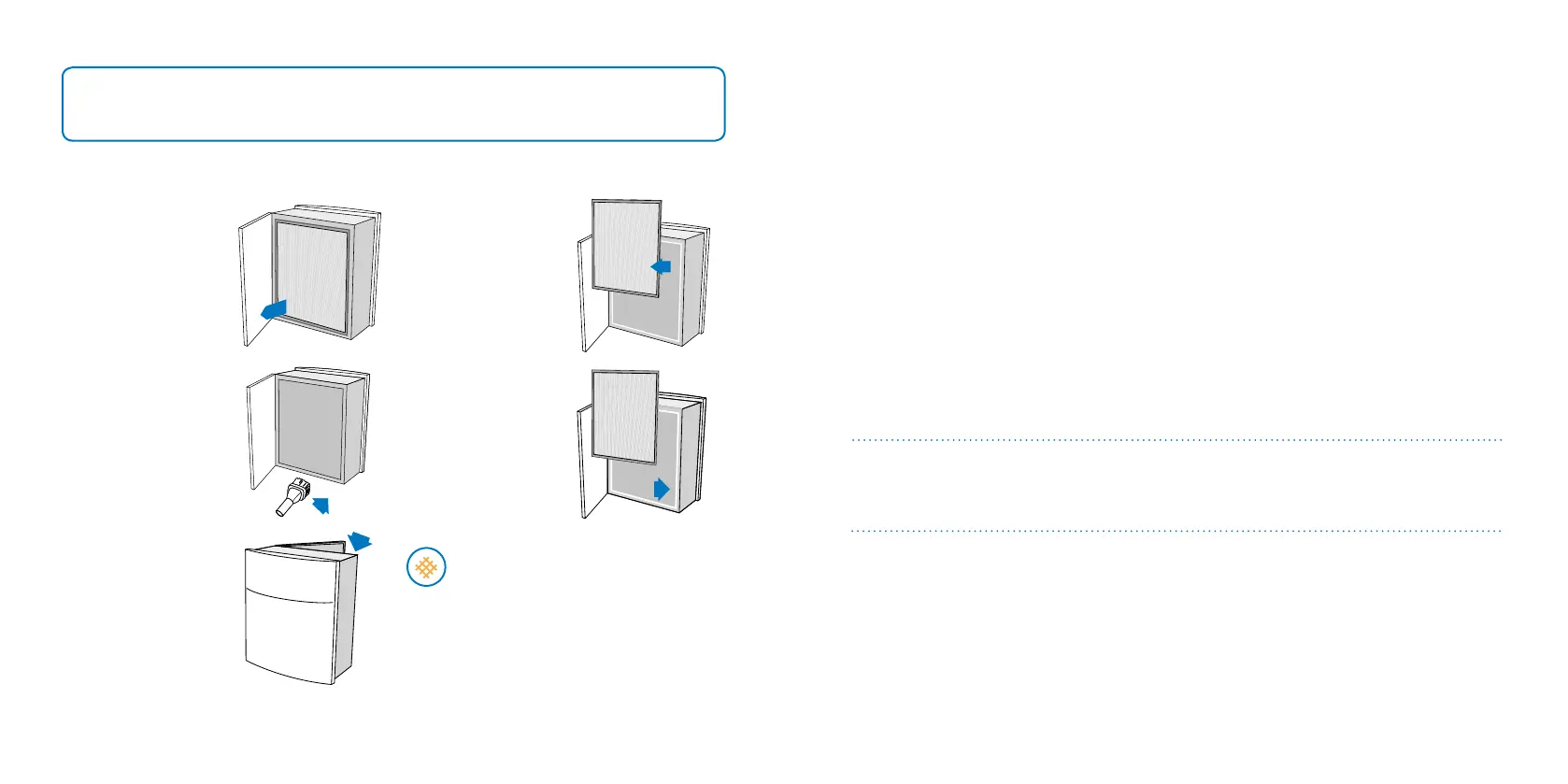
Changing the lters
Step 2
Pull out the lter.
Step 1
Open the back door.
Step 4
Insert the replacement
Blueair lter.
Step 3
Vacuum inside the unit
with a soft brush
attachment.
Step 5
Close the back door,
plug in the unit and
turn on.
The unit is now ready
for use.
IMPORTANT!
Always turn off and disconnect the unit from the supply mains before changing lters, cleaning or
carrying out maintenance procedures..
Status orange - replace lter and
reset by pressing down for 5 seconds.
Care and maintenance
We recommend routine cleaning in order to keep your unit in top condition.
When changing lters
1. Wipe clean the underside of the lid after removal.
2. Vacuum the air inlet grille from the inside using a soft brush and/or other suitable attachment.
3. Vacuum the small air inlets with a soft brush attachment.
General
1. Wipe the exterior of the unit with a soft, clean, damp cloth.
2. Never clean with gasoline, chemical solvents or corrosive material as these agents may damage
the surface.
3. Do not allow foreign objects to enter the ventilation or exhaust openings. This may cause elec-
tric shock or damage the unit.
4. Do not try to repair or adjust any of the electrical or mechanical functions on your Blueair unit
yourself. Contact your local dealer or Blueair for warranty information.
Help and support
If you have questions about Blueair Classic series, please visit www.blueair.com or contact your
local Blueair retailer.
Warranty information
The Blueair Limited Warranty applies only if the unit is used according to the instructions in this
manual.







 To Next Page