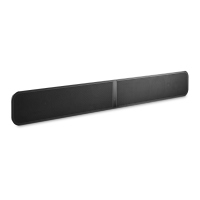
Need help?
Do you have a question about the Bluesound Pulse Soundbar+ and is the answer not in the manual?
Lists and visually identifies all included accessories for the soundbar.
Explains the meanings of different LED color patterns for system status.
Describes the functionality of the PLAY/PAUSE, VOLUME (+/-), and KICKSTAND FEET.
Details connections for TV (HDMI ARC), subwoofer (SUBW OUT), and analog audio sources.
Explains optical audio input, USB ports for storage/service, and LAN for wired networking.
Instructions for connecting the AC power cord.
Guidance on mounting the soundbar on a wall or placing it on a surface.
Advice on using a TV stand and optimal positioning for the Dolby Atmos experience.
Detailed steps to perform a factory reset on the soundbar.
 General
| Wi-Fi | Yes |
|---|---|
| Wi-Fi standards | Wi-Fi 5 (802.11ac) |
| Bluetooth version | 5.0 |
| USB 2.0 ports quantity | USB 2.0 ports have a data transmission speed of 480 Mbps, and are backwards compatible with USB 1.1 ports. You can connect all kinds of peripheral devices to them. |
| Connectivity technology | Wired & Wireless |
| AC input voltage | 100 - 240 V |
| AC input frequency | 50 - 60 Hz |
| Product color | Black |
| Audio formats supported | AAC, AIFF, ALAC, FLAC, MP3, MQA, OGG, OPUS, WAV, WMA, WMA-L |
| Number of tweeter drivers | 2 |
| Soundbar speaker RMS power | - W |
| Woofer diameter (imperial) | 102 \ |
| Tweeter diameter (imperial) | 19 \ |
| Total Harmonic Distortion (THD) | 0.03 % |
| Mid-range driver diameter (imperial) | 50 \ |
| Audio decoders | Dolby Digital |
| RMS rated power | 120 W |
| Audio output channels | - channels |
| Subwoofer frequency range | 30 - 20000 Hz |
| Cables included | AC, LAN (RJ-45), RCA |
| Number of products included | 1 pc(s) |
| Package type | Box |
 Weight and Dimensions
| Depth | 70 mm |
|---|---|
| Width | 1073 mm |
| Height | 141 mm |
| Soundbar weight | 6800 g |


 To Next Page