
 Need help?
Do you have a question about the Bluesound Pulse and is the answer not in the manual?
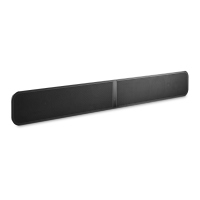
Place the PULSE SOUNDBAR on a flat surface and attach kickstand feet.
Use the supplied wall mount bracket to attach the PULSE SOUNDBAR to the wall.
Use the optional stand to adjust TV height if the soundbar obstructs the screen.
Connect TV audio via RCA or optical cable to the PULSE SOUNDBAR.
Select the appropriate AC cord and plug into the player and wall outlet.
Connect to the hotspot, then set up your home WiFi network.
Download the app and follow prompts for setup and music source selection.
Connect kickstand feet, subwoofer, TV audio, USB, and Ethernet ports.
Connect AC power, use standby button, and check status indicator LEDs.
Detailed steps to perform a factory reset on the player.
Use template to mark placement and mounting points on the wall.
Install bracket, then attach the soundbar securely.
Connect all necessary power, audio, and network cables.
Safety regarding power cords, grounding, lightning, and fire hazards.
Safe handling, damage requiring service, and replacement parts.
Keep away from heat, moisture, and handle batteries properly.
FCC compliance, modification warnings, and plug safety.
EU compliance declaration for wireless products.
Proper disposal and recycling of product and batteries.
Instructions for obtaining warranty service and support.
Details what is covered by the warranty.
Details what is NOT covered by the warranty.
 General
| FM radio | Yes |
|---|---|
| Product color | Black |
| TV stand usage | - |
| Audio formats supported | ALAC, FLAC, MP3, OGG, WAV, WMA |
| Frequency range | 70 - 20000 Hz |
| Apple docking compatibility | Not supported |
| Woofer diameter | 102 mm |
| Tweeter diameter | 19 mm |
| Mid-range driver diameter | 50 mm |
| Number of tweeter drivers | 2 |
| Soundbar speaker RMS power | - W |
| Woofer diameter (imperial) | 4 \ |
| Tweeter diameter (imperial) | 0.75 \ |
| Total Harmonic Distortion (THD) | 0.03 % |
| Mid-range driver diameter (imperial) | 2 \ |
| RMS rated power | 120 W |
| Audio output channels | 4.2 channels |
| Image formats supported | JPG |
| USB 2.0 ports quantity | 1 |
| Connectivity technology | Wired & Wireless |
| AC input voltage | 100-240 V |
| Cables included | AC, LAN (RJ-45), RCA |
 Weight and Dimensions
| Depth | 141 mm |
|---|---|
| Width | 1073 mm |
| Height | 70 mm |
| Soundbar weight | 6800 g |





 To Next Page