other end of the AC power cord to PULSE SOUNDBAR+’s AC Mains input socket. Never force the plug into a
wall outlet. An adaptor may be necessary in certain regions. Always disconnect the plug from the wall outlet
first, before disconnecting the cable from the PULSE SOUNDBAR+’s AC Mains input socket.
CHOOSE PLACEMENT
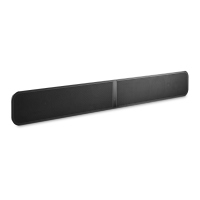
The PULSE SOUNDBAR+ is designed to give you options and flexibility when positioning within your home.
WALL MOUNT. For wall mount installations, the SOUNDBAR+ comes with a mounting bracket and mounting
template included in the box. Follow the mounting instructions on the mounting template to secure your
SOUNDBAR+ to the wall. Typically it will be wall-mounted directly below your TV, but other placements are possible.
Note that the SOUNDBAR+ can be attached to the wall mount bracket with the back panel facing up or down,
allowing you to run the attached cables in your preferred direction. The SOUNDBAR+ is equipped with an internal
accelerometer which ensures the left-right audio channels and the up/down volume buttons are always oriented
correctly, no matter which direction it is positioned.
TABLETOP. For tabletop installations, the SOUNDBAR+ comes with two kickstand feet that slot into tooled keyholes
on the back of the Player. Typically the SOUNDBAR+ will be table-mounted directly below your wall-mounted TV, but
other placements are possible. Note that the SOUNDBAR+ can be positioned with the back panel facing up or down,
allowing you to run the attached cables in your preferred direction. The
SOUNDBAR+ is equipped with an internal accelerometer which ensures the left-right audio channels and the
up/down volume buttons are always oriented correctly, no matter which direction it is positioned.
TS100 TV STAND (sold separately). For installations where the SOUNDBAR+ is taller than the support legs
supplied with your TV, and no wall-mounting is available, the TS100 is a dual-mounting, universal TV stand that
holds both the TV and the SOUNDBAR+. Using a TS100 ensures precise placement and spacing, so that the height
of your SOUNDBAR+ is never higher than the bottom of the TV. The TS100 is sold separately.
PLACEMENT CONSIDERATIONS FOR DOLBY ATMOS. For ideal results, place the PULSE SOUNDBAR+
below your television at approximately ear level and orient your seating position so that it directly faces the television.
Avoid placing any obstructions between the SOUNDBAR+ and the listening position. The Dolby height virtualizer
implementation in the SOUNDBAR+ is extremely flexible and does not require any additional or special room
considerations to work. All viewers within the seating area will experience an enhanced height sensation
WARNING!
Steps to Factory Reset:
1. Disconnect the player from electrical
2. Wait 30 seconds
3. Reconnect the power
4. Once the LED turns Red, press and hold the PLAY/PAUSE button. The LED will immediately turn Green and
then back to Red – continue to hold the button for 30 seconds
5. After 30 seconds, the LED will begin to blink red – then release the button
6. All customization to the Bluesound player will be removed and restored to factory settings
IMPORTANT: Removing your finger from the Standby button at any time before the LED begins flashing red will
cancel the factory reset and leave the player in Upgrade Mode. Just start the steps again to factory reset the player.
You will know the factory reset is successful if the player returns to Hotspot mode (wireless connection –
the LED will turn solid green). If the player is connected to your network through a wired Ethernet connection, it will
simply connect as if it was a new player (LED will turn solid blue).
Read More About This Manual & Download PDF:



 To Next Page