10. Adjusting the volume
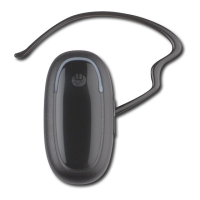
The headset has been designed with one VOL+ button, and one VOL- button. However, to make
the headset perfectly ergonomic and symmetrical, whether you use it on your left or right ear, it has
been designed with 2 back buttons (VOL+) and 2 front buttons (VOL-). But only 1 VOL+ button is
functional to adjust the volume up, and only 1 VOL- button is functional to adjust the volume down.
So to increase the volume during an active call, make sure you press shortly and gently on both
back buttons (VOL+) simultaneously.
And to decrease the volume during an active call, make sure you press shortly and gently on both
front buttons (VOL-) simultaneously.
11. Muting the microphone
To mute the microphone during an active call
Press on both VOL+ buttons, or on both VOL- buttons, simultaneously for about 2 seconds.
A periodic tone is heard in the speaker while the microphone is muted.
To end the mute function
When the microphone is muted, a short press on both VOL+ buttons, or on both VOL- buttons,
simultaneously will end the mute function and the periodic tone will disappear.
12. Transferring a call to the mobile phone
During an active call, press the TALK button for about 2 seconds.
This function only works in the Hands-Free Profile.
In the Headset profile, you can simply turn off your headset.
13. Transferring a call to Bluetrek
®
G2
During an active call on the mobile phone, press the TALK button briefly on the headset to transfer
the call from the mobile phone to the headset.
9 l Bluetrek G2 user guide


 To Next Page