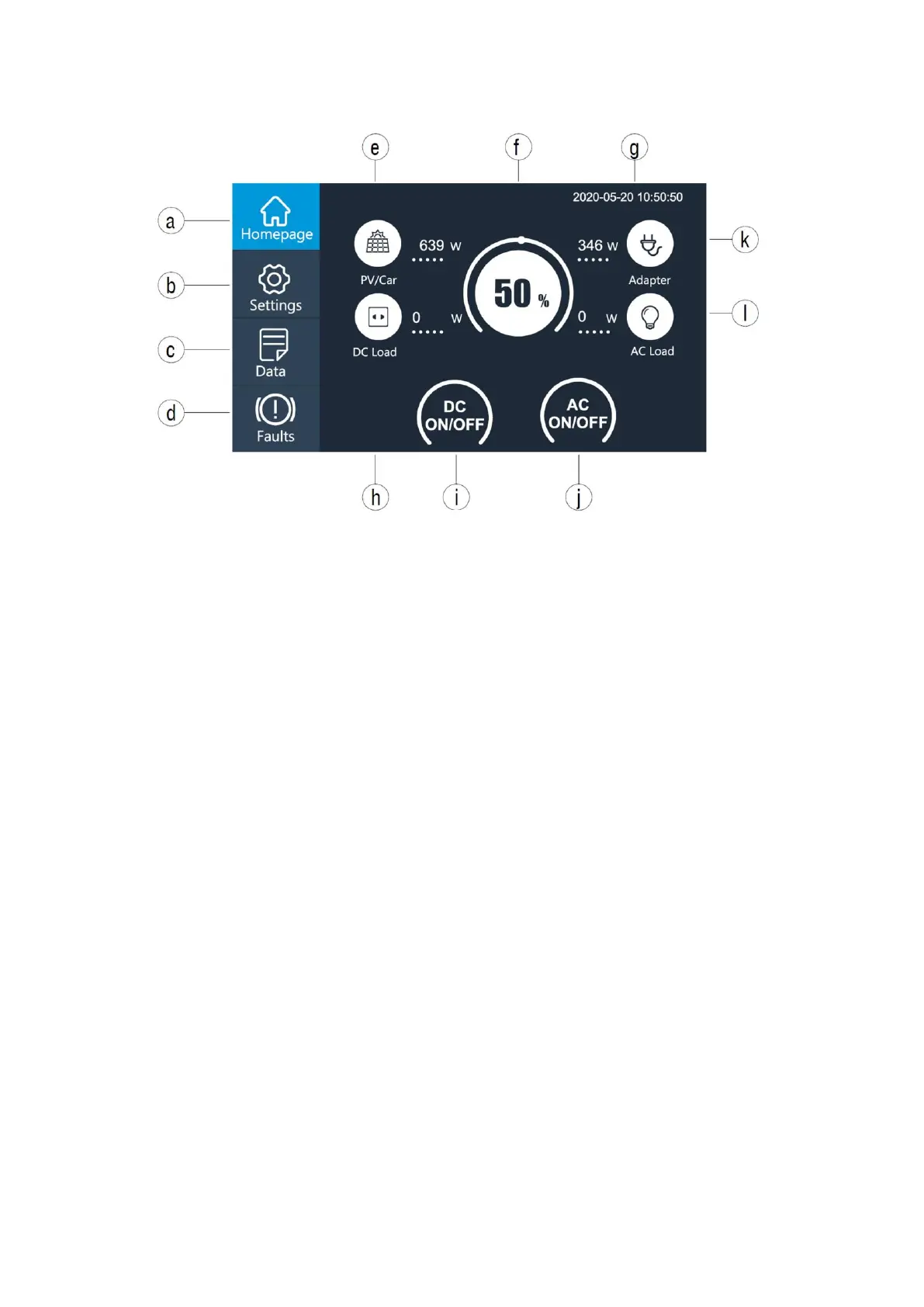
a. Homepage button
b. Settings button
c. Data button
d. Faults button
e. PV/Car charging display button
f. BMS information display button
g. Date/Time
h. DC load information display button
i. DC ON/OFF button
j. AC ON/OFF button
k. Adapter charging display button
l. AC load information display button
(2) Click the settings button in the main interface (Figure 2) to enter the setting interface
as follows (Figure 3) :
Warm tip: Please enter the setting interface to set the date and time according to the local
time zone, and check the output voltage, frequency and other parameters for the first time.
The default:
JP output: 100V/50Hz
US output: 120V/60Hz
EU output: 230V/50Hz
UK output: 230V/50Hz
DC Input Source: PV (solar)
ECO Mode: NO
Press “Next” button to enter language and date setting as below(Figure 3):
Language: Japanese, English



 To Next Page