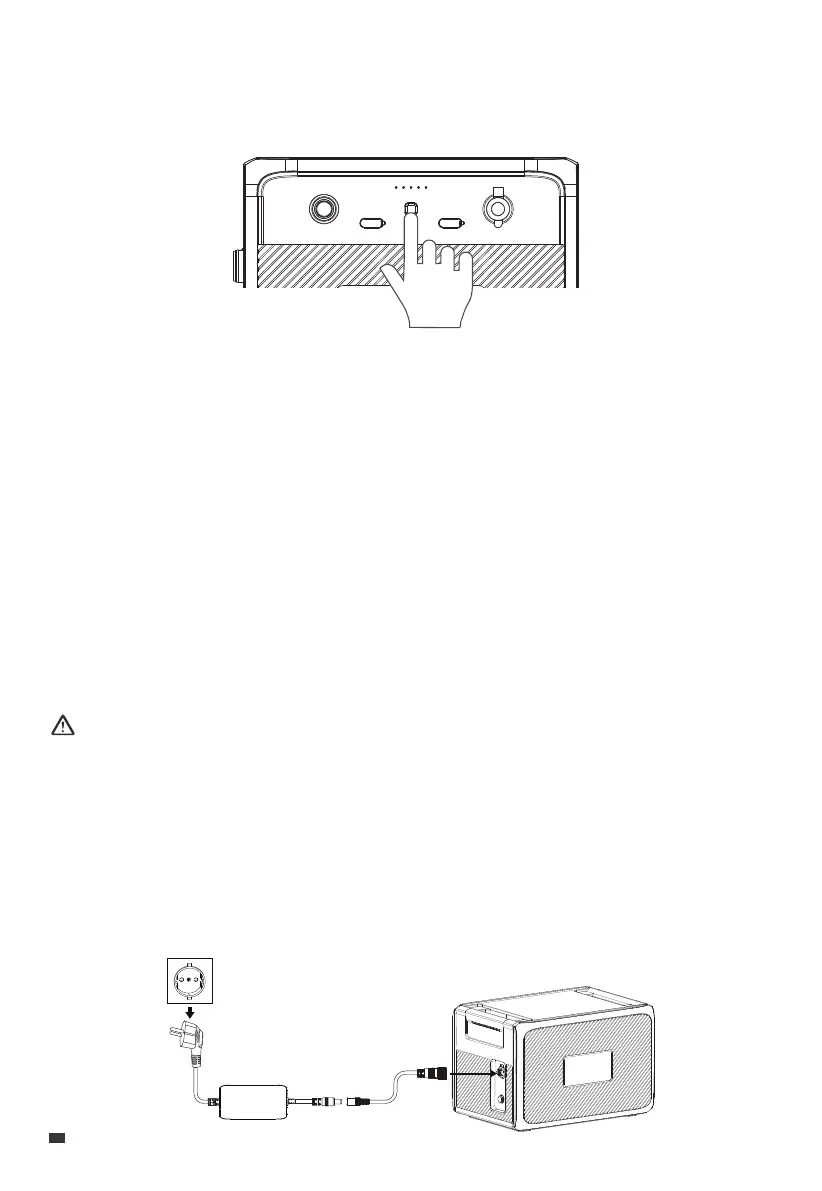
4. Power ON / OFF
5. Charging
The B210P can be charged using a standard wall outlet, solar energy, a car power source,
or in combination with the AC240P power station.
Notice:
• Double-check that all cables are firmly plugged in.
• Avoid getting plugs and ports wet to prevent any potential damage.
5.1 Wall Outlet
Simply plug the B210P into a standard wall outlet to start charging. It typically takes about
4.8-5.3 hours for a full charge at an ambient temperature of 25°C (77°F), and the charging
automatically stops once the battery is fully topped up.
To power on the B210P, press and hold the Power Button for about 2 seconds, the SoC
indicator will light up.
The B210P has a built-in feature that allows it to power on and starts charging as soon as it
detects input from a connected power source (e.g., wall outlet, solar panel, etc.).
To restart the B210P, simply press and hold the Power Button for more than 2 seconds to
shut down all outputs and turn off the unit. Press the button again to turn it back on.
Note: To completely turn off the B210P, please disconnect all power sources, such as solar
panels and adapter.
EN
JUST POWER ON
12



 To Next Page