Home
Bluetti
Storage
EP600
Installation
Page 9
Bluetti EP600 - Page 9
21 pages
Manual
Save Page as PDF
To Next Page
To Next Page
To Previous Page
To Previous Page
Loading...
9
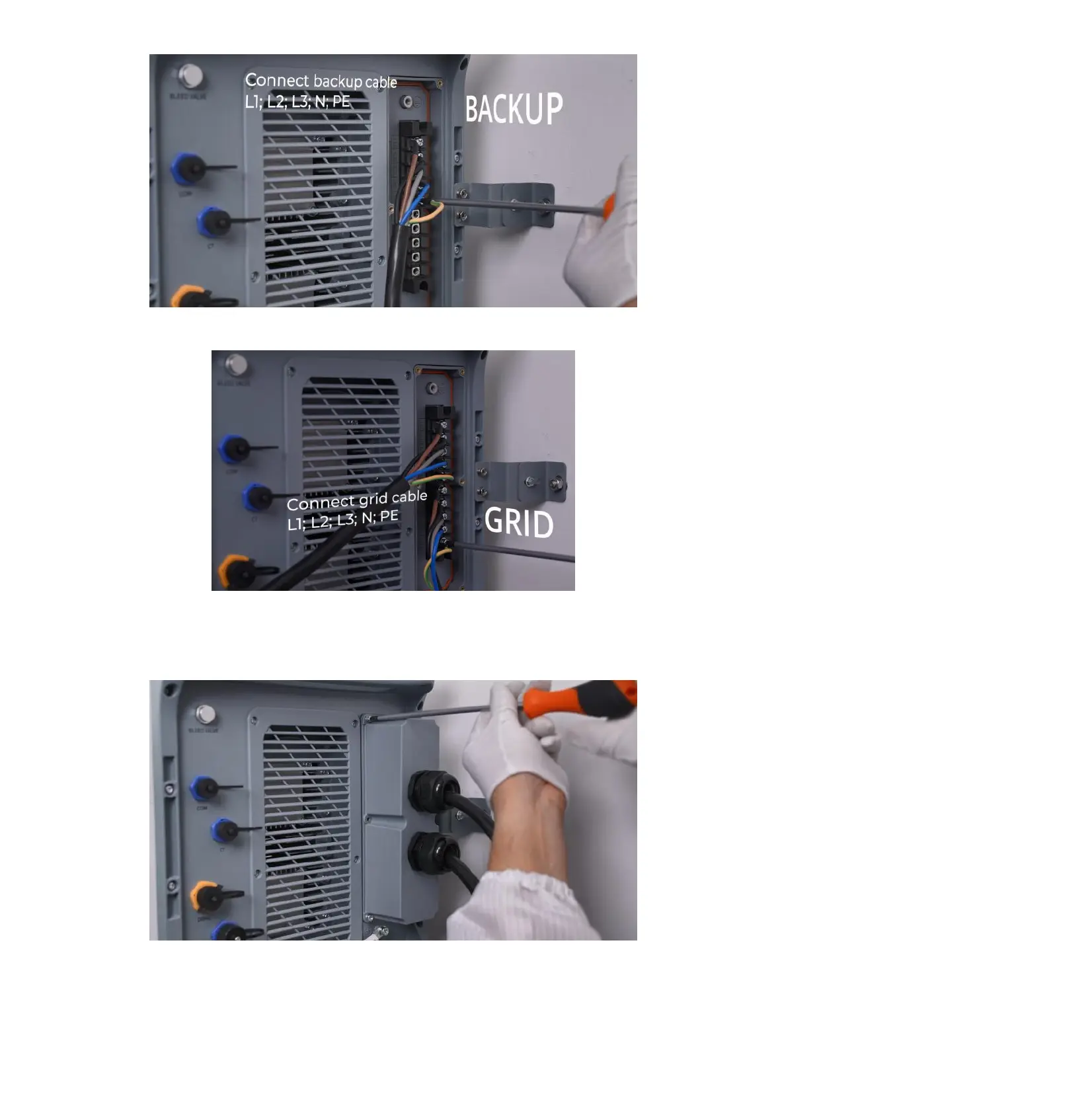
Step
4
C
onnect
the
Grid
cable
(Sequence
:
L1,
L2,
L3,
N
,
PE).
4.2.2
Install
the
AC
cable
protection
case
Install
the
AC
cable
protection
case
to
EP600.
4.3
Connecting
the
CT
signal
cable
Connect
the
CT
signal
cable
to
the
CT
port
of
EP6
00.
8
10
Table of Contents
Main Page
Table of Contents
2
Declaration
3
EP600 Energy Storage System Introduction
3
Electrical Connection Modes 1: DC Coupling
3
Electrical Connection Mode 3: AC/DC Coupling
5
Structure Installation of the ESS
6
Installing the Base, Keep 55Mm Distance between the Base and Wall
6
Put the Units on the Base
6
Install the Mounting Brackets
6
Electrical Connections of the ESS
7
Connecting the Grounding Cables
7
Connecting the Grid and Backup Interface Cables
7
Connecting the Battery Power Cables
10
Connecting the Communication Cable between EP600 and B500
11
Connecting the Battery Expansion Cables between B500S
11
Connecting the Communication Cables between B500S
12
Installing the Iot Controller
12
Connecting the PV Cables
13
Installing the Auxiliary Parts
14
Connecting to the Main Panel
14
Powering on the ESS
20
Using BLUETTI App
20
More Information
21
Other manuals for Bluetti EP600
User Manual
80 pages
Installation Manual
113 pages
Quick Guide
11 pages
Related product manuals
Bluetti EP900
40 pages
Bluetti EP760
80 pages
Bluetti EP800
80 pages



 To Next Page