LET`S GET STARTED
- 05 -
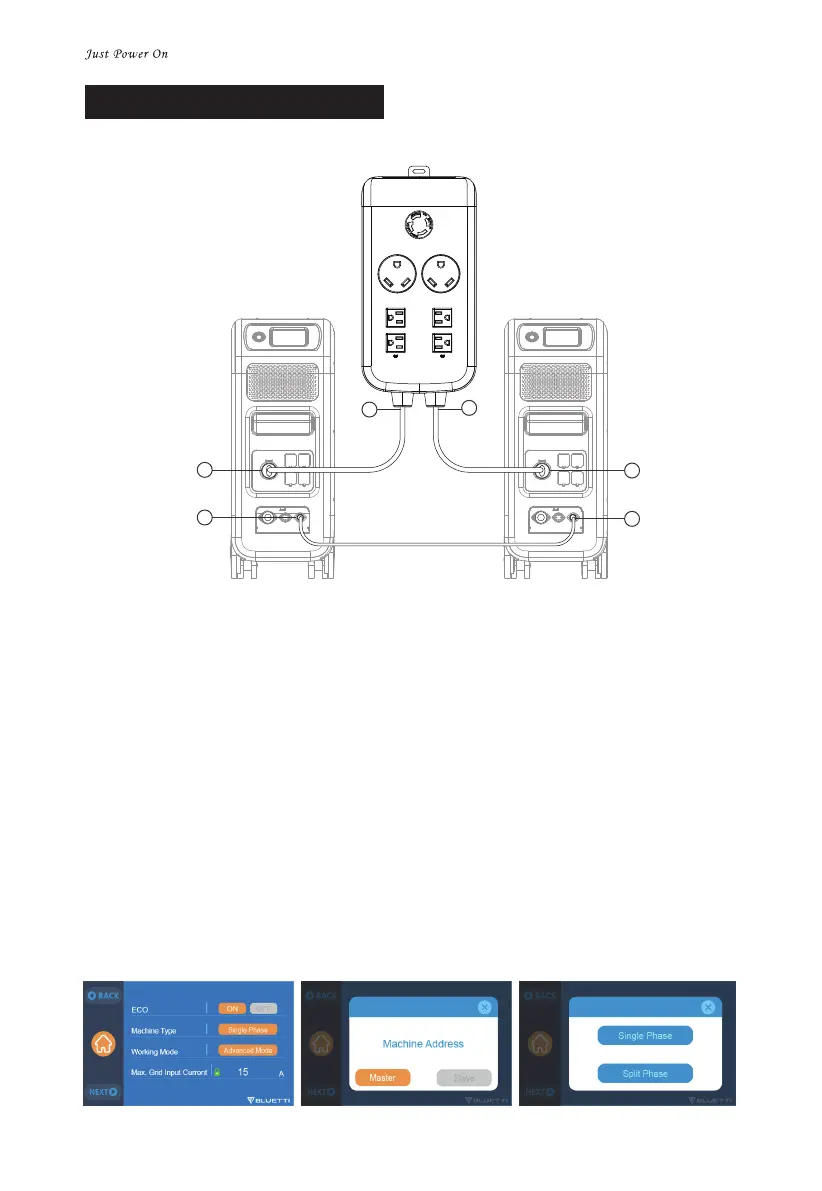
a
f
d
c
e
b
CONNECTION 1 (Standard Mode)
Step1.
Connect two EP500Pro/AC300 with communication cables. (a-b)
Step2.
Plug the AC Input Cables into P030A from L14-30 receptacle of EP500Pro/AC300. (c-d, e-f)
Step3.
a."Single Phase": the default machine type as operating one single EP500Pro or AC300.
b.Select "Master" or "Slave" on touchscreen of the operating EP500Pro/AC300(Tap Settings
- Next - Machine Type).
c.Tap "Master" on touchscreen will set the operating EP500Pro/AC300 as the one to
control both two EP500Pro/AC300.
d.Then select "Slave" on another unit to set the as the one controlled by another one
EP500Pro/AC300(Master).
e.Tap clear the alarm history if the buzzer sounded.


 To Next Page