4. LCD Screen
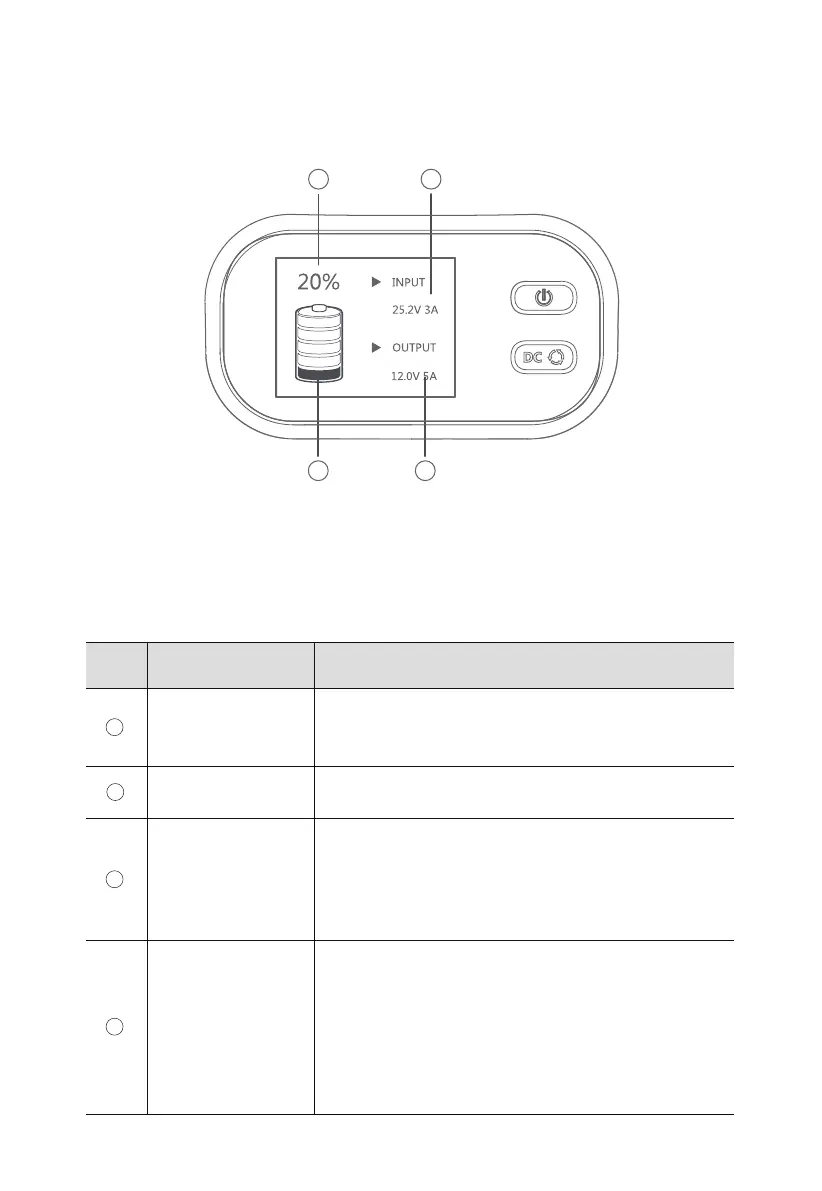
The LCD screen is lit when X30 is powered on. If X30 is powered off, press and hold the
power button for 3 seconds to turn it on. The display is shown in Figure 4-1.
SoC
(State of Charging)
Charging
(Power Input)
Disharging
(Power Output)
Battery Level
Displays the current battery level.
When the icon % flashes continuously, X30 is in battery
protection mode.
Displays when X30 is powered on.
Fashes when a load is connected. Press the DC button and
the power output information is displayed (e.g. 12.0V 4A),
which means X30 has started powering the DC device.
The icon has 5 segments, each indicating 20% of
battery power.
Note: SoC number indicates the accurate battery level.
When the bottom segment flashes, the remaining battery
level is less than 5% and the buzzer will continue to beep.
Please charge X30 in time.
Indicates that X30 is being charged.
DescriptionNameNo.
Table 4-1 LCD Screen Description
1 2
4 3
Figure 4-1 LCD Screen
1
2
3
4
JUST POWER ON 11



 To Next Page