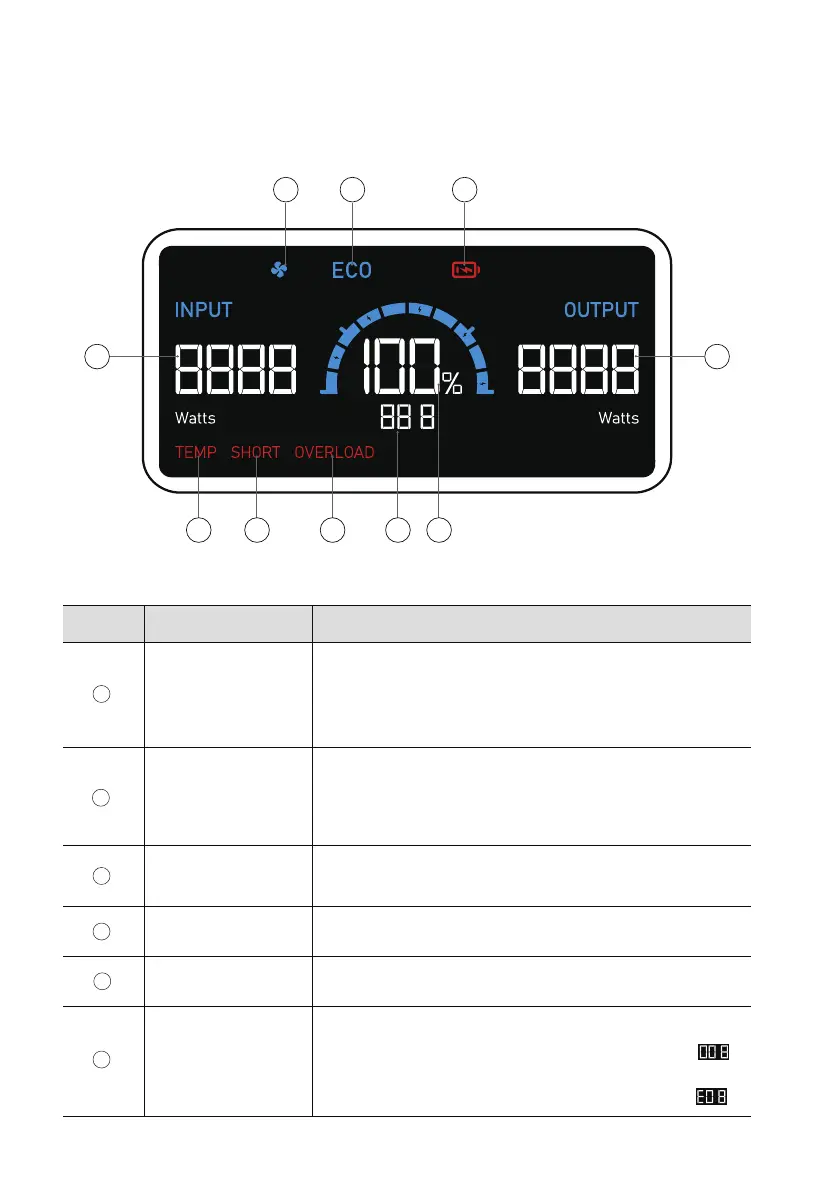
Fan Running
ECO Mode Enabled
Battery Low
Output Power
Displays when the battery level is ≤5%.
The buzzer will continue to beep. Please charge X60 in time.
The total power of the devices connected to X60.
Battery Level The remaining battery level. Also known as SoC.
Table 4-1 Description of LCD Screen
Firmware Version/
Fault Code
1 2 3
10
9 8 7 6 5
Firmware Version:
Displayed as 00X for 3s after powering on, e.g.
Fault Code:
Displayed as E0X after 3s of powering on, e.g.
4
1
2
3
4
5
6
4. LCD Screen
The LCD screen is lit when X60 is powered on. If X60 is powered off, press and hold the
power button for 3 seconds to turn it on. The display is shown in the following figure.
DescriptionItemNo.
Displays when the fan is running.
Note: The cooling fan inside X60 will run automatically when
the temperature is too high, and it will automatically stop
when the temperature restores.
Displays when ECO mode is enabled.
Note:The battery life can be extended under ECO Mode.
It is recommended to enable this mode if X60 is kept being
charged.
JUST POWER ON12



 To Next Page