5.2 Charging
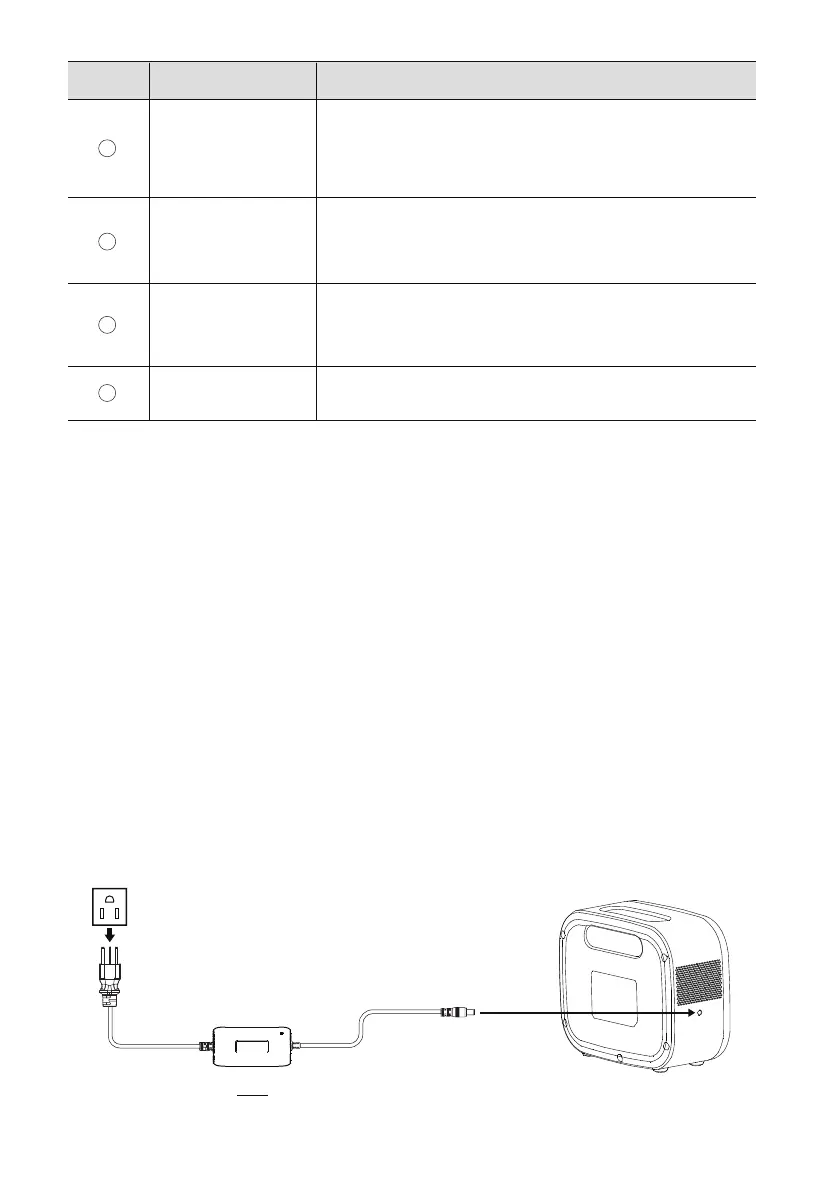
X60 supports 2 ways of charging: AC adaptor and car charging.
5.2.1 AC adaptor charging
Connect one end of the adaptor to the charging port of X60, and the other end to a wall
outlet. The charging will automatically stop when the battery is fully charged.
Overload
Short
Temperature
Abnormal
Displays when a short circuit occors.
Disconnect all the loads, and press the Power Button to clear
the fault. Then reconnect the loads.
Displays when X60 is overloaded.
Disconnect all the loads, and press the Power Button to clear
the fault. Then reconnect the loads.
Displays when the temperature of the battery or
mainboard is too high or too low.
Wait until the temperature resumes and try again.
Input Power The charging power of X60.
DescriptionItemNo.
5. Operations
5.1 Powering On/Off
• Powering On: When X60 is off, press and hold the power button for 3 seconds to power
it on. The LED indicator and LCD screen will light up. If the LCD backlight is off, press the
power button to lihgt it up again.
• Powering Off: When X60 is on, press and hold the power button for 3 seconds to power
it off. The LCD screen and LED indicator will be turned off.
7
8
9
10
JUST POWER ON 13



 To Next Page