If you are not going to use the product for a long time, please remove the battery and keep it in a
safe place. If the battery leaks, remove it and wipe the battery compartment clean.
This product uses a long-life battery and does not need to be replaced frequently. If you do need to
replace it, you can contact our company’s after-sales service.
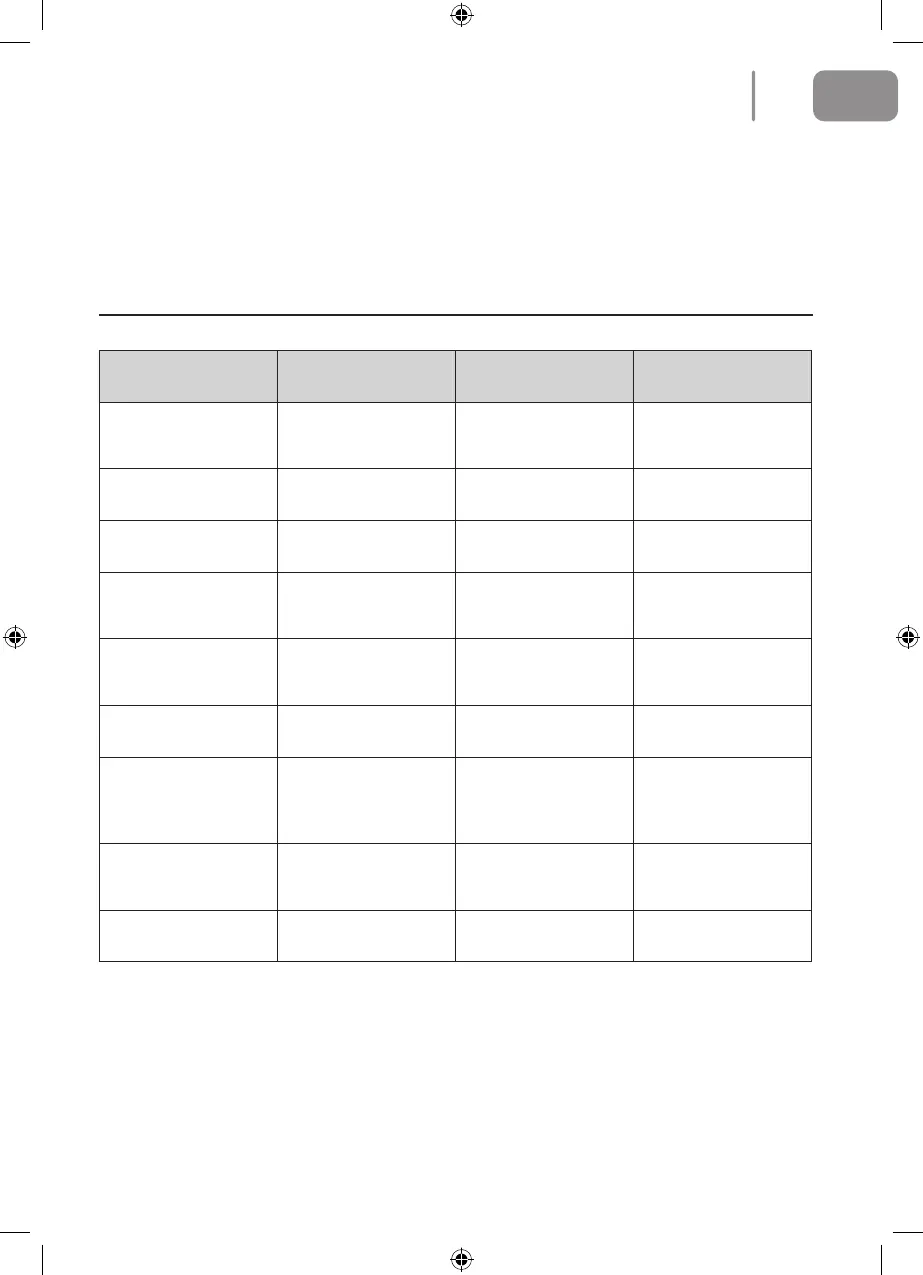
Alarms
Cause of Issue Display light APP content Solution
Side brush Red light on Please check whether
side brushes are
jammed.
Clean side brush.
Fan abnormality Red light on Motor cooling error. Please wait an hour
before using.
Roller brush Red light on Please check whether
roller brush is jammed.
Clean roller brush.
No dustbin inside Red light on Please check whether
dustbin is installed
correctly.
Please check whether
dustbin is in position.
Failure of surface
detection
Red light ashing Please check whether
wheels are on the
oor.
Clean the surface de-
tector and make sure
I'm not lifted up.
Stuck Red light ashing Please help me, I'm
stuck.
Please take me to an
open space.
Low battery Red light ashing Battery low, please
recharge me.
Manually move the
cleaner back to the
charging dock for
recharging.
Charging abnormality Red light ashing Please turn on the
power switch in order
to charge.
Please turn on the
power switch in order
to charge.
Gyroscope fail Red light ashing Navigation failure,
please restart me.
Turn on the switch
again.
15
EN
2021-08-11 OCG BluMill Robot Stofzuiger ManualV01.indd 152021-08-11 OCG BluMill Robot Stofzuiger ManualV01.indd 15 23-08-2021 10:0223-08-2021 10:02


 To Next Page