BM&M Screening Solutions Toll-free 1-800-663-0323
ROTOR
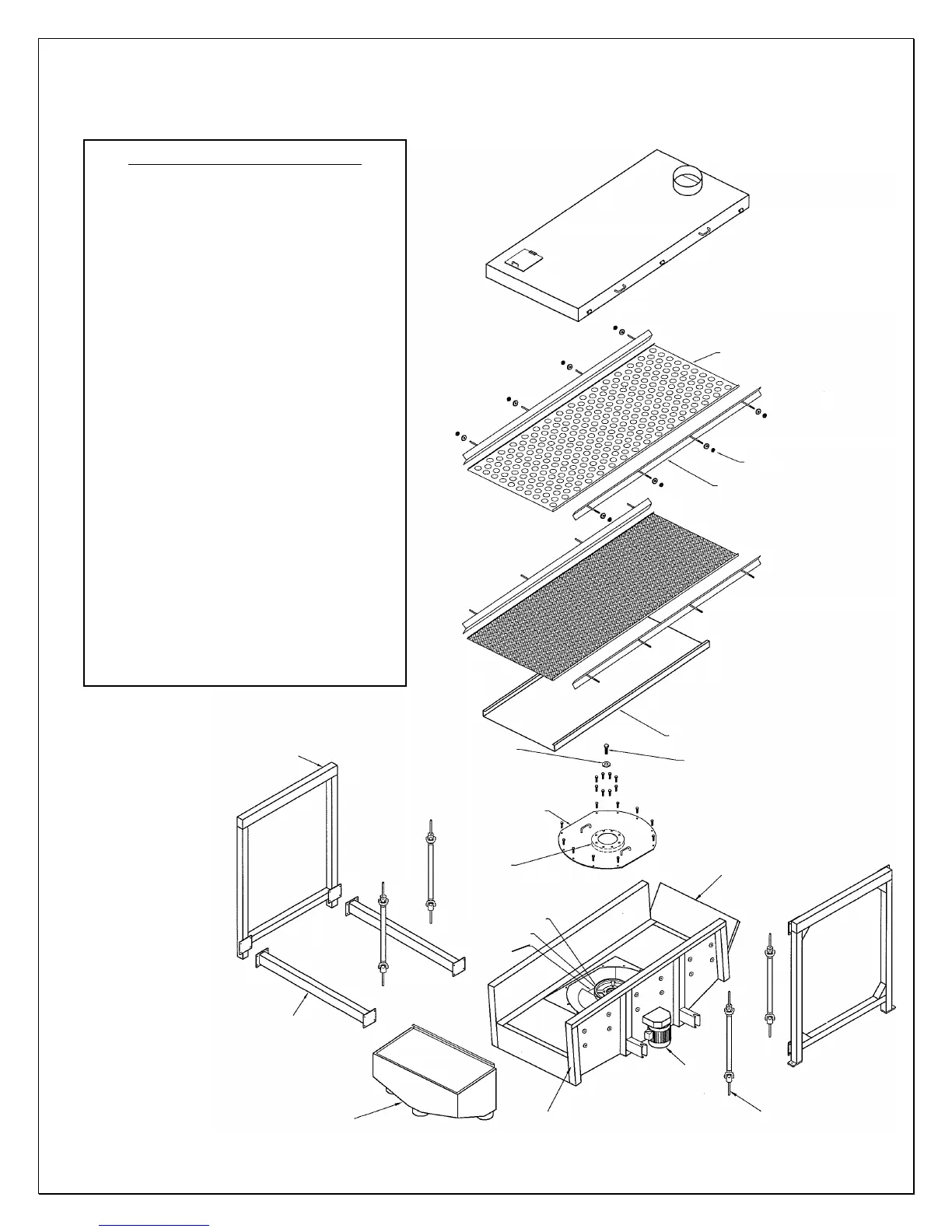
EXPLODED VIEW
1. Turn the power OFF.
2. Remove the skirt angles as required.
3. Remove the top screen(s).
4. Remove the fines pan section.
5. Remove the perimeter drive box cover bolts
(mark the position of the cover before removal).
6. Remove the three 1” NC bolts and the one 1” NC
plug bolt (pusher plug).
7. Insert a longer 1” NC bolt in the center hole of
the end cap and wrench down until the cover is
free (a wedge may be required at one edge of
the drive box cover).
8. Remove the old drive belt and any other debris
from inside the drive box.
9. Loosen the motor mounting plate to replace the
drive belt. When the drive belt is properly
tensioned and aligned, ensure that the rotor and
the drive belt rotate freely.
10. Replace the drive box cover and ensure all
surfaces are clean and that there are no scored
or marred surfaces on the machined parts. If
there are, contact BM&M.
11. Replace the perimeter drive box bolts (loose).
12. Insert three new 1” NC Grade 5 bolts in the end
cap and torque to a minimum of 480 ft-lbs.
Alternate the
bolts by walking them down until
they will not go down any further at the minimum
torque value.
13. Replace all other items and ensure all bolts are
tight.



 To Next Page