SPECTROstar Nano Operating Manual BMG LABTECH
14/16 0601B0001C 2012-07-18
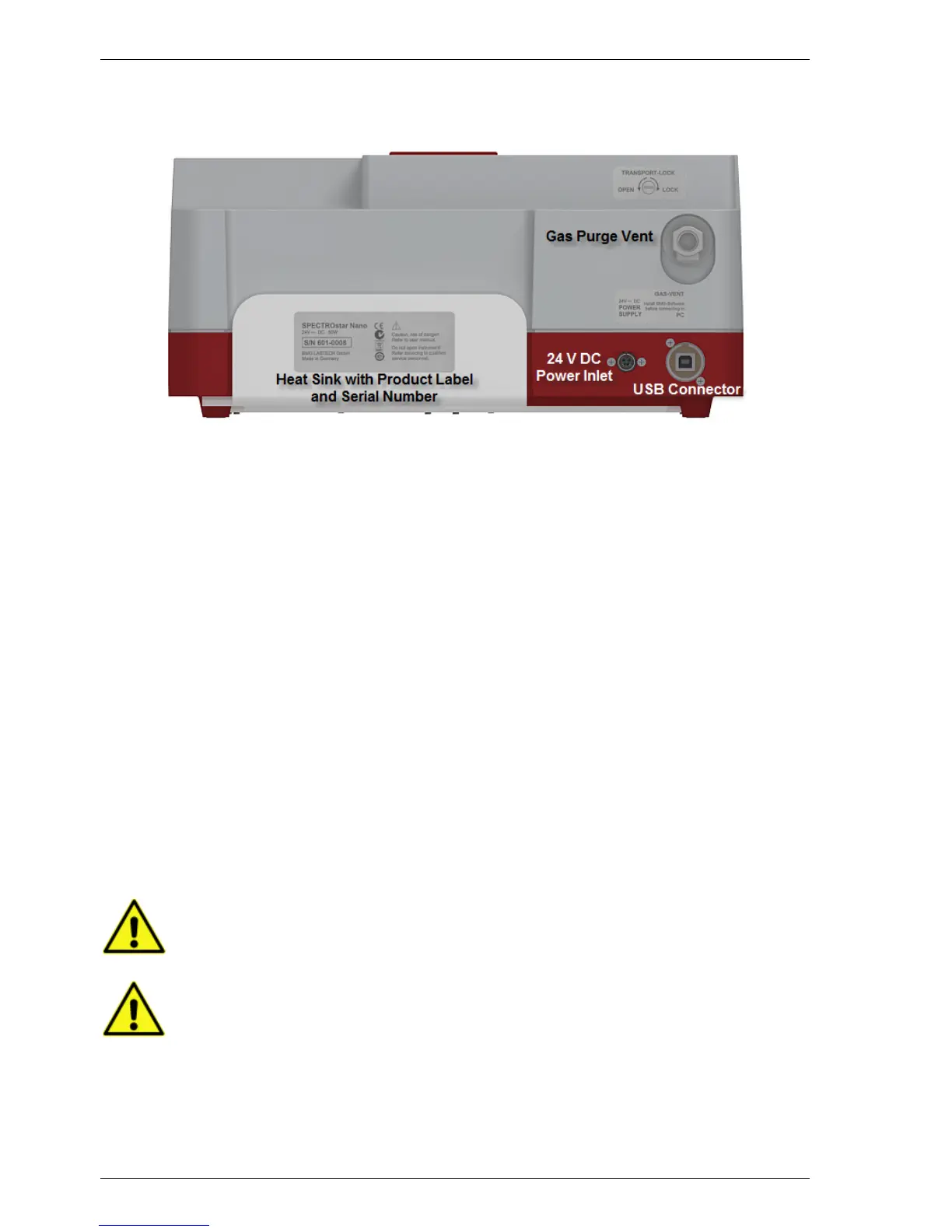
Back of SPECTROstar Nano 3.2
The backside of the SPECTROstar Nano depicts the power connector, the USB connection to a PC, and the
gas purge vent to control the atmosphere inside the instrument (figure 4).
Figure 4: Backside view of SPECTROstar Nano
4 Unpacking and Installation
This chapter includes the initial important points that must be followed before a measurement can be
performed. Please follow these steps.
When unpacking the instrument check to ensure that all parts are included.
The shipping box should contain:
SPECTROstar Nano instrument
• Control and MARS Data Analysis software (CD ROM in a cover inside the manual)
• Manual (also on CD ROM)
• Power cord + External Power Supply
• USB cable
• Slotted 5,5 mm screwdriver
Call BMG LABTECH immediately if any of these items are missing.
The area designated for the instrument should be free of dust, liquids and acidic vapours. The table's surface
should be flat and even. Avoid areas subject to vibrations and direct sunlight. Behind the instrument there
should be a minimum distance of 10 cm.
The operator of the SPECTROstar Nano microplate reader is assumed to be trained in the
correct operation of the instrument and the safety issues. Throughout this manual the
word "you" refers to this trained operator
Upon unpacking and positioning the reader, make sure to unlock the transport lock before
any power connection


 To Next Page