14
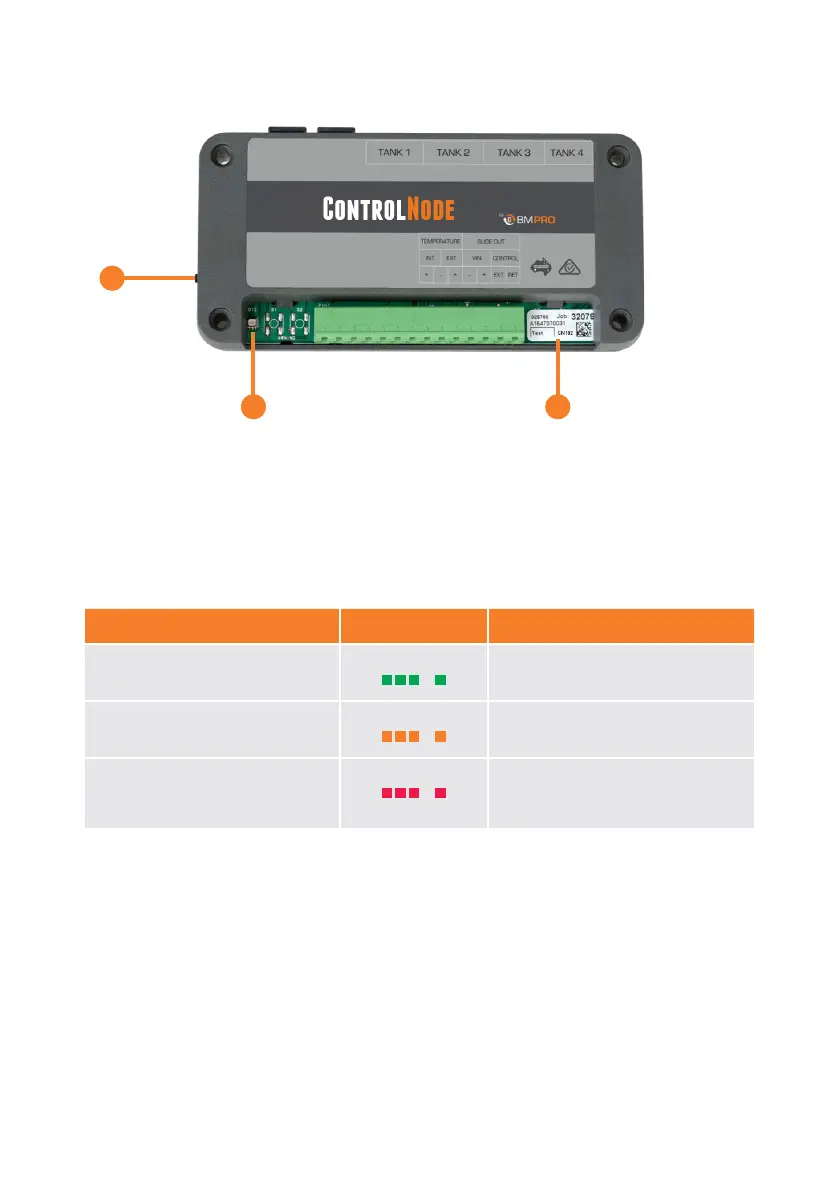
CONTROLNODE
Figure 2: The ControlNode
1
3 2
q PAIRING BUTTON
Button to enable Bluetooth pairing between the ControlNode and the JHub App
on your own personal mobile device or JHub Tablet.
w LED STATUS INDICATOR
Indicates the operational/pairing status of the ControlNode.
Table 5: ControlNode Operational Status and LED Flash Codes
*After memory has been cleared, the ControlNode LED Status Indicator will flash green.
Operational Status Flashing Status Note
ControlNode is ready to pair Green Flash 30 sec
ControlNode memory is full,
cannot pair to any new devices
Orange Flash 1 sec To pair to a new mobile device, clear
the memory of the ControlNode
Clearing ControlNode memory* Red Flash 1 sec
Memory will only be cleared if the
user presses and holds the Pairing
Button for 10 seconds.
e CONTROLNODE SERIAL NUMBER
Required to choose the correct device when pairing the ControlNode to the JHub
App on your own personal mobile device or JHub Tablet.



 To Next Page