Under the hood
204
Press button 4 in the turn indicator lever repeat-
edly until the oil level display appears in the
instrument cluster.
The oil level must be between the two mark-
ings.
A new measurement is taken automatically
each time the engine is started.
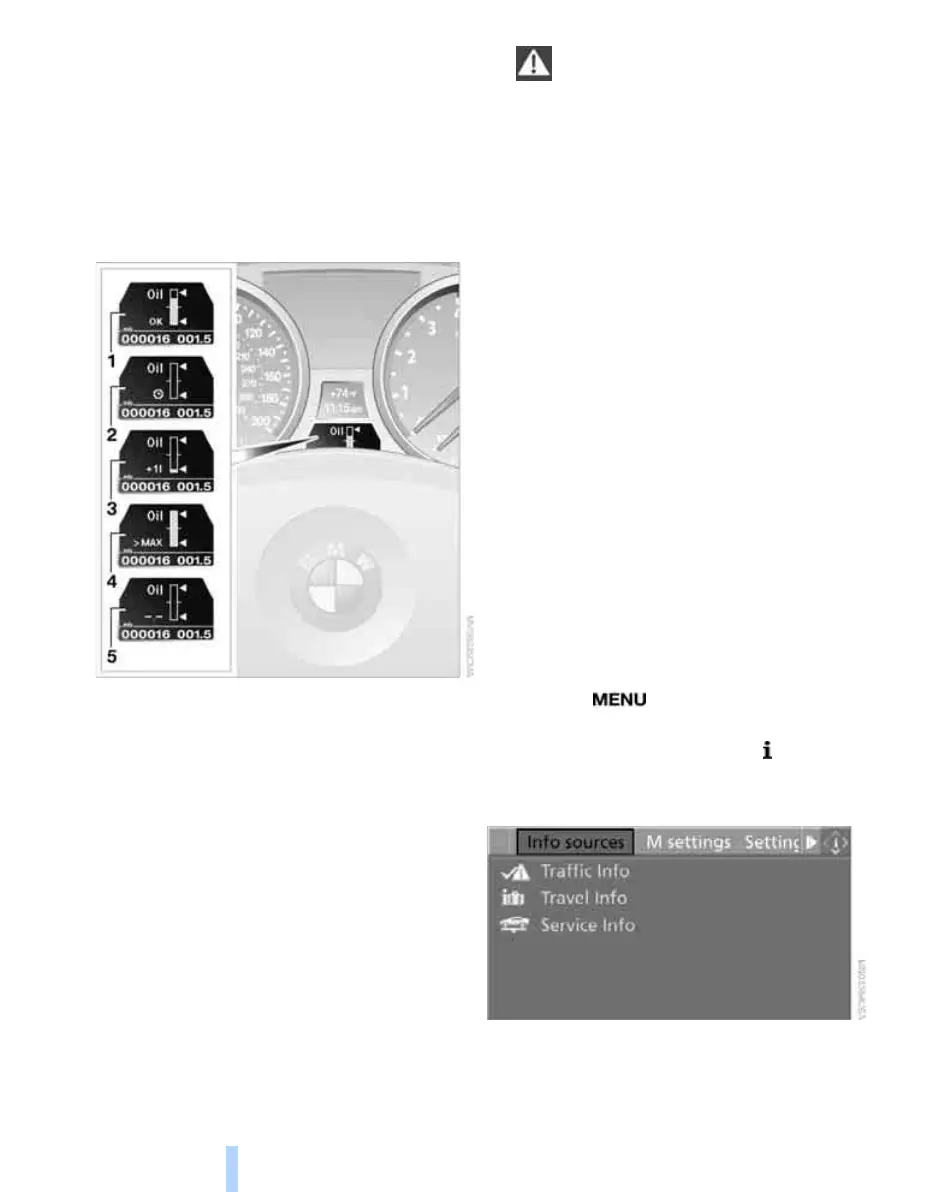
Possible displays
1 Oil level OK
2 Oil level is being checked.
This can take about 1 minute if the car is at
a standstill on a level surface, or about
5 minutes while the car is moving.
If engine oil was added, it can take up to
30 minutes to get an oil level reading.
3 Oil level down to minimum:
Add engine oil at the next opportunity, but
no more than 1 US quart/1 liter, refer also to
Adding engine oil on page 205. Add at least
0.5 US quart/0.5 liters, otherwise the oil-
level monitor will be unable to display the
new value reliably.
If the oil level is below the minimum value,
add engine oil immediately to avoid engine
damage.
4 Oil level is too high.
Have the vehicle checked immedi-
ately, otherwise the excess oil may
lead to engine damage.<
5 A value cannot be read at this time. The
engine is not yet warm.
Quick measurement
In addition to the automatic measurement, you
can also determine the current oil level manu-
ally, e.g. after adding engine oil, but such mea-
surements are less accurate.
1. Park the vehicle with a warm engine, i.e.
after an uninterrupted drive of at least
6 miles/10 km, on a horizontal surface.
2. Let the engine idle.
3. Press the computer button in the turn indi-
cator lever repeatedly until the oil level dis-
play appears in the instrument cluster.
4. Press the computer button for at least
2seconds.
The oil level is determined. A clock symbol
appears during measurement.
5. After approx. 1 minute, the current oil level
is displayed.
Display via iDrive
iDrive, for operating principle refer to page 16.
1. Press the button.
This opens the start menu.
2. Press the controller to open the menu.
3. Select "Info sources" and press the control-
ler.
4. Select "Service Info" and press the control-
ler.
Online Edition for Part no. 01 41 0 014 699 - © 10/07 BMW AG



 To Next Page