Controls
65
Reference At a glanceDriving tipsCommunications NavigationEntertainmentMobility
Settings and information
Operating principle
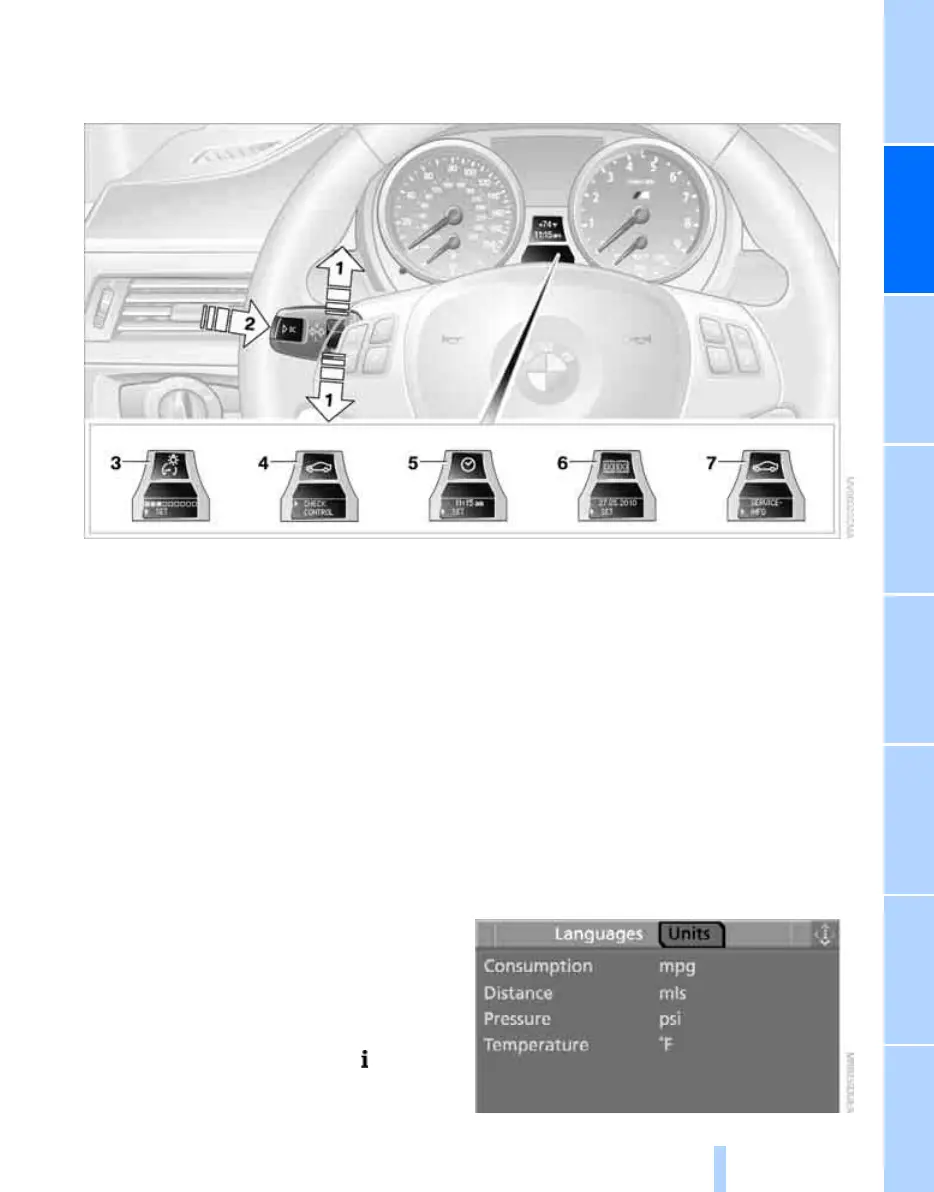
1 Button for:
> Selecting display
> Setting values
2 Button for:
> Confirming selected display or set val-
ues
> Calling up computer information 62
3 When the lights are on: instrument lighting
brightness 88
4 Calling up Check Control 70
5 Setting the time 68
6 Setting the date 70
7 Viewing service requirement display 66
Exiting displays
The outside-temperature reading and the time
reappear when you press button 2 or if you
make no entries within approx. 15 seconds. If
required, complete the current setting first.
Units of measure
You can set units of measure.
iDrive, for operating principle refer to page 16.
1. Open the start menu.
2. Press the controller to open the menu.
3. Select "Settings" and press the controller.
4. Select "Language / Units" and press the
controller.
5. If necessary, move the highlight marker to
the uppermost field. Turn the controller
until "Units" is selected and press the con-
troller.
Online Edition for Part no. 01 41 0 014 699 - © 10/07 BMW AG



 To Next Page