Starting destination guidance after
entering the destination
1. "Accept destination"
2. "Start guidance" or "Add as another
destination"
Add, refer to page 147, a destination as a
further destination.
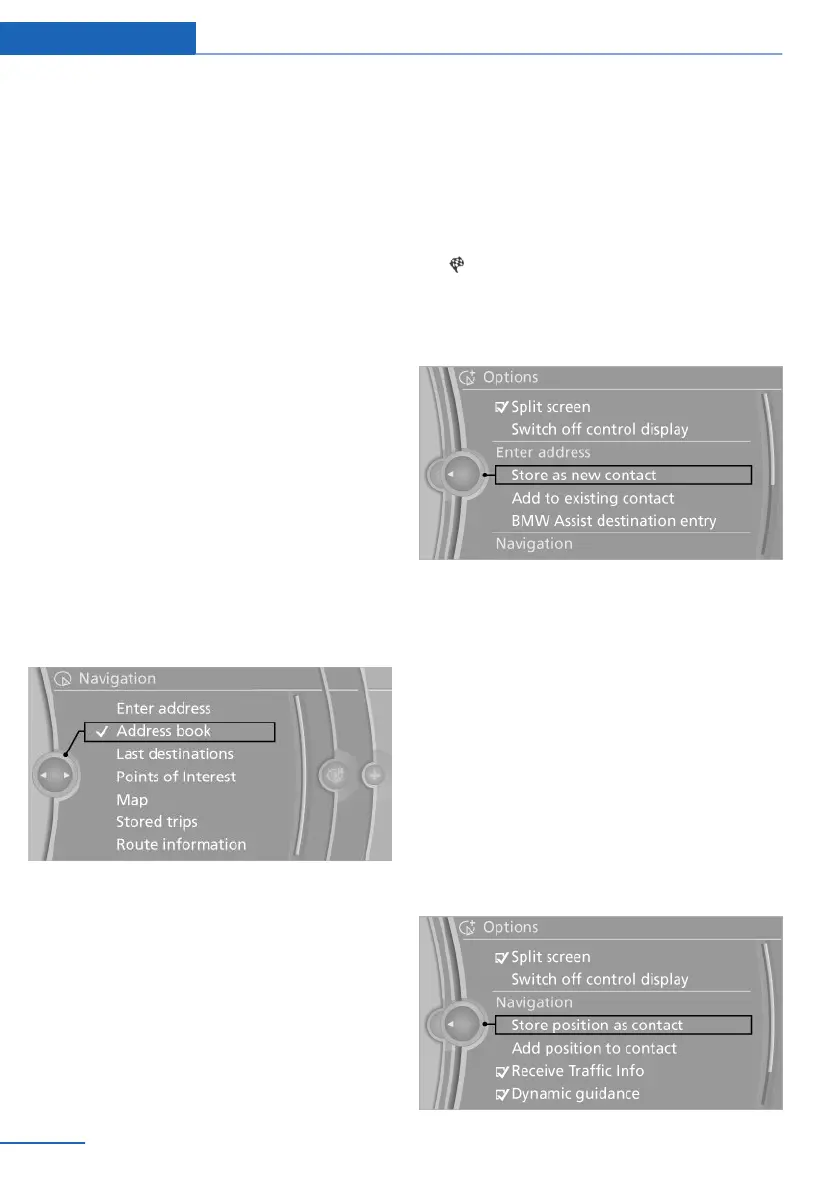
Address book
Create contacts, refer to page 213.
Selecting a destination from the
address book
1.
"Navigation"
2. "Address book"
Contacts with addresses are displayed if
these addresses have been checked as des‐
tinations in the contacts.
If the contacts with addresses from the mo‐
bile phone are not displayed, they first need
to be checked as destinations, refer to
page 214.
3. Select a contact in the list or, if desired, with
"A-Z search".
4. "Business address" or "Home address"
Storing the destination in the address
book
After entering the destination, store the desti‐
nation in the address book.
1. "Navigation"
2. "Map"
3. "Guidance"
4. Open "Options".
5. "Store as new contact" or "Add to existing
contact"
6. Select an existing contact, if available.
7. "Business address" or "Home address"
8. Enter "Last name" and, if necessary, "First
name".
9. "Store in vehicle"
Storing the position
The current position can be stored in the ad‐
dress book.
1.
"Navigation"
2. Open "Options".
3. "Store position as contact" or "Add position
to contact"
Seite 142
Navigation Destination entry
142
Online Edition for Part no. 01 40 2 914 595 - VI/12



 To Next Page