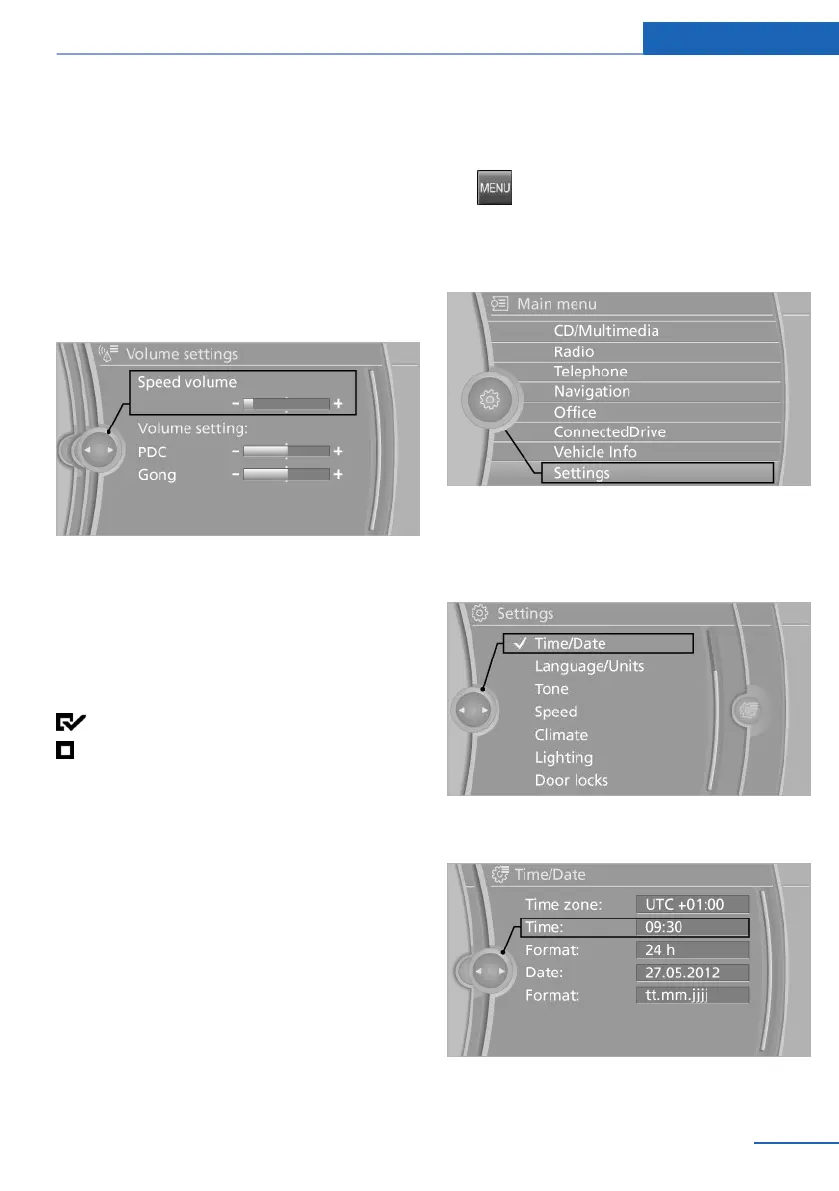
▷ Control options for the selected main menu,
e.g., for "Radio".
▷ If applicable, further operating options for
the selected menu, for instance "Store
station".
Changing settings
1. Select a field.
2. Turn the controller until the desired setting
is displayed.
3. Press the controller.
Activating/deactivating the functions
Several menu items are preceded by a check‐
box. It indicates whether the function is acti‐
vated or deactivated. Selecting the menu item
activates or deactivates the function.
The function is activated.
The function is deactivated.
Example: setting the clock
Setting the clock
1.
Press the button. The main menu is
displayed.
2. Turn the controller until "Settings" is high‐
lighted, and then press the controller.
3. If necessary, move the controller to the left
to display "Time/Date".
4. Turn the controller until "Time/Date" is high‐
lighted, and then press the controller.
5. Turn the controller until "Time:" is high‐
lighted, and then press the controller.
Seite 21
iDrive At a glance
21
Online Edition for Part no. 01 40 2 914 595 - VI/12



 To Next Page