Switching on/off
Automatic activation
The system automatically switches on when se‐
lector lever position R is engaged while the en‐
gine is running.
The camera perspective appropriate for the cur‐
rent driving situation is shown.
For further information:
Park Distance Control, switching on/off, see
page 279.
Switching on/off manually
Press the Park Assistant button.
▷ On: the LED is illuminated.
▷ Off: the LED is extinguished.
Depending on the equipment, the Reversing As‐
sist camera cannot be switched off when reverse
gear is engaged.
Automatic deactivation when
moving forwards
The system switches off once a certain distance
or speed is exceeded.
Switch the system back on if necessary.
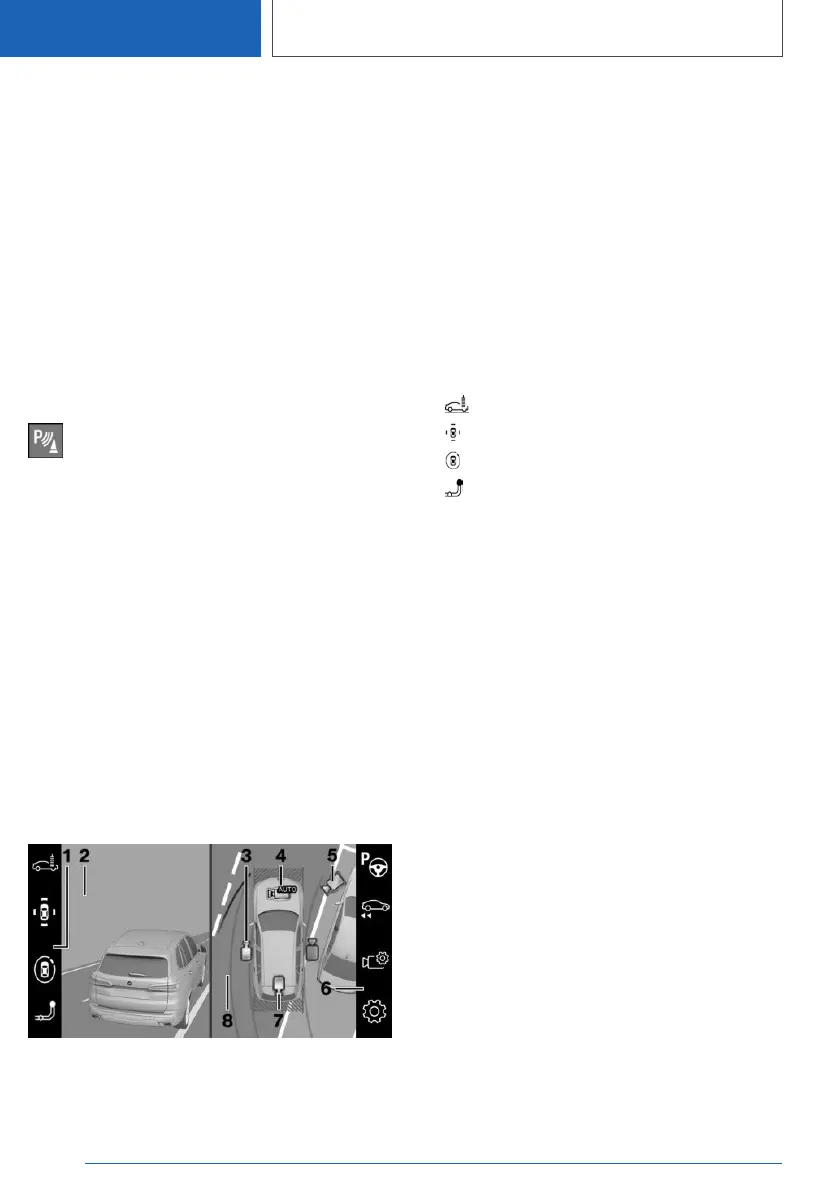
Display on the control display
Overview
1 Toolbar, left
2 Camera image
3 Flank view
4 Automatic camera perspective
5 Movable, free camera perspective
6 Toolbar, right
7 Rear-view camera
8 Selection window
Toolbar, left
It is possible to select various views directly using
iDrive and the function bar on the left. To do this,
tilt the Controller to the left if necessary.
▷ "Car wash".
▷ "Parking": around the vehicle.
▷ "3D view": free camera.
▷ "Tow hitch".
Flank view
Flank view can be selected for the right or left
side of the vehicle.
This view displays the area at the side to assist
with positioning the vehicle at the kerb or along‐
side any other obstacles.
Flank view looks from the rear to the front. If
there is a hazard, it automatically focuses on pos‐
sible obstacles.
Automatic camera perspective
The automatic camera perspective displays a
steering angle-dependent view looking towards
the vehicle's direction of travel.
This perspective adapts to the current driving sit‐
uation.
As soon as obstacles are detected, the view
switches to a fixed display of the area in front or
behind the bumper or, if necessary, to a flank
view.
Movable, free camera perspective
If the movable camera perspective is selected, a
circular path is shown on the control display.
Seite 294
CONTROLS
Driver Assistance Systems
294
Online Edition for Part no. 01405A1EA53 - X/20



 To Next Page