iDrive
20
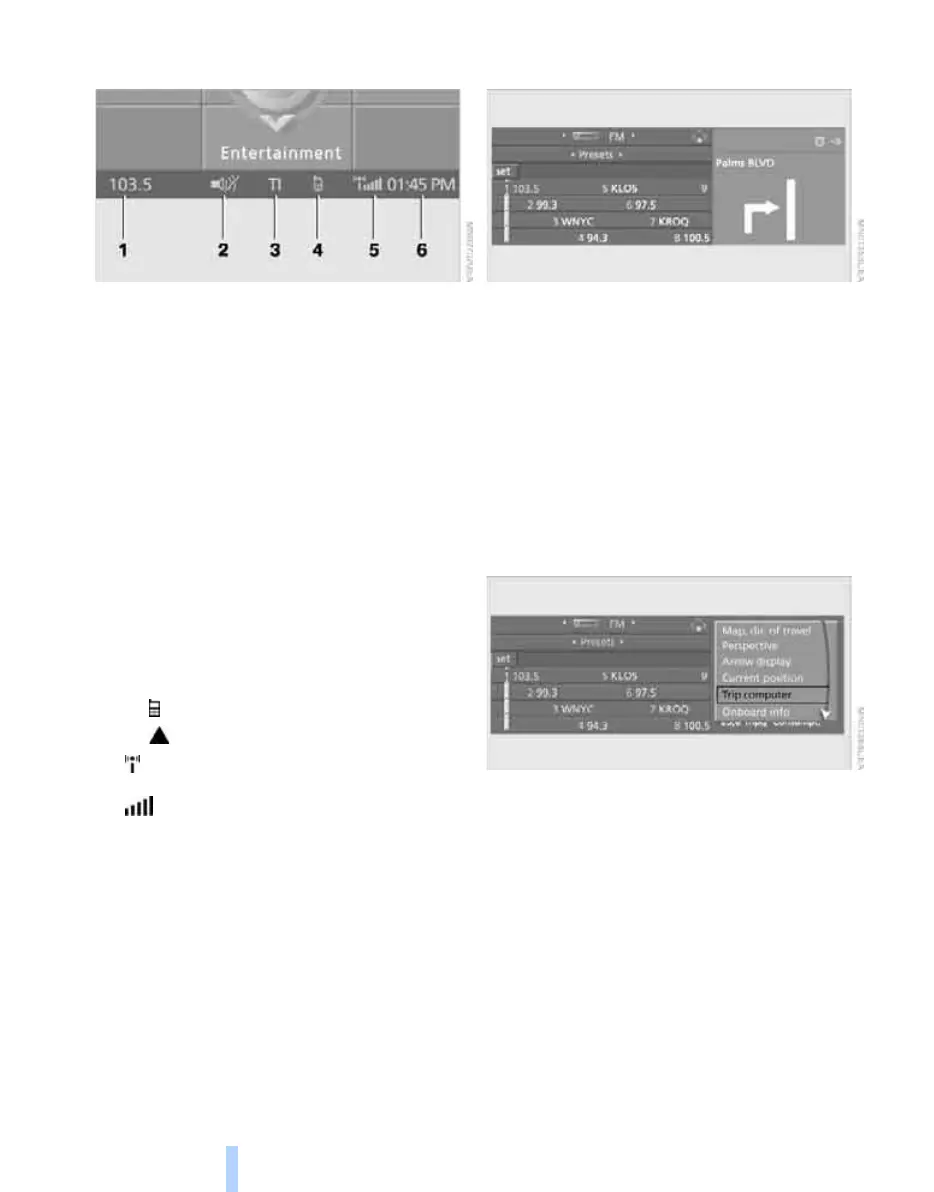
Status information
1 Display for:
> Entertainment:
Radio, CD
> Telephone
*
in "Communication":
Name of linked mobile phone, network
search or no network
> "BMW Assist"
*
:
Existing voice connection with a service
from BMW Assist
2 Entertainment sound output off
3 Display for traffic information
*
:
"TI":
Traffic information for the navigation sys-
tem
can be received and transmission is
switched on
4 Display for:
> New entries present in "Missed calls"
*
> Roaming active
5 Telephoning
*
possible if the mobile
phone is logged-on in the vehicle
Mobile phone network reception
strength, display dependent on mobile
phone
6 Time
Other displays:
When Check Control information appears or
entries are made via the voice command sys-
tem
*
, the status information is temporarily hid-
den.
Assistance window*
Additional information can be displayed in the
assistance window:
> the computer or the trip computer
> the arrow or map view with navigation sys-
tem
*
> the current position
Selecting display
1. Move the controller to the right to change to
the assistance window and press the con-
troller.
2. Select a menu item.
3. Press the controller.
Online Edition for Part no. 01 41 0 012 830 - © 08/06 BMW AG



 To Next Page