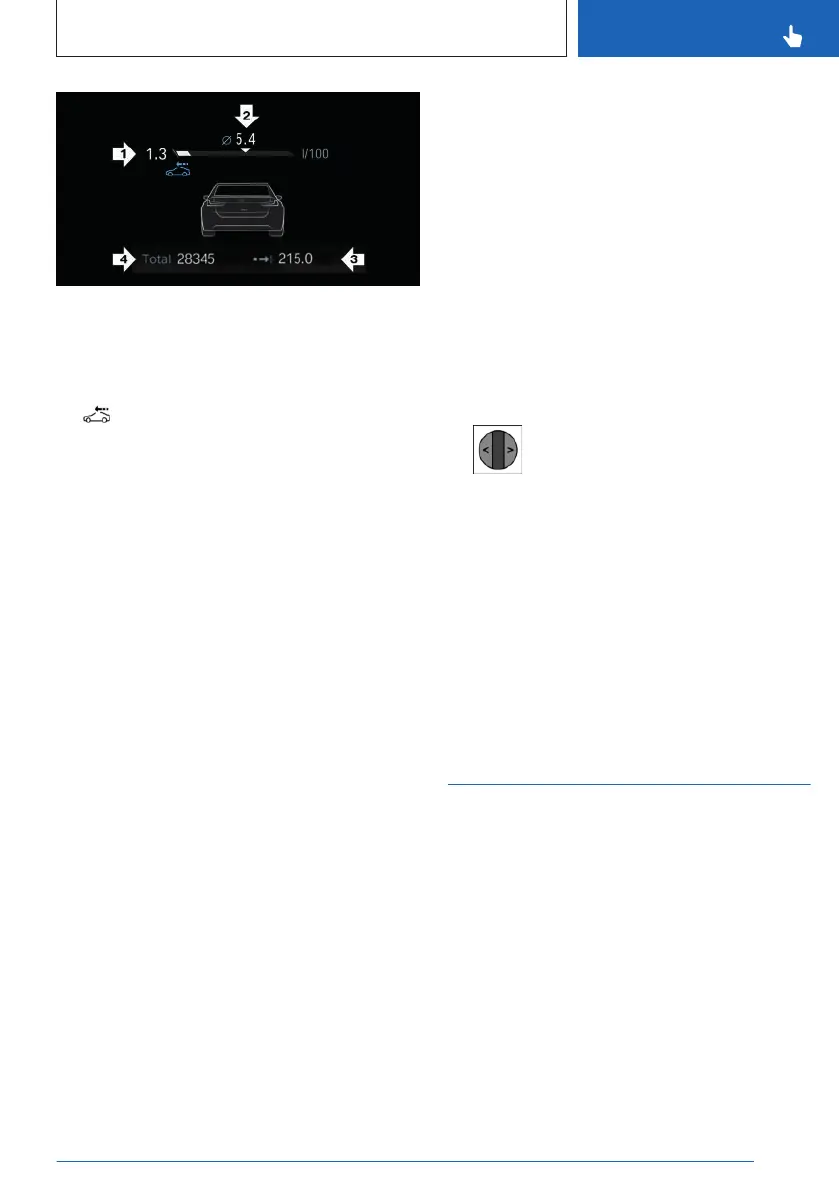
▷ Current consumption, arrow 1.
▷ Average consumption, arrow 2.
▷ Distance traveled depending on the config-
ured interval, arrow 3.
An icon is displayed when coasting.
▷ Total mileage, arrow 4.
Current consumption
The current fuel consumption display allows
you to check the current fuel consumption, e.g.,
to drive economically and in an environmen-
tally-friendly manner.
Average consumption
The average fuel consumption is displayed in
the instrument cluster depending on how the
intervals for displaying trip data are configured.
Adjusting the display of the trip data
The intervals for the display of the trip data
in the instrument cluster and on the control
display are adjustable.
1.
Go through the menu as follows via iDrive:
Apps menu / "Vehicle" / "System settings" /
"Time period for trip data" / "Values".
2. Select the desired setting:
▷ "for this trip": the values are automati-
cally reset approx. four hours after the
vehicle has come to a standstill.
▷ "since last refuel": the values are au-
tomatically reset after refueling with a
larger quantity of fuel.
▷ "Since factory": the values since the
time of the factory delivery are dis-
played.
▷ "Since Individual ()": the values since
the last manual reset are displayed. The
values can be reset at any time.
Resetting average values manually
The average values of the trip data can be
reset manually:
"since Individual"
Using the thumbwheel on the steering wheel:
1.
Display trip data on the instrument cluster.
2. Press and hold the knurled wheel on
the steering wheel until the values reset.
To reset the average values via iDrive, call
up the following menu path: Apps menu /
"Vehicle" / "System settings" / "Time period for
trip data" / "Reset Individual"
The average values and counters are reset.
Once the average values and counters have
been reset, the following interval is automati-
cally activated:
"since Individual"
Assisted View
Principle
With Assisted View, information on the driver
assistance systems can be displayed on the
instrument cluster with a vehicle image.
Parking and maneuvering information is dis-
played in the Assisted View whenever the
parking assistance system is on.
Seite 143
Displays
CONTROLS
143
Online Edition for Part no. 01405A8A536 - VI/23



 To Next Page