Vehicle status
Principle
In the Vehicle status menu, the statuses can
be displayed or actions performed for several
systems such as for Check Control.
Displaying vehicle status
To display the vehicle status, call up the fol-
lowing menu path via iDrive: Apps menu /
"Vehicle" / "Vehicle status"
Overview
Icon Description
"Flat Tire Monitor": Status of
the flat tire monitor, refer to
page 334.
"Tire Pressure Monitor": status
of the Tire Pressure Monitor,
refer to page 327.
"Engine oil level": electronic
oil measurement, refer to
page 346.
"Check Control": displaying
stored Check Control mes-
sages, refer to page 131.
"Required services": display of
the service notification, refer to
page 147.
Current driving condition
Principle
The current driving condition is displayed dy-
namically while driving in the Live Vehicle
menu on the control display.
The following states can be displayed:
▷
Driving.
▷ Coasting mode: "Efficient coasting"
▷ "Charging battery"
With mild hybrid technology:
▷ Adaptive recuperation.
Depending on the situation, additional in-
formation on adaptive recuperation is dis-
played.
▷ Efficient rolling with engine switched off.
Additional information:
▷ Adaptive recuperation, refer to page 307.
▷ Coasting, refer to page 308.
Functional requirements
▷ Personal Mode or Efficient Mode drive
mode must be selected.
▷ With Live Vehicle, the following settings
must be selected: "Adaptive content"
Display
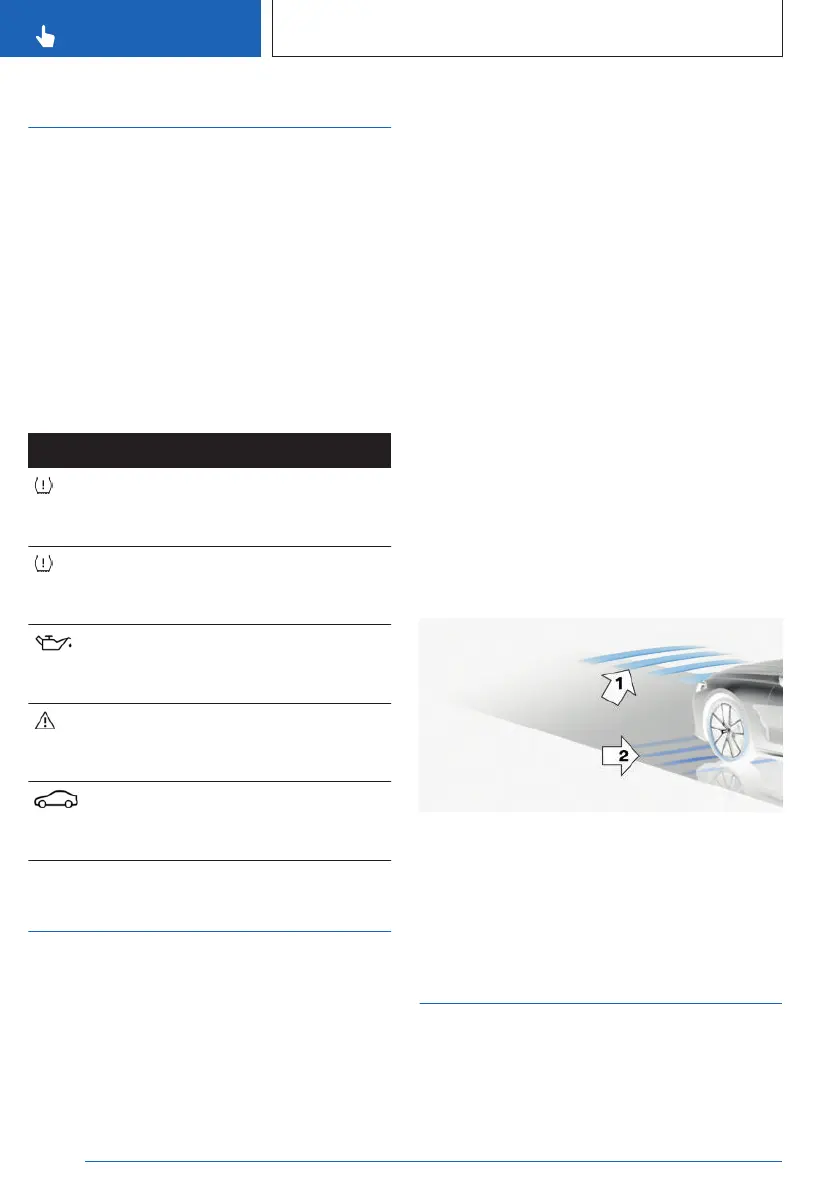
An example:
The adaptive recuperation is active, arrow 1.
The vehicle battery is charged when the vehi-
cle decelerates, arrow 2.
Sport displays
Principle
The sport displays in the Live Vehicle menu
assist mainly with a sporty driving style.
Seite 146
CONTROLS
Displays
146
Online Edition for Part no. 01405A8A536 - VI/23



 To Next Page