Wireless charging tray
Principle
The wireless charging tray allows wireless
charging of mobile phones and other mobile
devices certified according to the Qi standard.
General information
Quick charging functions are supported de-
pending on the mobile device.
The integrated fan cools the device to be
charged.
When inserting the device to be charged, make
sure that there are no objects between the de-
vice to be charged and the wireless charging
tray.
The charging process is displayed as follows:
▷ Charging indicator on the control dis-
play.
▷ Illumination of the storage area.
Safety information
Warning
When charging a Qi-compatible device in the
wireless charging tray, any metal objects on
the tray together with the device can become
very hot. If storage media or electronic cards,
e.g., chip cards, cards with magnetic strips,
or cards that transmit signals, are placed on
the tray together with the device, they may
not function correctly. There is a risk of injury
and risk of damage to property. When charg-
ing mobile devices, make sure there are no
objects on the tray together with the device.
NOTICE
The tray is intended for mobile phones up
to a particular size. Forceful inserting of the
mobile phone into the tray can damage the
tray or the mobile phone. There is a risk of
damage to property. Observe the maximum
dimensions for mobile phones. Do not force
the mobile phone into the tray.
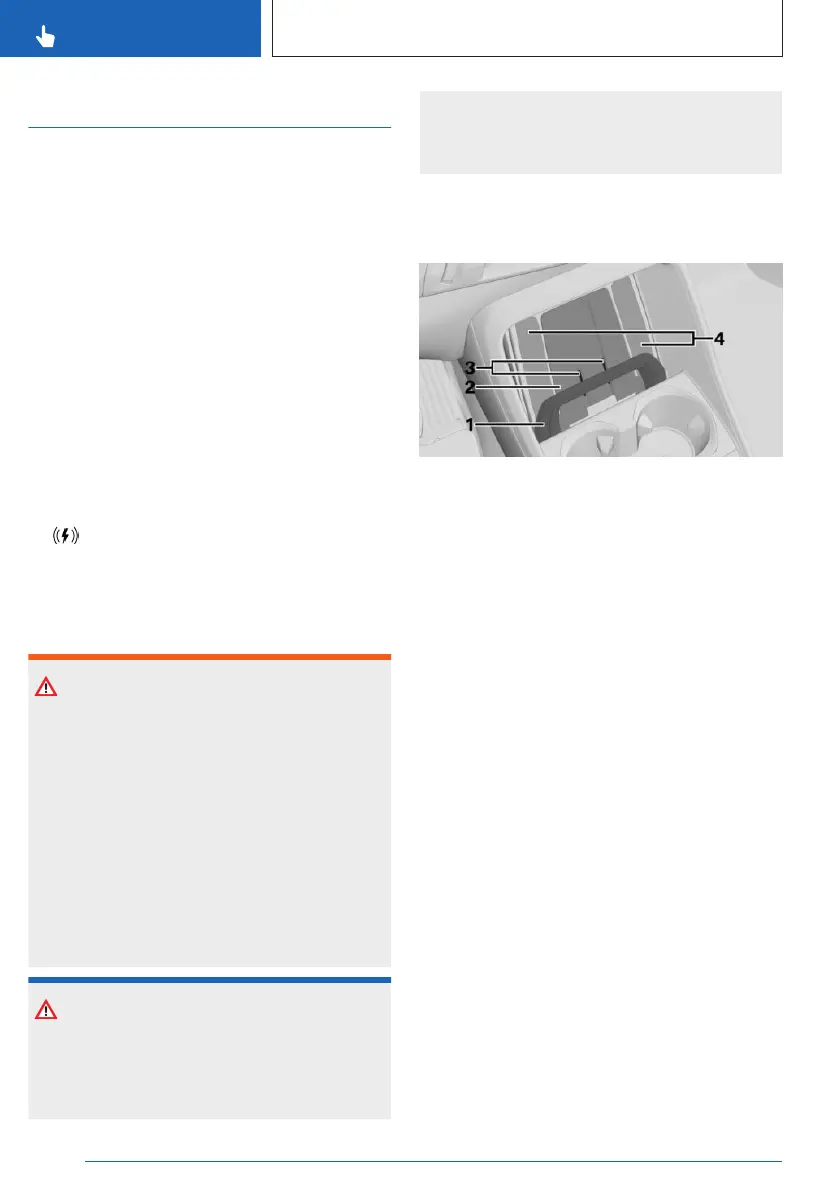
Overview
Tray in the center console:
1 Car mount
2 Storage area
3 Fan
4 Lighting of the storage area
Functional requirements
▷
The device to be charged must be certified
according to the Qi standard.
▷ Standby state is switched on.
▷ Charging function is turned on.
▷ The mobile phone cannot exceed a max-
imum size of approx. 6.69 x 3.34 x
0.7 in/170 x 85 x 18 mm.
▷ Protective sleeves and covers must be suit-
able for wireless charging.
▷ Place the mobile phone to be charged up-
right in the center of the tray. The mobile
phone display is pointing upwards.
Turning the charging function on/off
Go through the menu as follows via iDrive:
Apps menu / "Vehicle" / "System settings" /
"Wireless charging tray" / "Wireless charging"
Seite 276
CONTROLS
Interior equipment
276
Online Edition for Part no. 01405A8A536 - VI/23



 To Next Page