Parking aid lines
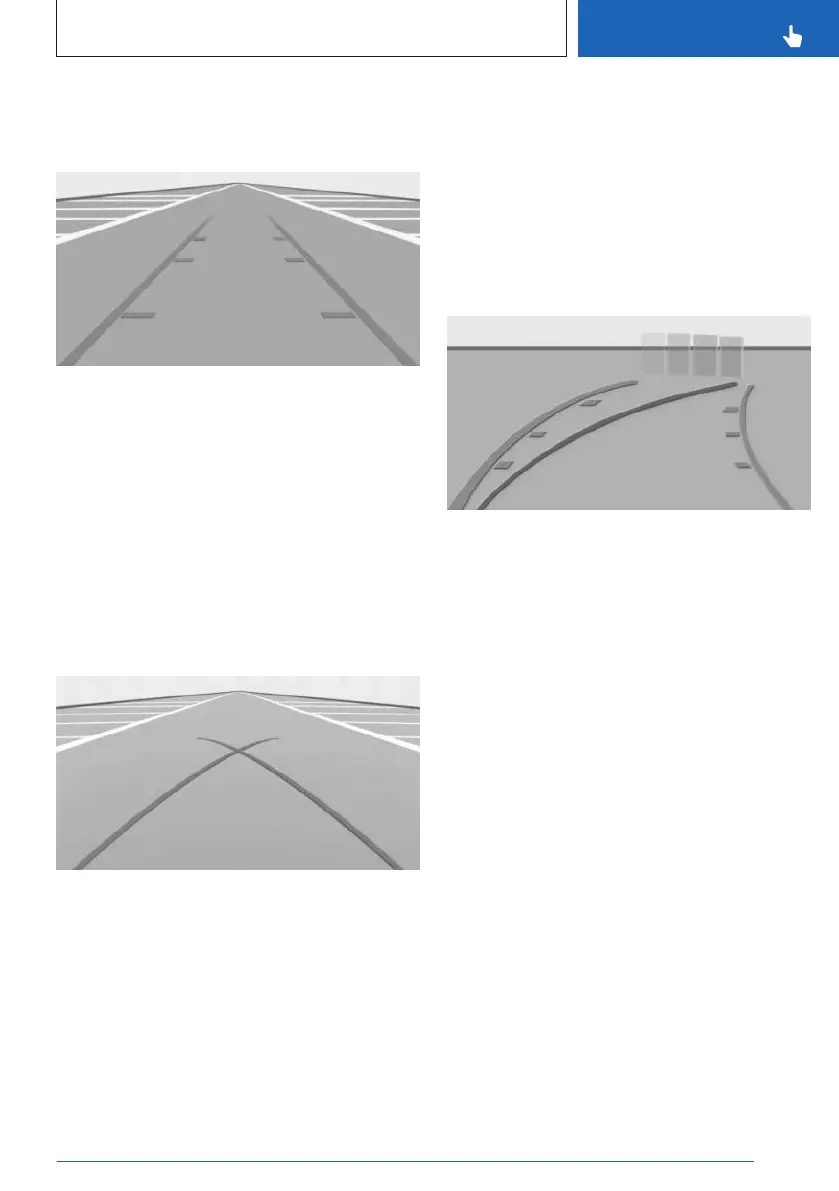
Pathway lines
The pathway lines help to estimate the re-
quired space when parking and maneuvering
on level roads.
Depending on the engaged gear position, the
pathway lines are displayed in front of or be-
hind the vehicle in the camera image on the
control display.
The pathway lines are continuously adjusted
to the steering movements depending on the
steering-wheel angle.
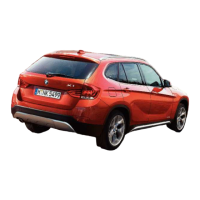
Turning circle lines
The turning circle lines show the path with the
smallest possible turning circle on level roads
in the camera image on the control display.
Only one turning circle line is displayed after
the steering wheel is turned past a certain an-
gle.
Turning circle lines can only be superimposed
on the camera image together with pathway
lines.
Using parking aid lines
1. Position the vehicle so that the red turning
circle line leads into the boundaries of the
parking space.
2. Turn the steering wheel so that the green
pathway line covers the corresponding
turning circle line.
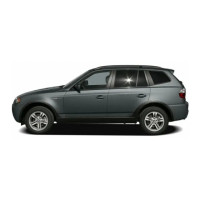
Obstacle marking
The sensors detect obstacles when parking.
The obstacles detected by the Park Distance
Control are shown and marked in the camera
image on the control display.
Colored gradients for the obstacle markings in
green, yellow and red indicate the distances.
Functional limitations
The parking assistance systems can only be
used to a limited extent in the following situa-
tions:
▷ With a door open.
▷ With open cargo area.
▷ With exterior mirrors folded in.
Areas with gray hatching with an icon in the
camera image identify areas that are currently
not shown such as an open door.
Seite 239
Parking
CONTROLS
239
Online Edition for Part no. 01405B46537 - VI/24



 To Next Page