Map
Vehicle features and
options
This chapter describes all standard, country-spe‐
cific and optional features offered with the series.
It also describes features and functions that are
not necessarily available in your vehicle, e.g., due
to the selected options or country versions. This
also applies to safety-related functions and sys‐
tems. When using these functions and systems,
the applicable laws and regulations must be ob‐
served.
Map
Go to the map
The map can be accessed directly with the
button on the Controller.
Map view
General information
The map can be used via iDrive.
Additional information:
Basic entry explanation, operating concept, refer
to the Owner's Manual for the vehicle.
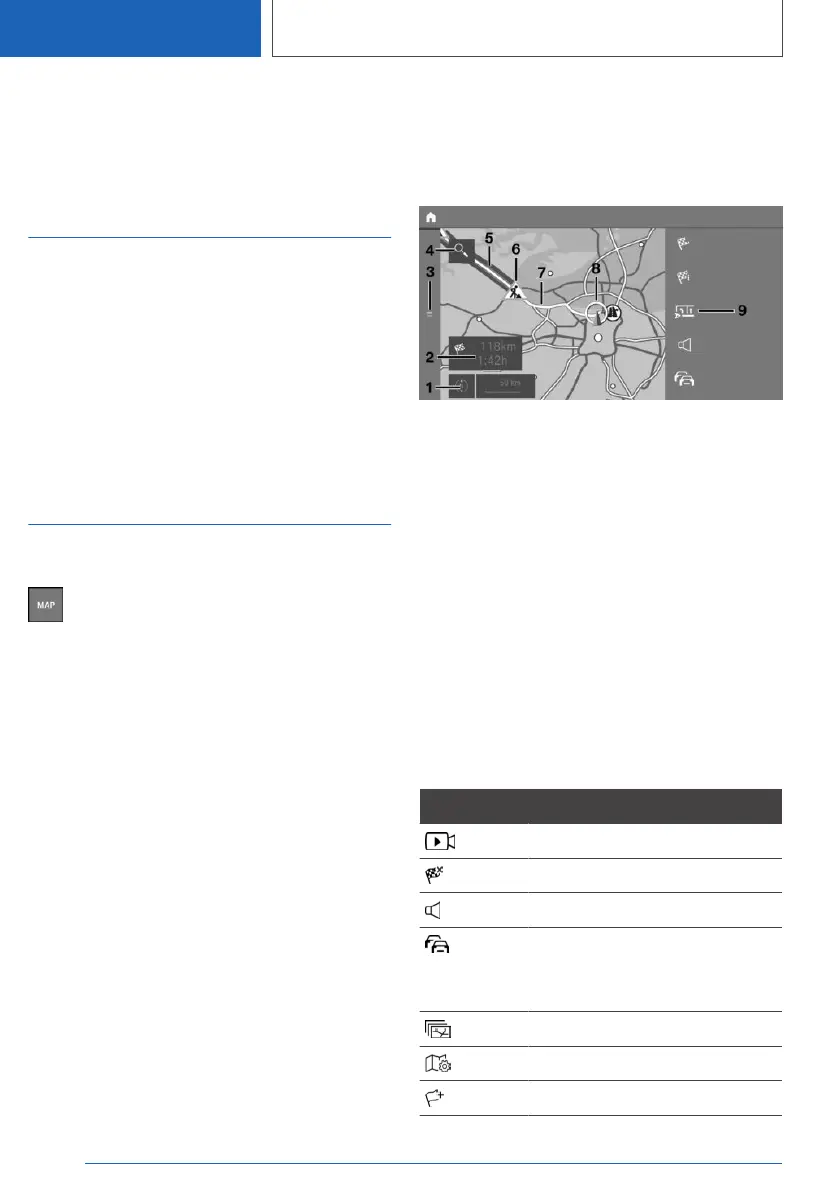
Overview
1 With operation via touchscreen: change map
view
2 Status field
3 Go to destination input menu
4 Search
5 Route section with traffic obstruction
6 Traffic sign for traffic obstruction
7 Planned route
8 Current location
9 Toolbar
Toolbar
To change to the toolbar, move the Controller to
the right.
Icon Function
Go to Demo mode.
End destination guidance.
Turn voice guidance on and off.
Real Time Traffic Information
RTTI.
Status of RTTI.
Select theme map.
Set up map.
Add intermediate destination.
Seite 16
NAVIGATION
Map
16
Online Edition for Part no. 01405A39127 - VI/21



 To Next Page